
Get-Package - PS核心不再提供安装的软件。
Get-Package - PS核心不再提供安装的软件。
提问于 2022-09-15 12:00:22
我正在移动一个yaml管道,所以它使用PS核心。其中一个步骤是解析当前已安装的软件,并在存在时卸载它:
    $appsToUninstall = Get-Package -Provider Programs -IncludeWindowsInstaller -name "*$Instance*"
    if ($appsToUninstall.count -gt 0)
    {
        Get-Service | Where-Object { $_.Name -match "$Instance" } | Stop-Service
        $appsToUninstall | Uninstall-Package -Force -Verbose
        Write-Output "Uninstalled $Instance"
    }
    else
    {
        Write-Warning "Nothing to uninstall! Could not locate $Instance as an installed instance. Continuing as usual."
    }
然而,新的Get软件包似乎不再提供已安装的软件。
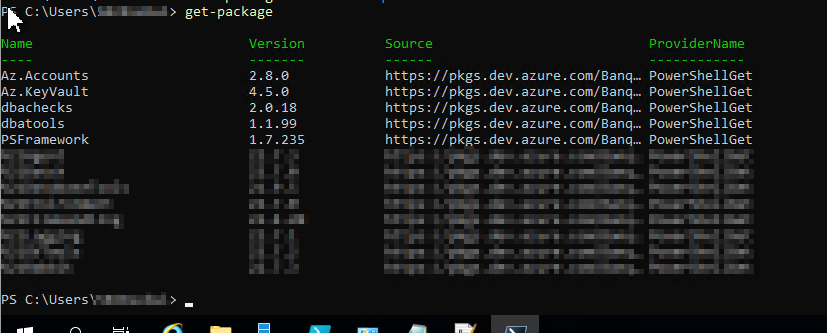

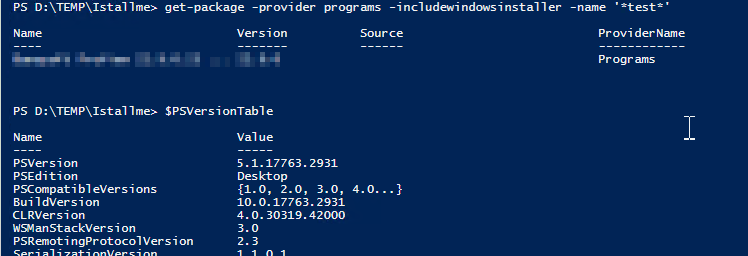
是否有任何方法使用本机cmdlet(不推荐使用CMI/WMI wmi!)为了在新的PS 7+中实现这一点?
回答 1
Stack Overflow用户
回答已采纳
发布于 2022-09-15 13:18:10
您可以解析注册表以实现这一点:
$Instance = "MyAppToUninstall"

# Initialize array to avoid errors on 32 bits applications addition
[array]$appsToUninstall = @()

# Get 64 bits programs
$appsToUninstall = Get-ItemProperty `
                   HKLM:\Software\Microsoft\Windows\CurrentVersion\Uninstall\* |
                   Select DisplayName, UninstallString |
                   Where { $_.DisplayName -like "*$Instance*" }

# Add 32 bits programs
$appsToUninstall += Get-ItemProperty `
                    HKLM:\Software\Wow6432Node\Microsoft\Windows\CurrentVersion\Uninstall\* |
                    Select DisplayName, UninstallString |
                    Where { $_.DisplayName -like "*$Instance*" }

if ($appsToUninstall.count -gt 0)
{
    Get-Service | Where-Object { $_.Name -match "$Instance" } | Stop-Service
    $appsToUninstall | ForEach-Object {
        $app = $_.UninstallString.Substring(0, $_.UninstallString.IndexOf(".exe") + 4)
        $arguments = $_.UninstallString.Substring($_.Uninstallstring.IndexOf(".exe") + 5)
        if ($app -match "(?i)msiexec")
        {
            # if MSI package, replace /i parameter by /x to uninstall and
            # add /passive parameter to automate the uninstallation
            $arguments = "$($arguments.Replace("/I", "/x", [system.StringComparison]::InvariantCultureIgnoreCase)) /passive"
        }
        Start-Process -FilePath $app -ArgumentList $arguments
    }
    Write-Output "Uninstalled $Instance"
}
else
{
    Write-Warning "Nothing to uninstall! Could not locate $Instance as an installed instance. Continuing as usual."
}
我希望这有帮助:)
页面原文内容由Stack Overflow提供。腾讯云小微IT领域专用引擎提供翻译支持
原文链接:
https://stackoverflow.com/questions/73730755
复制相关文章
相似问题
腾讯云开发者

Copyright © 2013 - 2026 Tencent Cloud. All Rights Reserved. 腾讯云 版权所有
深圳市腾讯计算机系统有限公司 ICP备案/许可证号:粤B2-20090059  粤公网安备44030502008569号
腾讯云计算(北京)有限责任公司 京ICP证150476号 | 京ICP备11018762号