
不呈现嵌套类或伪类的带有PostCSS文件的.css
不呈现嵌套类或伪类的带有PostCSS文件的.css
提问于 2022-09-13 10:00:04
tw-imports.css
@tailwind base;
@tailwind components;
@tailwind utilities;
tailwind.config.js
const { createGlobPatternsForDependencies } = require('@nrwl/angular/tailwind');
const { join } = require('path');

module.exports = {
  mode: 'jit',
  content: [
    join(__dirname, 'src/**/!(*.stories|*.spec).{ts,html}'),
    ...createGlobPatternsForDependencies(__dirname),
  ],
  darkMode: 'media',
  theme: {
    extend: {},
  },
  plugins: [],
};
postcsss.config.js
module.exports = {
  plugins: [
    'postcss-import',
    'tailwindcss',
    'postcss-flexbugs-fixes',
    'postcss-nested',
    'postcss-custom-properties',
    'autoprefixer',
    [
     'postcss-preset-env',
     {
         autoprefixer: {
             flexbox: 'no-2009',
         },
         stage: 3,
         features: {
             'custom-properties': true,
             'nesting-rules': true,
         },
     },
    ],
  ],
}
css
.button {
  @apply rounded text-slate-500 ring-slate-900/5 shadow p-3 ring-2;

  &:hover {
    --mainColor: #b3a5c0;
    color: var(--mainColor);
  }
}
.故事书/main.js
module.exports = {
  stories: [],
  addons: [
    '@storybook/addon-essentials',
    {
      name: '@storybook/addon-postcss',
      options: {
        postcssLoaderOptions: {
          implementation: require('postcss'),
        }
      }
    }
  ],
  core: {
    builder: 'webpack5',
  },
  // uncomment the property below if you want to apply some webpack config globally
  webpackFinal: async (config, { configType }) => {
    // Make whatever fine-grained changes you need that should apply to all storybook configs

    // Return the altered config
    return config;
  },
};
结果
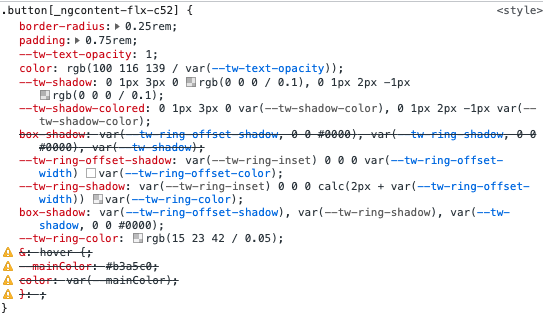
回答 1
Stack Overflow用户
发布于 2022-09-14 15:19:43
下面是我最近项目中的一个postcss.config.js示例。我使用的是tailwindcss/nesting,它仍然包装着postcss-nested,如这里所解释的,https://tailwindcss.com/docs/using-with-preprocessors#nesting
module.exports = {
  plugins: {
    "postcss-import": {},
    "tailwindcss/nesting": {},
    tailwindcss: {},
    autoprefixer: {},
    cssnano: {
      preset: "default",
      autoprefixer: { add: false },
    },
  },
}我之前也遇到了类似的问题,包版本很重要,下面是我的package.json。
  "devDependencies": {
    "@tailwindcss/line-clamp": "^0.4.0",
    "@tailwindcss/typography": "^0.5.2",
    "autoprefixer": "^10.2.5",
    "cssnano": "^4.1.11",
    "postcss": "^8.4.14",
    "postcss-cli": "^9.1.0",
    "postcss-custom-media": "^7.0.8",
    "postcss-import": "^14.1.0",
    "postcss-nested": "^5.0.5",
    "postcss-preset-env": "^6.7.0",
    "tailwindcss": "^3.1.2"
  }
这是TailwindCSS v3,看起来您可能在使用v2,但希望它仍然有用。
页面原文内容由Stack Overflow提供。腾讯云小微IT领域专用引擎提供翻译支持
原文链接:
https://stackoverflow.com/questions/73701018
复制相关文章
相似问题
腾讯云开发者

Copyright © 2013 - 2026 Tencent Cloud. All Rights Reserved. 腾讯云 版权所有
深圳市腾讯计算机系统有限公司 ICP备案/许可证号:粤B2-20090059  粤公网安备44030502008569号
腾讯云计算(北京)有限责任公司 京ICP证150476号 | 京ICP备11018762号