
Chrome扩展:在远程网站上访问“`window`”是可行的,但在本地主机上是不可能的
我有一个非常简单的Chrome扩展,它在window对象上定义了一个常量。
它在在线网站上工作,但在显示本地文件的选项卡上失败。
Blocked script execution in 'file:...mht' because the document's frame is sandboxed and the 'allow-scripts' permission is not set.
我会以某种方式理解,如果它是相反的安全方式,但这种方式,它觉得我可以做一些事情,在扩展,以一种方式,它也适用于本地离线文件。
manifest.json
{
  "name": "Extension Expose",
  "description": "Extension.",
  "version": "1.0",
  "manifest_version": 3,
  "content_scripts": [
    {
      "matches": ["http://*/*", "https://*/*", "http://localhost/*", "https://localhost/*"],
      "js": ["content.js"]
    }
  ],
  "web_accessible_resources": [{
    "resources": ["write.js"],
    "matches": ["http://*/*", "https://*/*", "http://localhost/*", "https://localhost/*"]
  }]
}
content.js
console.log("content.js")

var s = document.createElement('script');
s.src = chrome.runtime.getURL('write.js');
s.onload = function() {
    this.remove();
};
(document.head || document.documentElement).appendChild(s);
write.js
console.log("write.js")
window.ee = "abc"
console.log("successfully written to window")
在任何现场直播的网站上,它都能完美地完成自己的任务。
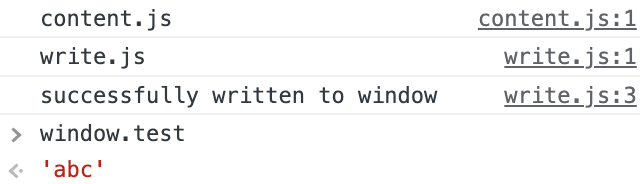
但是,如果打开本地.mht,则会得到以下信息
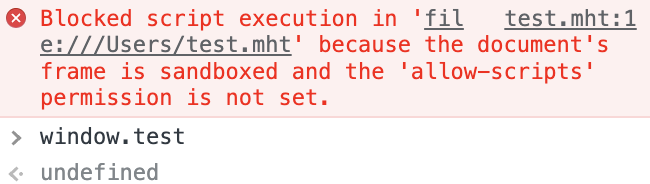
此外,我现在已经将matches设置为["http://*/*", "https://*/*", "http://localhost/*", "https://localhost/*", "file://*", "file://*/*", "http://127.0.0.1/*", "https://127.0.0.1/*"],只是为了更安全,这并没有改变任何事情。
在纯html文件中,控制台抛出
content.js:8 GET chrome-extension://abcdef/write.js net::ERR_BLOCKED_BY_CLIENT,
这可能与跨域http请求有关,但我不明白为什么相同的错误不会在mht文件上触发。
备选方案
我找到了这个答案,https://stackoverflow.com/a/9517879列出了许多不同的方法来做类似的事情。我在这里主要做的是Method 1。有趣的是,方法3(定义内嵌脚本)对online html和offline html都有效,但不幸的是,这在.mht上仍然失败。我认为这是因为.mht内部的工作方式。
回答 1
Stack Overflow用户
发布于 2022-09-07 05:38:03
文件:// pages上有一个web_accessible_resources错误,只在Chrome 106中修复。
一个更好的解决方案是使用chrome.scripting而不是,因为它可以在页面开始可靠加载之前设置变量,而且我们不会让网站检测到扩展。
从manifest.json.
- Remove content.js
- 添加到manifest.json:
的
- 删除content_scripts和web_accessible_resources
  "background": {"service_worker": "bg.js"},
  "permissions": ["scripting"],
  "host_permissions": ["<all_urls>"]
background.js:添加
chrome.runtime.onInstalled.addListener(async () => {
  const old = await chrome.scripting.getRegisteredContentScripts();
  if (old[0]) await chrome.scripting.unregisterContentScripts({ids: old.map(s => s.id)});
  await chrome.scripting.registerContentScripts([{
    id: 'write',
    js: ['write.js'],
    matches: ['<all_urls>'],
    runAt: 'document_start',
    world: 'MAIN',
  }]);
});https://stackoverflow.com/questions/73627752
复制相似问题
腾讯云开发者

Copyright © 2013 - 2026 Tencent Cloud. All Rights Reserved. 腾讯云 版权所有
深圳市腾讯计算机系统有限公司 ICP备案/许可证号:粤B2-20090059  粤公网安备44030502008569号
腾讯云计算(北京)有限责任公司 京ICP证150476号 | 京ICP备11018762号