
如何实时跟踪函数执行?
如何实时跟踪函数执行?
提问于 2022-09-06 10:54:37
我为我的python创建了自己的分析器,它的工作过程是为模块的每个函数/类函数注入一个分析包装器,它非常粗糙,而且非常困难:https://blender.stackexchange.com/questions/273803/profiling-a-blender-plugin/273804#273804。
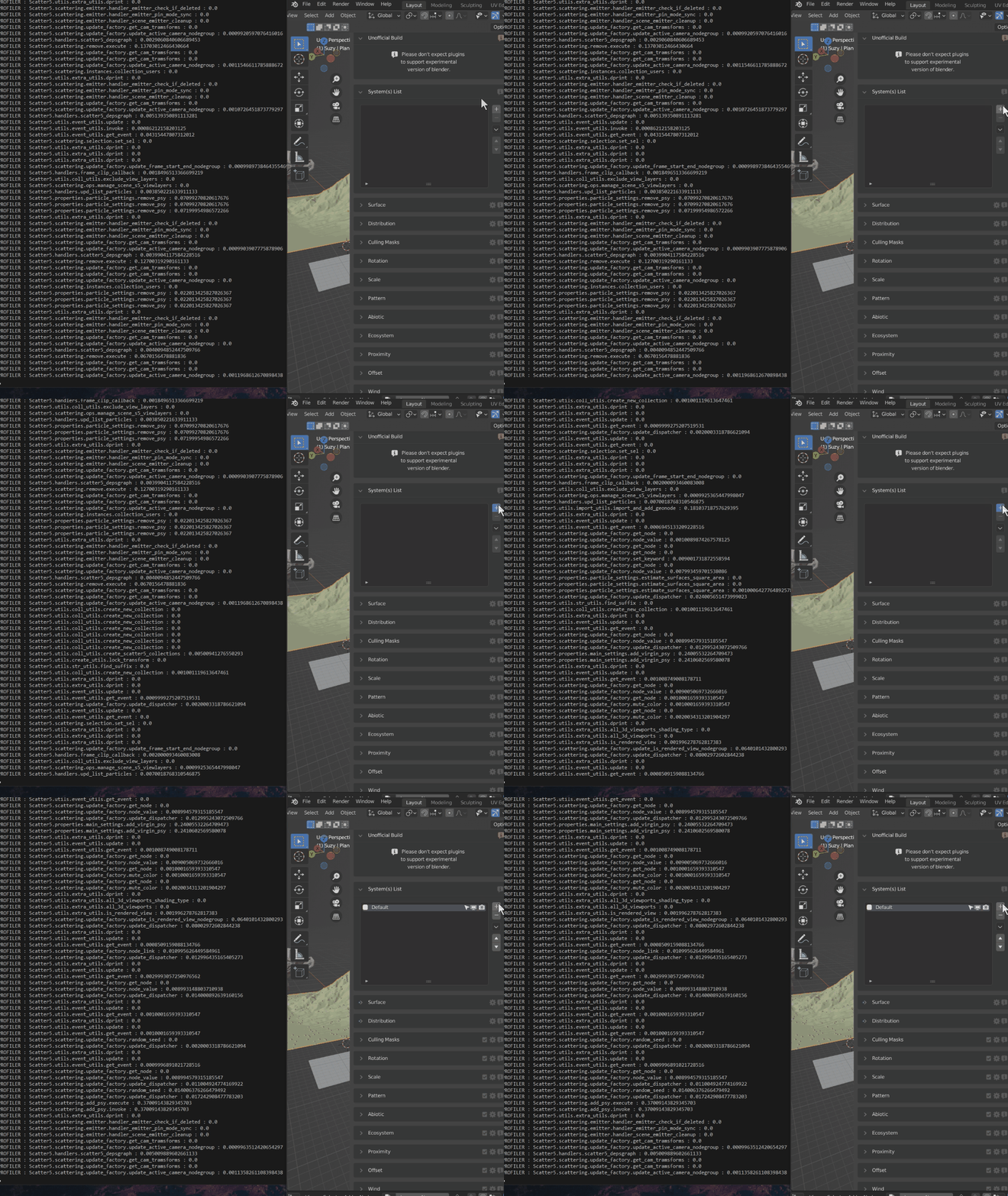
它允许我实时查看在python插件中执行的函数。如下所示,当我单击一个按钮时,我将看到所有相关的执行。
如何与cProfile或其他内置模块实现相同的效果?的目标是在控制台中显示所有函数的执行(过滤X模块),实时地,w/o手动将装饰器添加到许多函数中。
回答 1
Stack Overflow用户
回答已采纳
发布于 2022-09-08 19:27:33
您可以使用sys.setprofile或sys.settrace - 正式文件跟踪函数执行情况。
下面是一个简单的函数分析器:
import os
import sys
import time
from collections import defaultdict
from datetime import datetime
from types import FrameType

import numpy as np

CALL_STACK = defaultdict(list)


def function_time_profiler(frame: FrameType, event: str, arg):

    # check possible options here https://docs.python.org/3/library/sys.html#sys.setprofile
    # now we are going to trace functions
    if event == "call":
        # where is the function is defined
        source_code_path = os.path.abspath(frame.f_code.co_filename)

        # by default all the functions are traced
        # including standard libs
        # now we skip tracing all functions from installed libraries
        # and tracing only user defined function
        # you may need to change this behaviour for your specific needs
        if not source_code_path.startswith(sys.prefix):
            function_name = frame.f_code.co_name
            func_key = f"{source_code_path}:{function_name}"
            current_time = datetime.now()
            # save the time at the moment of a call
            CALL_STACK[func_key].append(current_time)
            print(f"Calling function: '{func_key}' at {current_time}")

    # function exiting
    if event == "return":
        source_code_path = os.path.abspath(frame.f_code.co_filename)
        function_name = frame.f_code.co_name
        func_key = f"{source_code_path}:{function_name}"

        if func_key in CALL_STACK:
            # previously we saved the time when the function was called
            # so we can measure elapsed time
            func_start_time = CALL_STACK[func_key].pop()
            elapsed = (datetime.now() - func_start_time).total_seconds()
            print(
                f"Exiting function '{source_code_path}:{function_name}'. Execution time: {elapsed} seconds"
            )

    return function_time_profiler


def my_func_a(a):
    time.sleep(0.2)
    return a * a


def my_func_b(a, b):
    s = 0
    for _ in range(a):
        s += my_func_a(a)
    return a + np.sqrt(b)


# Start profiling
sys.setprofile(function_time_profiler)

r = my_func_b(5, 25)
assert r == (0 + 1 + 2 + 4) + 5

# Stop profiling
sys.setprofile(None)
sys.setprofile(function_time_profiler)
结果:
Calling function: '/home/u1234x1234/so/exp.py:my_func_b' at 2022-09-08 22:23:58.885964
Calling function: '/home/u1234x1234/so/exp.py:my_func_a' at 2022-09-08 22:23:58.885989
Exiting function '/home/u1234x1234/so/exp.py:my_func_a'. Execution time: 0.200249 seconds
Calling function: '/home/u1234x1234/so/exp.py:my_func_a' at 2022-09-08 22:23:59.086269
Exiting function '/home/u1234x1234/so/exp.py:my_func_a'. Execution time: 0.200262 seconds
Calling function: '/home/u1234x1234/so/exp.py:my_func_a' at 2022-09-08 22:23:59.286568
Exiting function '/home/u1234x1234/so/exp.py:my_func_a'. Execution time: 0.20027 seconds
Calling function: '/home/u1234x1234/so/exp.py:my_func_a' at 2022-09-08 22:23:59.486873
Exiting function '/home/u1234x1234/so/exp.py:my_func_a'. Execution time: 0.200266 seconds
Calling function: '/home/u1234x1234/so/exp.py:my_func_a' at 2022-09-08 22:23:59.687175
Exiting function '/home/u1234x1234/so/exp.py:my_func_a'. Execution time: 0.200265 seconds
Exiting function '/home/u1234x1234/so/exp.py:my_func_b'. Execution time: 1.001529 seconds页面原文内容由Stack Overflow提供。腾讯云小微IT领域专用引擎提供翻译支持
原文链接:
https://stackoverflow.com/questions/73620822
复制相关文章
相似问题
腾讯云开发者

Copyright © 2013 - 2026 Tencent Cloud. All Rights Reserved. 腾讯云 版权所有
深圳市腾讯计算机系统有限公司 ICP备案/许可证号:粤B2-20090059  粤公网安备44030502008569号
腾讯云计算(北京)有限责任公司 京ICP证150476号 | 京ICP备11018762号