
ggtext: ggplot2-使用element_markdown()进行呈现
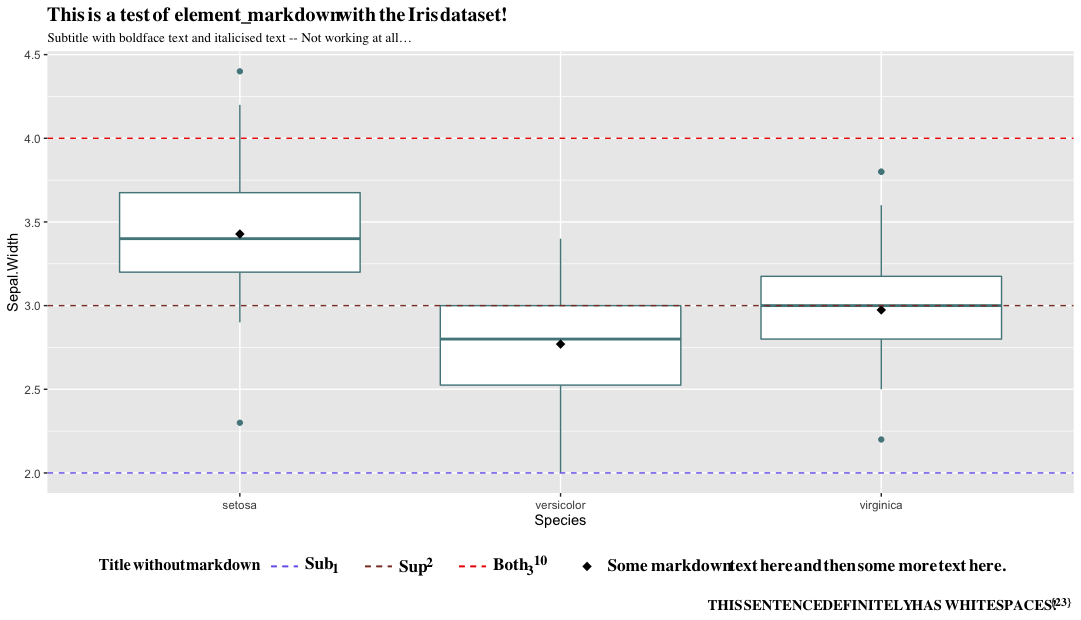
我试图在情节标题、副标题、标题和图例文本中创建一个带有标记文本的ggplot。图例文本依赖于一个变量,因此在图例文本的生成过程中存在一个变量和ifelse-statement。在其中一种情况下,我希望文本的一部分以斜体显示,因此我尝试使用来自element_markdown包的-function,并将文本的这一部分包装在'*‘中。但是,在使用ggplot2正确地呈现它时,我面临一些问题。当使用element_markdown-function时,文本变得非常紧凑和重叠,看起来很糟糕。我试图调整字体大小,脸和家庭,以及周围的区域周围的讨论,但没有运气。我也尝试过使用替代函数,比如expression和paste或glue,但是ifelse-statement使得这很困难,我甚至尝试使用UNICODE符号作为输入。不管我尝试过哪种方法,我都没有做到我想要做的事情,我真的认为这应该可以用element_markdown-function来完成,所以我希望在这里能得到一些帮助。
我正在macOS蒙特雷12.5.1上运行RVersion4.2.1 (2022-06-23),通过RStudio版本2022.7.1.554 (Spotted )运行。我使用的是0.1.1版本的ggtext包。
我得到的最小示例和输出:
library(tidyverse)
library(glue)
library(ggtext)

random_variable <- TRUE

iris %>%
    ggplot(aes(x = Species, y = Sepal.Width)) +
    geom_boxplot(show.legend = F, col = 'cadetblue4') +
    stat_summary(fun = mean, geom = 'point', shape = 18, size = 3, aes(col = 'mean')) +
    geom_hline(aes(yintercept = 2, col = '1st'), size = .5, lty = 2) +
    geom_hline(aes(yintercept = 3, col = '2nd'), size = .5, lty = 2) +
    geom_hline(aes(yintercept = 4, col = '3rd'), size = .5, lty = 2) +
    scale_colour_manual(name = 'Title without markdown',
                        values = c('1st' = 'slateblue2', '2nd' = 'coral4', '3rd' = 'red2', 'mean' = 'black'),
                        labels = c('Sub<sub>1</sub>', 'Sup<sup>2</sup>', 'Both<sub>3</sub><sup>10</sup>',
                                   paste('Some', ifelse(random_variable, yes = '*markdown* text here', no = 'not markdown text here'), 'and then some more text here.')),
                        guide = guide_legend(override.aes = list(
                            linetype = c(rep('dashed', 3), 'blank'),
                            shape = c(rep(NA, 3), 18)))) +
    labs(title = paste0("This is a test of element_", ifelse(T, yes = '*markdown*', no = 'text'), " with the Iris dataset!"),
         subtitle = "Subtitle with **boldface text** and *italicised text* -- Not working at all…",
         caption = "THIS SENTENCE DEFINITELY HAS WHITESPACES!^{23}") +
    theme(
          # TITLES AND CAPTION
          plot.title = element_markdown(family="Times", face = "bold", size=15),
          plot.subtitle = element_markdown(family="Times", size=10),
          plot.caption = element_markdown(family = "Times", face = "bold", size = 11),

          # LEGEND SETTINGS
          legend.position = 'bottom',
          legend.key.size = unit(1.75, 'line'),
          legend.spacing.x = unit(.1, 'cm'),
          legend.title = element_markdown(size = 12, face = 'bold', family = 'Times',
                                      margin = margin(r = .25, unit = 'cm')),
          legend.text = element_markdown(size = 13, face = 'bold', family = 'Times',
                                     margin = margin(r = .5, unit = 'cm')),
          legend.key =  element_blank())
回答 1
Stack Overflow用户
发布于 2022-09-06 11:35:59
通过使用gridtext安装remotes::install_github("wilkelab/gridtext")的dev版本,然后用library(gridtext)加载包解决了问题。
感谢@stefan的贴士在原来的帖子的评论!
https://stackoverflow.com/questions/73619914
复制相似问题
腾讯云开发者

Copyright © 2013 - 2026 Tencent Cloud. All Rights Reserved. 腾讯云 版权所有
深圳市腾讯计算机系统有限公司 ICP备案/许可证号:粤B2-20090059  粤公网安备44030502008569号
腾讯云计算(北京)有限责任公司 京ICP证150476号 | 京ICP备11018762号