
允许内存大小为536870912字节(尝试分配607631544字节)
在Zend升级之后,我得到了这些随机内部服务器错误。(点击刷新几次,它就会消失)。
我的Wordpress debug.log显示:
PHP Fatal error: Allowed memory size of 536870912 bytes exhausted (tried to allocate 607631544 bytes) in C:\MyWebsite\htdocs\website.mywebsite.com\wp-content\plugins\cookie-notice\cookie-notice.php on line 1299我看着Stack溢出,注意到其他人也有类似的问题。(相同的错误消息,但字节数不同)。
在其他问题中,解决方案是增加允许的最大字节数。在我的情况下,字节数非常大(几个GBs)。我的网页不应该占用这么多空间。
在我的情况下,特定的错误消息指的是特定的插件。然而,如果我删除Wordpress插件,我只会得到与另一个插件相同的错误消息。因此,我不确定是否真的是插件造成了这个问题。
我的堆栈跟踪如下:
 Cookie_Notice() at C:\MyWebsite\htdocs\website.mySite.com\wp-content\plugins\cookie-notice\cookie-notice.php: 1299
 main() at C:\MyWebsite\htdocs\website.mySite.com\wp-content\plugins\cookie-notice\cookie-notice.php: 1308
 main() at C:\MyWebsite\htdocs\website.mySite.com\wp-settings.php: 428
 main() at C:\MyWebsite\htdocs\website.mySite.com\wp-config.php: 112
 main() at C:\MyWebsite\htdocs\website.mySite.com\wp-load.php: 50
 main() at C:\MyWebsite\htdocs\website.mySite.com\wp-blog-header.php: 13
 main() at C:\MyWebsite\htdocs\website.mySite.com\index.php: 17
我回顾了这个插件,它看起来如下: /**
- 初始化Cookie通知。*/
函数Cookie_Notice() {静态$instance;//这是第1299行
//首先调用instance()初始化插件,如果( $instance === null \x!( $instance instanceof Cookie_Notice )) $instance = Cookie_Notice::instance();返回$instance;
}
起初,我认为这个插件可能不好,所以我删除了整个插件。但是,对于另一个插件,我得到了同样的错误:
PHP Fatal error: Allowed memory size of 536870912 bytes exhausted (tried to allocate 4230139628 bytes) in C:\MyWebsite\htdocs\website.myWebsite.com\wp-content\plugins\wp-mail-smtp\wp-mail-smtp.php on line 55第55行如下所示:
function wp_mail_smtp() {
    /**
     * @var \WPMailSMTP\Core
     */
    static $core;   //LINE 55 is here

    if ( ! isset( $core ) ) {
        $core = new \WPMailSMTP\Core();
    }

    return $core;
}
堆栈轨道如下所示:
 wp_mail_smtp() at C:\MyWebsite\htdocs\website.myWebsite.com\wp-content\plugins\wp-mail-smtp\wp-mail-smtp.php: 55
 main() at C:\MyWebsite\htdocs\website.myWebsite.com\wp-content\plugins\wp-mail-smtp\wp-mail-smtp.php: 64
 main() at C:\MyWebsite\htdocs\website.myWebsite.com\wp-content\plugins\wp-mail-smtp\wp_mail_smtp.php: 303
 main() at C:\MyWebsite\htdocs\website.myWebsite.com\wp-settings.php: 428
 main() at C:\MyWebsite\htdocs\website.myWebsite.com\wp-config.php: 112
 main() at C:\MyWebsite\htdocs\website.myWebsite.com\wp-load.php: 50
 main() at C:\MyWebsite\htdocs\website.myWebsite.com\wp-blog-header.php: 13
 main() at C:\MyWebsite\htdocs\website.myWebsite.com\index.php: 17
到目前为止,$static变量似乎正在破坏我的服务器?知道是什么导致的吗?
回答 1
Stack Overflow用户
发布于 2022-09-02 19:45:11
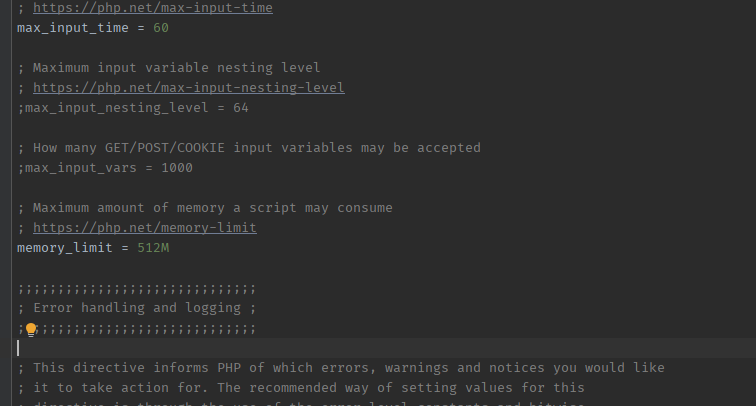
您的php安装使用的内存超过了允许的大小。因此,您应该增加php.ini中的内存大小并重新启动xampp。
https://stackoverflow.com/questions/73586941
复制相似问题
腾讯云开发者

Copyright © 2013 - 2026 Tencent Cloud. All Rights Reserved. 腾讯云 版权所有
深圳市腾讯计算机系统有限公司 ICP备案/许可证号:粤B2-20090059  粤公网安备44030502008569号
腾讯云计算(北京)有限责任公司 京ICP证150476号 | 京ICP备11018762号