
IIS-10用于BI内部服务器的反向代理无法工作。
IIS-10用于BI内部服务器的反向代理无法工作。
提问于 2022-09-01 21:39:11
我跟随本教程,但我想我遗漏了一些东西
https://www.tevpro.com/blog/using-iis-as-a-reverse-proxy-server
我正试着发送请求
https://192.168.1.77/bi/Dashboards/Pretrial%20PSA%20Dashboard?rs:embed=true
这将发送请求,如下面的链接,这是工作时,我们直接发送请求。https://192.168.1.77:9998/reports/powerbi/Dashboards/Pretrial%20PSA%20Dashboard?rs:embed=true
<rewrite>
        <rule name="IB Proxy" stopProcessing="true">
                <match url="/bi/(.*)" />
                <action type="Rewrite" url="https://192.168.1.77:9998/reports/powerbi/{R:1}" appendQueryString="false" />
            </rule>
        </rules>
    </rewrite>
嗨,我试图在测试服务器上设置反向代理,但是当我试图访问BI服务器时,我想我遗漏了一些东西,因为我得到了404错误。
回答 1
Stack Overflow用户
回答已采纳
发布于 2022-09-02 06:25:25
请尝试以下重写规则:
<rewrite>
   <rules>
      <rule name="IB Proxy" stopProcessing="true">
         <match url="bi/(.*)" />
         <action type="Rewrite" url="https://192.168.1.77:9998/reports/powerbi/{R:1}" appendQueryString="true" />
      </rule>
   </rules>
</rewrite>
变动:
<match url="/bi/(.*)" />到<match url="bi/(.*)" />
例如,
- ,假设当前网站的网址是https://test.com/Home/Index?page=1,那么匹配规则模式的部分是Home/Index.
。
appendQueryString="false"到appendQueryString="true"
当
- 设置为true时,来自原始URL的查询字符串将被追加到替换的URL.
中。
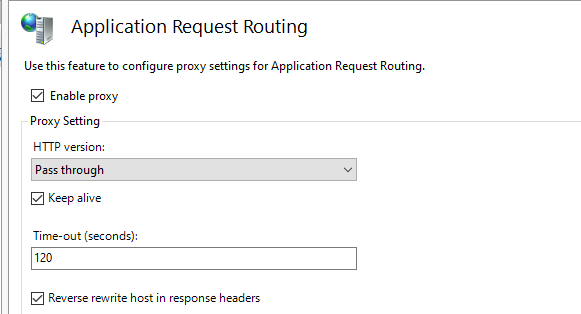
此外,还需要在IIS服务器上启用ARR。
页面原文内容由Stack Overflow提供。腾讯云小微IT领域专用引擎提供翻译支持
原文链接:
https://stackoverflow.com/questions/73575676
复制相关文章
相似问题
腾讯云开发者

Copyright © 2013 - 2026 Tencent Cloud. All Rights Reserved. 腾讯云 版权所有
深圳市腾讯计算机系统有限公司 ICP备案/许可证号:粤B2-20090059  粤公网安备44030502008569号
腾讯云计算(北京)有限责任公司 京ICP证150476号 | 京ICP备11018762号