
如何使用powershell对两个excel表进行比较
如何使用powershell对两个excel表进行比较
提问于 2022-09-01 19:41:30
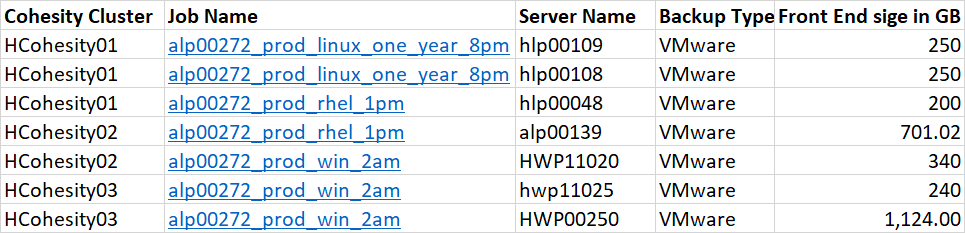
上个月我有下面的excel表格
当前月份excel表如下
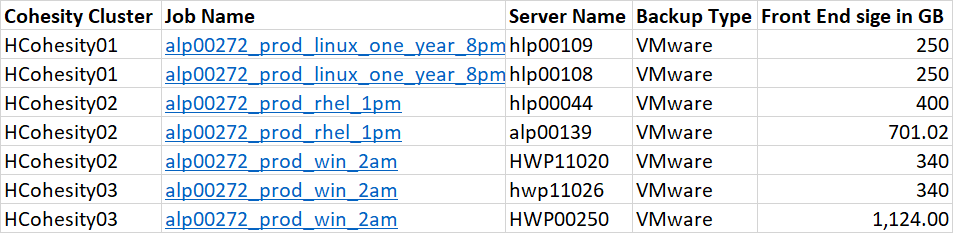
现在,我想查找当前月份添加的新服务器名称,然后列出它们,如下所示

到目前为止,我得到了以下代码。有什么好主意吗?我将用windows调度器任务来调度这个任务,.This应该是powershell,因为我将在以后添加更多的代码,如何从SMB共享中选择正确的excel表。
我在试这个
$oldbk = Import-Excel -Path '\\hcohesity05\cohesity_reports\2022\7\07-29\Cohesity_FETB_Report-2022-07-29-14-26-48.xlsx'
$newbk = Import-Excel -Path '\\hcohesity05\cohesity_reports\2022\8\08-26\Cohesity_FETB_Report-2022-08-26-14-26-48.xlsx'

$Compare = Compare-Object $oldbk $newbk -Property "Server Name" -includeDifferent -PassThru
        $Compare | Export-Excel -Path '.\diff.xlsx'
但是,无法找到与参数名称“message deDiff传”匹配的参数。
回答 1
Stack Overflow用户
回答已采纳
发布于 2022-09-02 00:15:36
通过查看您的代码,我假设您只对查找服务器感兴趣,而不是在旧的Excel文档中显示,如果您只需要Where-Object进行过滤:
$oldbk = Import-Excel -Path 'path\to\oldfile.xlsx'
Import-Excel -Path 'path\to\newfile.xlsx' | Where-Object {
    $_."Server Name" -notin $oldbk."Server Name"
} | Export-Excel -Path 'path\to\diff.xlsx'至于错误消息,Compare-Object没有-IncludeDifferent参数,并显示了两个对象之间的差异(默认情况下为)。
$Compare = Compare-Object $oldbk $newbk -Property "Server Name" -PassThru页面原文内容由Stack Overflow提供。腾讯云小微IT领域专用引擎提供翻译支持
原文链接:
https://stackoverflow.com/questions/73574674
复制相关文章
相似问题
腾讯云开发者

Copyright © 2013 - 2026 Tencent Cloud. All Rights Reserved. 腾讯云 版权所有
深圳市腾讯计算机系统有限公司 ICP备案/许可证号:粤B2-20090059  粤公网安备44030502008569号
腾讯云计算(北京)有限责任公司 京ICP证150476号 | 京ICP备11018762号