
配置项目‘:@volst_react-本机-tuya’时发生问题
我正在做一个博览会项目。我安装了@volst/react本机-tuya,使用
yarn add @volst/react-native-tuya我正在使用他们的0.3.14版本的。我从这里中阅读了所有这些文档,并遵循了所有步骤。
但是,在我安装并尝试在android上运行之后,我面临的问题是:
配置项目‘:@volst_react-本机-tuya’时出现问题。无法确定null的依赖项。无法解决配置的所有依赖关系:@volst_react本机-tuya:classpath‘。>不支持在没有显式选择的情况下使用不安全的存储库协议。将Maven存储库'maven(http://maven.aliyun.com/nexus/content/groups/public/)‘切换到安全协议(如HTTPS)或允许不安全协议。有关更多详细信息,请参阅https://docs.gradle.org/7.3.3/dsl/org.gradle.api.artifacts.repositories.UrlArtifactRepository.html#org.gradle.api.artifacts.repositories.UrlArtifactRepository:allowInsecureProtocol。
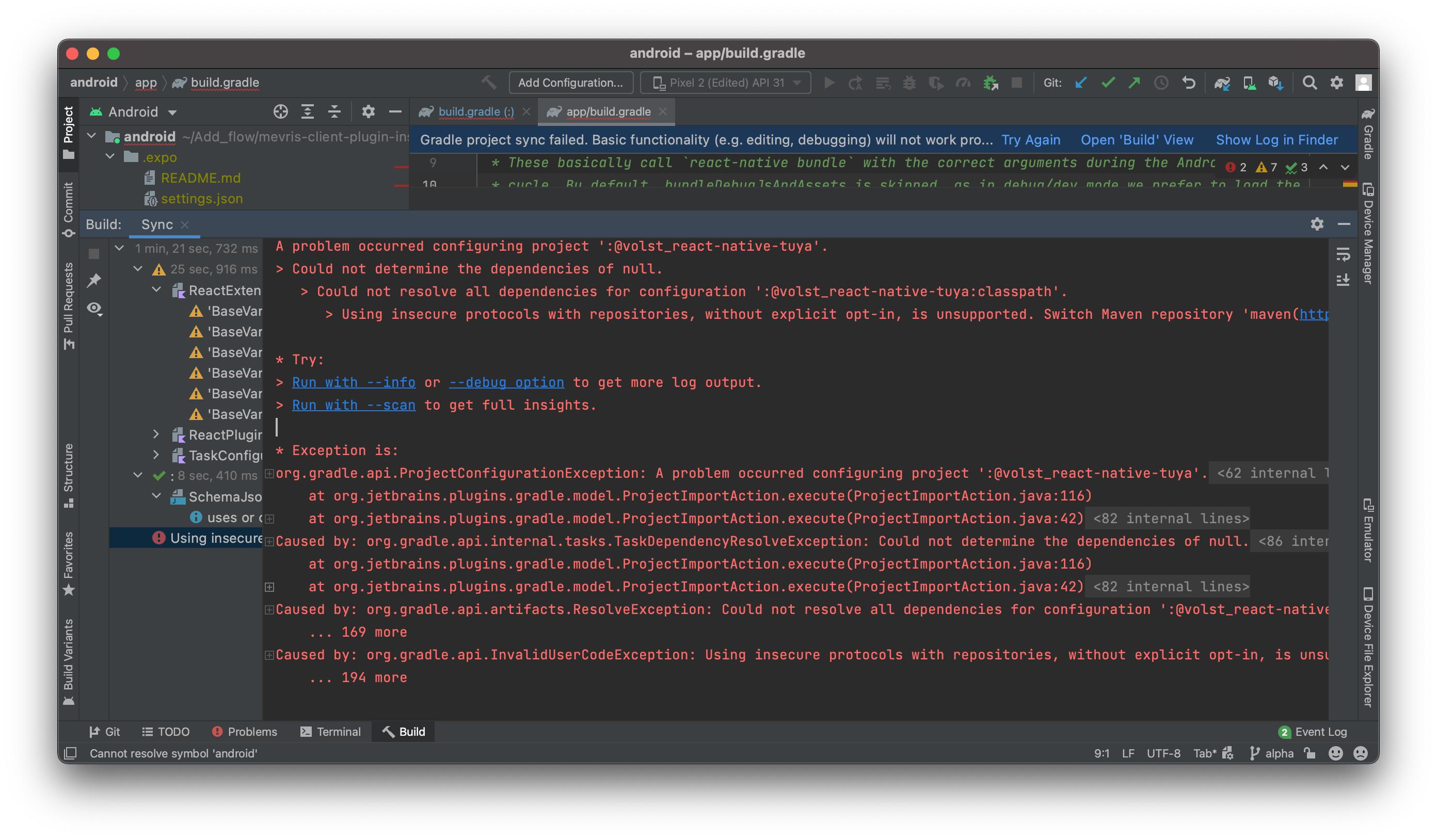
我尽了全力,但解决不了这个问题。
我的Package.json文件
{
   "name": "@mevris/client-plugin-installation-components",
   "description": "The Add flow driver",
   "author": "BlueEast Team <code@blueeast.com>",
   "version": "3.0.0-alpha.8",
   "main": "dist/index.js",
   "typings": "dist/index.d.ts",
   "module": "dist/index.js",
   "repository": {
     "type": "git",
     "url": "https://github.com/BlueEastCode/mevris-client-plugin-installation-components"
   },
   "remarkConfig": {
    "plugins": [
       "remark-preset-lint-recommended"
     ]
   },
   "config": {
     "react-native-storybook-loader": {
        "searchDir": [
         "src"
       ],
       "pattern": "**/*.stories.tsx",
       "outputFile": "./storybook/storyLoader.js"
     }
   },
   "scripts": {
     ...
   },
   "dependencies": {
     ...

     "@volst/react-native-tuya": "^0.3.0",
     "expo": "~45.0.0",
     "expo-barcode-scanner": "^11.4.0",
     "expo-location": "~14.2.2",
     "expo-splash-screen": "~0.15.1",
     "expo-status-bar": "~1.3.0",
     "react": "17.0.2",
     "react-dom": "17.0.2",
     "react-native": "0.68.2",
     "react-native-web": "0.17.7",
     "react-native-wifi-reborn": "^4.7.0",
     "yup": "^0.32.11"
   },
   "resolutions": {
     "@types/react": "17.0.2",
     "@types/react-dom": "17.0.2",
     "graphql": "^16.5.0"
   },
   "devDependencies": {
     ...
   },
   "prettier": {
     "singleQuote": true,
     "useTabs": true,
     "trailingComma": "es5"
   },
   "publishConfig": {
     "access": "public"
   },
   "peerDependencies": {
     "yup": "^0.32.11"
   }
 }
我的Settings.gradle文件
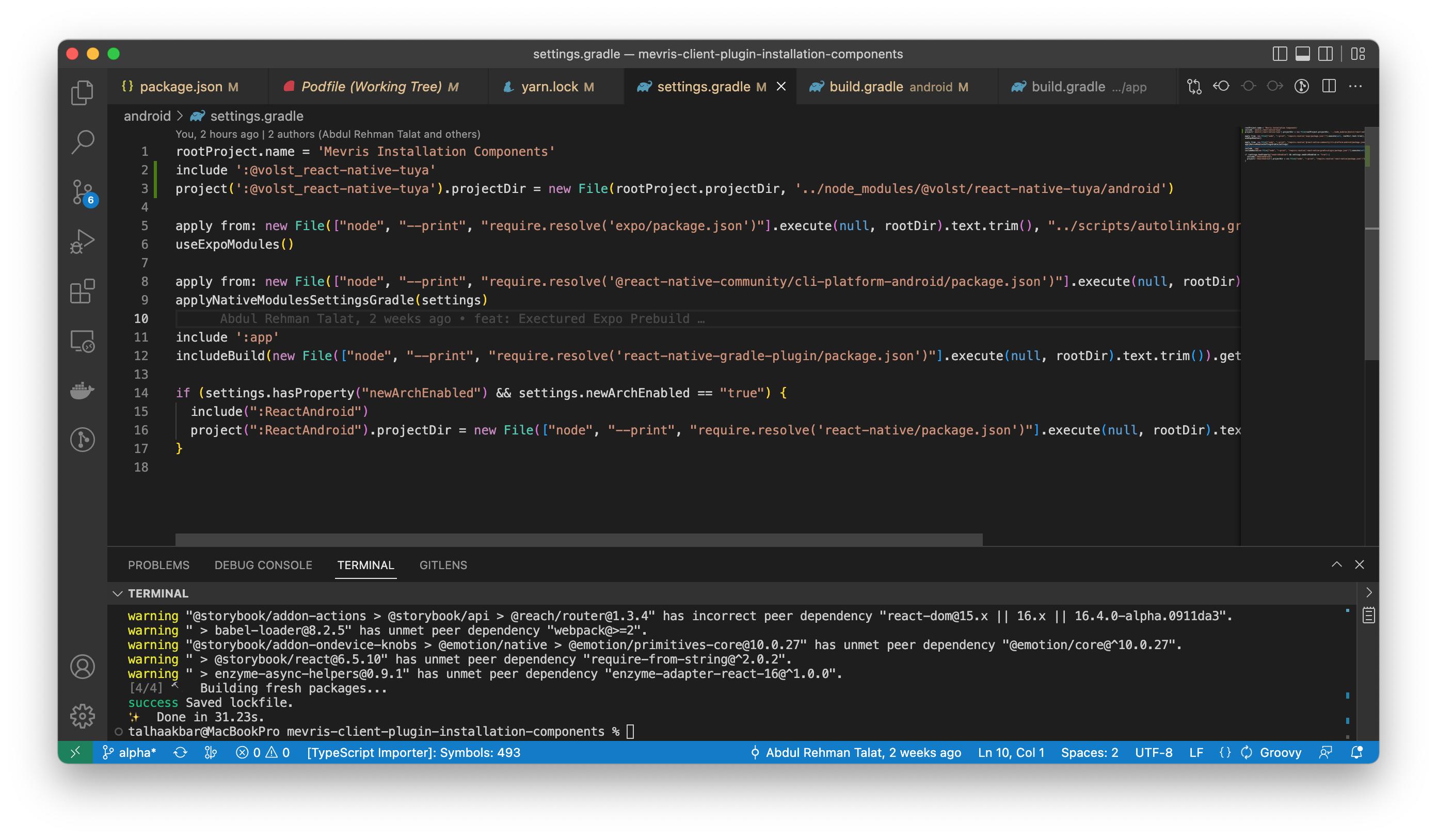
我的安卓/build.gradle
import org.apache.tools.ant.taskdefs.condition.Os

 // Top-level build file where you can add configuration options common to all sub-projects/modules.

 buildscript {
     ext {
         buildToolsVersion = findProperty('android.buildToolsVersion') ?: '31.0.0'
         minSdkVersion = Integer.parseInt(findProperty('android.minSdkVersion') ?: '21')
         compileSdkVersion = Integer.parseInt(findProperty('android.compileSdkVersion') ?: '31')
         targetSdkVersion = Integer.parseInt(findProperty('android.targetSdkVersion') ?: '31')
         if (findProperty('android.kotlinVersion')) {
             kotlinVersion = findProperty('android.kotlinVersion')
         }
         frescoVersion = findProperty('expo.frescoVersion') ?: '2.5.0'

         if (System.properties['os.arch'] == 'aarch64') {
             // For M1 Users we need to use the NDK 24 which added support for aarch64
             ndkVersion = '24.0.8215888'
         } else {
             // Otherwise we default to the side-by-side NDK version from AGP.
             ndkVersion = '21.4.7075529'
         }
     }
     repositories {
         google()
         mavenCentral()
     }
     dependencies {
         classpath('com.android.tools.build:gradle:7.0.4')
         classpath('com.facebook.react:react-native-gradle-plugin')
         classpath('de.undercouch:gradle-download-task:4.1.2')
         // NOTE: Do not place your application dependencies here; they belong
              // in the individual module build.gradle files
     }
 }

 allprojects {
     repositories {
         mavenLocal()
         maven {
             // All of React Native (JS, Obj-C sources, Android binaries) is installed from npm
             url(new File(['node', '--print', "require.resolve('react-native/package.json')"].execute(null, rootDir).text.trim(), '../android'))
         }
         maven {
             // Android JSC is installed from npm
             url(new File(['node', '--print', "require.resolve('jsc-android/package.json')"].execute(null, rootDir).text.trim(), '../dist'))
         }

         google()
         maven { url "https://maven.google.com" }
                 jcenter() {
                     allowInsecureProtocol = true
                 }
         mavenCentral {
             // We don't want to fetch react-native from Maven Central as there are
             // older versions over there.
             content {
                 excludeGroup 'com.facebook.react'
             }
         }
         maven { url 'https://www.jitpack.io' }
     }
}回答 2
Stack Overflow用户
发布于 2022-09-08 17:09:46
问题在于包本身,因为它调用问题中提到的url而没有将allowInsecureProtocol设置为true,当然基于https的url不可用。您可以这样修复它,这有点麻烦,但是只要开发人员不推动更新,就没有人能做任何afaik的事情。
- 转到package文件夹
node_modules/@volst/react-native-tuya/android并打开build.gradle文件。 - 替换
maven{url 'http://maven.aliyun.com/nexus/content/groups/public/'}
在这方面:
maven {
      url 'http://maven.aliyun.com/nexus/content/groups/public/'
      allowInsecureProtocol = true
}- 另一个但建议的步骤是使用修补程序包创建临时修复程序(https://www.npmjs.com/package/patch-package)。
Stack Overflow用户
发布于 2022-09-26 09:43:21
这是插件的问题。我克隆这个插件并通过更新一些代码库来解决这个问题。
如果您也面临这个问题,您可以通过在您的package.json上安装@artalat/ were本机-tuya来解决这个问题。
https://stackoverflow.com/questions/73565820
复制相似问题
腾讯云开发者

Copyright © 2013 - 2026 Tencent Cloud. All Rights Reserved. 腾讯云 版权所有
深圳市腾讯计算机系统有限公司 ICP备案/许可证号:粤B2-20090059  粤公网安备44030502008569号
腾讯云计算(北京)有限责任公司 京ICP证150476号 | 京ICP备11018762号