
Azure MSAL节点ClientAuthError
Azure MSAL节点ClientAuthError
提问于 2022-08-30 08:57:47
我试图在节点后端服务器上使用@azure/msal节点。
我按照他们的Github页面上的教程进行操作,当我试图调用acquireTokenByCode时,我得到了以下错误:
[Tue, 30 Aug 2022 08:23:34 GMT] : @azure/msal-node@1.12.1 : Info - getAuthCodeUrl called
[Tue, 30 Aug 2022 08:23:34 GMT] : @azure/msal-node@1.12.1 : Verbose - initializeRequestScopes called
[Tue, 30 Aug 2022 08:23:34 GMT] :  : @azure/msal-node@1.12.1 : Verbose - buildOauthClientConfiguration called
[Tue, 30 Aug 2022 08:23:34 GMT] :  : @azure/msal-node@1.12.1 : Verbose - building oauth client configuration with the authority: https://login.microsoftonline.com/common/
[Tue, 30 Aug 2022 08:23:34 GMT] :  : @azure/msal-node@1.12.1 : Verbose - createAuthority called
[Tue, 30 Aug 2022 08:23:34 GMT] :  : @azure/msal-node@1.12.1 : Verbose - Auth code client created
[Tue, 30 Aug 2022 08:23:35 GMT] : @azure/msal-node@1.12.1 : Info - acquireTokenByCode called
[Tue, 30 Aug 2022 08:23:35 GMT] : @azure/msal-node@1.12.1 : Verbose - initializeRequestScopes called
[Tue, 30 Aug 2022 08:23:35 GMT] :  : @azure/msal-node@1.12.1 : Verbose - buildOauthClientConfiguration called
[Tue, 30 Aug 2022 08:23:35 GMT] :  : @azure/msal-node@1.12.1 : Verbose - building oauth client configuration with the authority: https://login.microsoftonline.com/common/
[Tue, 30 Aug 2022 08:23:35 GMT] :  : @azure/msal-node@1.12.1 : Verbose - createAuthority called
[Tue, 30 Aug 2022 08:23:35 GMT] :  : @azure/msal-node@1.12.1 : Verbose - Auth code client created
[Tue, 30 Aug 2022 08:23:35 GMT] :  : @azure/msal-common@7.3.0 : Info - in acquireToken call
ClientAuthError: network_error: Network request failed. Please check network trace to determine root cause. | Fetch client threw: Error: HTTP status code 401 | Attempted to reach: https://login.microsoftonline.com/common/oauth2/v2.0/token
    at ClientAuthError.AuthError [as constructor] (C:\Users\user\project\node_modules\@azure\msal-common\dist\index.cjs.js:500:24)
    at new ClientAuthError (C:\Users\user\project\node_modules\@azure\msal-common\dist\index.cjs.js:802:28)
    at Function.ClientAuthError.createNetworkError (C:\Users\user\project\node_modules\@azure\msal-common\dist\index.cjs.js:845:16)
    at NetworkManager.<anonymous> (C:\Users\user\project\node_modules\@azure\msal-common\dist\index.cjs.js:3418:51)
    at step (C:\Users\user\project\node_modules\@azure\msal-common\dist\index.cjs.js:79:23)
    at Object.throw (C:\Users\user\project\node_modules\@azure\msal-common\dist\index.cjs.js:60:53)
    at rejected (C:\Users\user\project\node_modules\@azure\msal-common\dist\index.cjs.js:51:65)
    at processTicksAndRejections (internal/process/task_queues.js:94:5) {
  errorCode: 'network_error',
  errorMessage: 'Network request failed. Please check network trace to determine root cause. | Fetch client threw: Error: HTTP status code 401 | Attempted to reach: https://login.microsoftonline.com/common/oauth2/v2.0/token',
  subError: '',
  name: 'ClientAuthError'
}
我的代码:
const loggerOptions = {
  loggerCallback(loglevel, message, containsPii) {
    console.log(message);
  },
  piiLoggingEnabled: false,
  logLevel: msal.LogLevel.Verbose,
}
const clientConfig = {
  auth: {
    clientId: "XXXXXXXX-XXXX-XXXX-XXXX-XXXXXXXXXXXX",
    authority: "https://login.microsoftonline.com/common/",
  },
  system: {
    loggerOptions: loggerOptions
  }
};
publicMicrosoftClient = new msal.PublicClientApplication(clientConfig);

app.get('/connect', function (req, res) {
  const authCodeUrlParameters = {
    scopes: ['https://outlook.office.com/IMAP.AccessAsUser.All', 'https://outlook.office.com/SMTP.Send', 'offline_access', 'openid', 'profile', 'Mail.ReadWrite', 'Mail.Send', 'MailboxSettings.Read', 'MailboxSettings.ReadWrite', 'IMAP.AccessAsUser.All'],
    redirectUri: "http://localhost:4220/redirect",
  };
  client.getAuthCodeUrl(authCodeUrlParameters).then((response) => {
    res.json(response);
  }).catch((error) => console.log(JSON.stringify(error)));
});

app.get('/redirect', function (req, res) {
  const tokenRequest = {
    redirectUri: "http://localhost:4220/redirect",
    scopes: ['https://outlook.office.com/IMAP.AccessAsUser.All', 'https://outlook.office.com/SMTP.Send', 'offline_access', 'openid', 'profile', 'Mail.ReadWrite', 'Mail.Send', 'MailboxSettings.Read', 'MailboxSettings.ReadWrite', 'IMAP.AccessAsUser.All'],
    code: req.query.code
  };
  const authCodeResponse = { code: req.query.code }
  client.acquireTokenByCode(tokenRequest, authCodeResponse).then((response) => {
    console.log("Successfully acquired token using Authorization Code.");
    res.sendStatus(200);
  }).catch((error) => {
    console.log(error);
    res.status(500).send(error);
  });
});
第一个请求工作正常。我可以连接到这个链接,并且我在/redirect上被很好地重定向。
如果有人知道是怎么回事?
节点版本: 12.14.0
@azure/msal-节点版本: 1.12.1
回答 1
Stack Overflow用户
发布于 2022-09-02 09:28:33
请检查,当DNS未被解析为.Try以用您计算机的IP地址替换本地主机时,可能会出现问题。
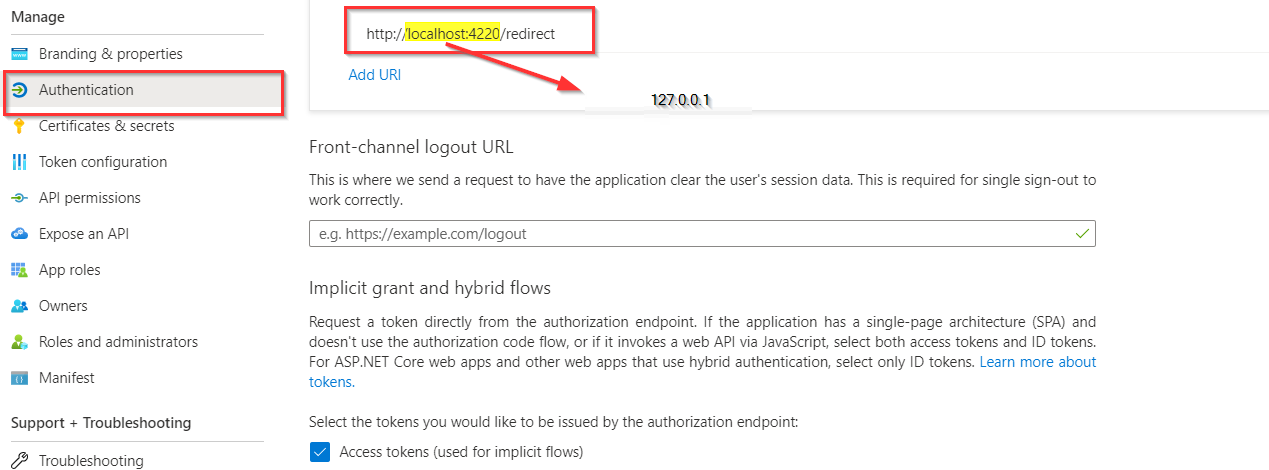
- 对于本地和移动应用程序,请使用以下内容之一:使用嵌入式浏览器的应用程序使用
https://login.microsoftonline.com/common/oauth2/nativeclient,使用系统浏览器的应用程序使用http://localhost。 - 由于您已经授予了
openidoffline_access,profile权限,请检查相同的api权限是在azure广告门户中提供的,并且是来自门户的profile权限,或者是同时进行身份验证的。 - 在授权代码流中,客户端最初将用户定向到
/authorize端点,并请求用户的openid、offline_access和https://graph.microsoft.com/mail.read权限等作用域。
参考:Microsoft平台和Microsoft2.0授权代码流-MicrosoftentraMicrosoft.Docs
页面原文内容由Stack Overflow提供。腾讯云小微IT领域专用引擎提供翻译支持
原文链接:
https://stackoverflow.com/questions/73539708
复制相关文章
相似问题
腾讯云开发者

Copyright © 2013 - 2026 Tencent Cloud. All Rights Reserved. 腾讯云 版权所有
深圳市腾讯计算机系统有限公司 ICP备案/许可证号:粤B2-20090059  粤公网安备44030502008569号
腾讯云计算(北京)有限责任公司 京ICP证150476号 | 京ICP备11018762号