
如何在CATransform3DRotate中使用iOS时避免使用简陋的动画?
如何在CATransform3DRotate中使用iOS时避免使用简陋的动画?
提问于 2022-08-29 23:45:01
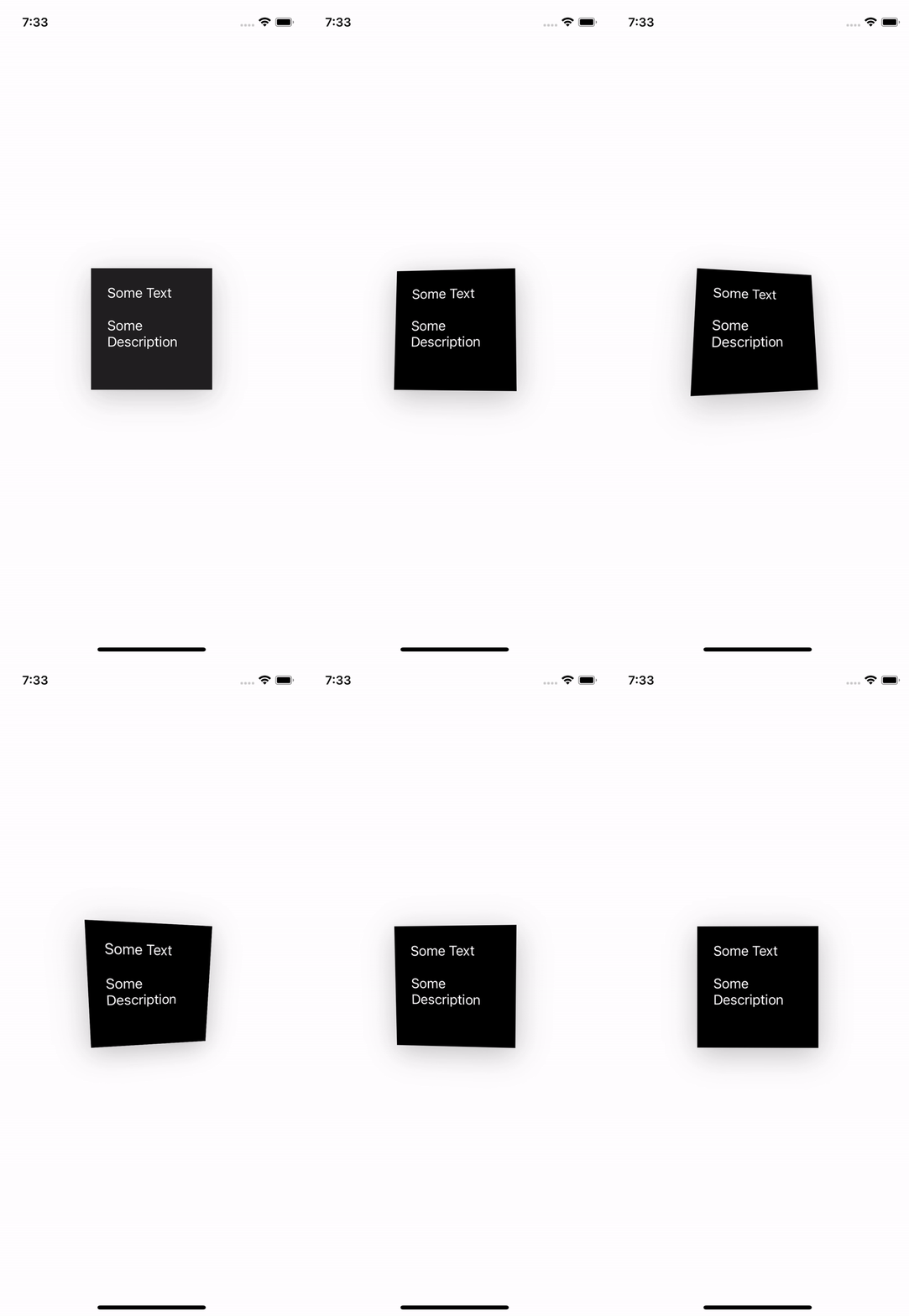
我在下面为它添加了代码,基本上动画作品中,我可以让它在触摸到某些点时动画化,但问题是,动画之后,它开始以一种奇怪的方式进行转换。另一方面,当你移动设备时,运动动画工作得很好。我正试图找出如何防止它从3D到平面图像出现后。
class ViewController: UIViewController {

    var redView: SpecialView!

    override func viewDidLoad() {
        super.viewDidLoad()

        view.backgroundColor = .white

        redView = SpecialView()
        redView.backgroundColor = .black
        view.addSubview(redView)

        let label = UILabel()
        label.text = "Some Text"
        label.textColor = .white
        label.translatesAutoresizingMaskIntoConstraints = false

        redView.addSubview(label)

        let label2 = UILabel()
        label2.text = "Some Description"
        label2.textColor = .white
        label2.numberOfLines = 0
        label2.translatesAutoresizingMaskIntoConstraints = false

        redView.addSubview(label2)

        redView.translatesAutoresizingMaskIntoConstraints = false

        NSLayoutConstraint.activate([
            label.trailingAnchor.constraint(equalTo: redView.trailingAnchor),
            label.topAnchor.constraint(equalTo: redView.topAnchor, constant: 20),
            label.leadingAnchor.constraint(equalTo: redView.leadingAnchor, constant: 20),

            label2.trailingAnchor.constraint(equalTo: label.trailingAnchor),
            label2.topAnchor.constraint(equalTo: label.bottomAnchor, constant: 20),
            label2.leadingAnchor.constraint(equalTo: label.leadingAnchor),

            redView.heightAnchor.constraint(equalToConstant: 150),
            redView.widthAnchor.constraint(equalTo: redView.heightAnchor),
            redView.centerXAnchor.constraint(equalTo: view.centerXAnchor),
            redView.centerYAnchor.constraint(equalTo: view.centerYAnchor)
        ])

        addParallaxToView(vw: redView)
    }

}

final class SpecialView: UIView {

    func findCorner(from point: CGPoint) -> SPPerspectiveHighlightCorner? {
        let width = bounds.width
        let height = bounds.height

        let mediumXLeft = width/4
        let mediumXRight = width/2 + width/4

        let mediumYTop = height/4
        let mediumYBot = height/2 + height/4

        switch (point.x, point.y) {
        case (0...mediumXLeft, 0...mediumYTop):
            return .topLeft
        case (mediumXLeft...mediumXRight, 0...mediumYTop):
            return .topMedium
        case (mediumXRight...width, 0...mediumYTop):
            return .topRight
        case (0...mediumXLeft, mediumYTop...mediumYBot):
            return .mediumLeft
        case (mediumXRight...width, mediumYTop...mediumYBot):
            return .mediumRight
        case (0...mediumXLeft, mediumYBot...height):
            return .bottomLeft
        case (mediumXLeft...mediumXRight, mediumYBot...height):
            return .bottomMedium
        case (mediumXRight...width, mediumYBot...height):
            return .bottomRight
        default:
            return nil
        }
    }

    fileprivate func makeVector(for corner: SPPerspectiveHighlightCorner, step: CGFloat) -> Vector {
        switch corner {
        case .topMedium: return Vector(x: step * 2, y: 0, z: 0)
        case .topRight: return Vector(x: step, y: step, z: 0)
        case .mediumRight: return Vector(x: 0, y: step * 2, z: 0)
        case .bottomRight: return Vector(x: -step, y: step, z: 0)
        case .bottomMedium: return Vector(x: -step * 2, y: 0, z: 0)
        case .bottomLeft: return Vector(x: -step, y: -step, z: 0)
        case .mediumLeft: return Vector(x: 0, y: -step * 2, z: 0)
        case .topLeft: return Vector(x: step, y: -step, z: 0)
        }
    }

    override func touchesBegan(_ touches: Set<UITouch>, with event: UIEvent?) {
        startMoving(touches: touches)
    }

    override func touchesMoved(_ touches: Set<UITouch>, with event: UIEvent?) {
        startMoving(touches: touches)
    }

    func startMoving(touches: Set<UITouch>) {
        guard let location = touches.first?.location(in: self) else { return }
        var identity = CATransform3DIdentity
        identity.m34 = -1 / 500.0

        guard let highlightCorner = findCorner(from: location) else { return }
        let corner = makeVector(for: highlightCorner, step: 3.14)
        print(corner)

        UIView.animate(withDuration: 0.5) {
            self.layer.transform = CATransform3DRotate(identity, (10 * .pi) / 180, corner.x, corner.y, corner.z)
        }
    }

    override func touchesEnded(_ touches: Set<UITouch>, with event: UIEvent?) {
        var identity = CATransform3DIdentity
        identity.m34 = -1 / 500.0

        UIView.animate(withDuration: 1) {
            self.layer.transform = CATransform3DRotate(identity, (0 * .pi) / 180, 1.0, 0.0, 0.0)
        }
    }
}

func addParallaxToView(vw: UIView) {

    var identity = CATransform3DIdentity
    identity.m34 = -1 / 500.0

    let minimum = CATransform3DRotate(identity, (315 * .pi) / 180, 1.0, 0.0, 0.0)
    let maximum = CATransform3DRotate(identity, (45 * .pi) / 180, 1.0, 0.0, 0.0)

    let minimum2 = CATransform3DRotate(identity, (135 * .pi) / 90, 0, 1, 0.0)
    let maximum2 = CATransform3DRotate(identity, (225 * .pi) / 90, 0, 1, 0.0)

    vw.layer.transform = identity
    let effect = UIInterpolatingMotionEffect(
        keyPath: "layer.transform",
        type: .tiltAlongVerticalAxis)
    effect.minimumRelativeValue = minimum
    effect.maximumRelativeValue = maximum

    let effect2 = UIInterpolatingMotionEffect(
        keyPath: "layer.transform",
        type: .tiltAlongHorizontalAxis)
    effect2.minimumRelativeValue = minimum2
    effect2.maximumRelativeValue = maximum2

    let groupMotion = UIMotionEffectGroup()
    groupMotion.motionEffects = [effect, effect2]

    vw.addMotionEffect(groupMotion)
}


struct Vector {
    public var x: CGFloat
    public var y: CGFloat
    public var z: CGFloat
}
回答 1
Stack Overflow用户
发布于 2022-08-30 15:32:08
好像是移除了运动效果修复了它。我在模拟器上面对这个问题似乎很奇怪。
页面原文内容由Stack Overflow提供。腾讯云小微IT领域专用引擎提供翻译支持
原文链接:
https://stackoverflow.com/questions/73535703
复制相关文章
相似问题
腾讯云开发者

Copyright © 2013 - 2026 Tencent Cloud. All Rights Reserved. 腾讯云 版权所有
深圳市腾讯计算机系统有限公司 ICP备案/许可证号:粤B2-20090059  粤公网安备44030502008569号
腾讯云计算(北京)有限责任公司 京ICP证150476号 | 京ICP备11018762号