
私有子worksheet_selectionchange(以sub目标为范围)中的程序太大
当所需单元格处于活动状态时,此宏将执行另一个宏。
这个宏一直工作到第十列。在此之后添加更多的宏会产生“过程太大”错误。我认为它已经达到了容量极限。如何使代码更短/更有效?
注意:这段代码一直持续到AA列,唯一变化的是范围列("B11" -> "C11")和代码(B_11 -> C_11)。
图1:列B:AA是区域,行11:14是任务。
代码调用为这些单元格设置的不同宏。例如,单元格B11调用B_11宏,等等。
选择区域和任务

Private Sub Worksheet_SelectionChange(ByVal Target As Range)
If Target.Count = 1 Then

' B-Column Click Macro------------------------------------------------------------

If Not Intersect(Target, Range("B11")) Is Nothing Then Call B_11
If Not Intersect(Target, Range("B12")) Is Nothing Then Call B_12
If Not Intersect(Target, Range("B13")) Is Nothing Then Call B_13
If Not Intersect(Target, Range("B14")) Is Nothing Then Call B_14

If Not Intersect(Target, Range("B16")) Is Nothing Then Call B_16
If Not Intersect(Target, Range("B17")) Is Nothing Then Call B_17

If Not Intersect(Target, Range("B19")) Is Nothing Then Call B_19
If Not Intersect(Target, Range("B20")) Is Nothing Then Call B_20
If Not Intersect(Target, Range("B21")) Is Nothing Then Call B_21
If Not Intersect(Target, Range("B22")) Is Nothing Then Call B_22

If Not Intersect(Target, Range("B24")) Is Nothing Then Call B_24
If Not Intersect(Target, Range("B25")) Is Nothing Then Call B_25
If Not Intersect(Target, Range("B26")) Is Nothing Then Call B_26
If Not Intersect(Target, Range("B27")) Is Nothing Then Call B_27

' C-Column Click Macro------------------------------------------------------------

If Not Intersect(Target, Range("C11")) Is Nothing Then Call C_11
If Not Intersect(Target, Range("C12")) Is Nothing Then Call C_12
If Not Intersect(Target, Range("C13")) Is Nothing Then Call C_13
If Not Intersect(Target, Range("C14")) Is Nothing Then Call C_14

If Not Intersect(Target, Range("C16")) Is Nothing Then Call C_16
If Not Intersect(Target, Range("C17")) Is Nothing Then Call C_17

If Not Intersect(Target, Range("C19")) Is Nothing Then Call C_19
If Not Intersect(Target, Range("C20")) Is Nothing Then Call C_20
If Not Intersect(Target, Range("C21")) Is Nothing Then Call C_21
If Not Intersect(Target, Range("C22")) Is Nothing Then Call C_22

If Not Intersect(Target, Range("C24")) Is Nothing Then Call C_24
If Not Intersect(Target, Range("C25")) Is Nothing Then Call C_25
If Not Intersect(Target, Range("C26")) Is Nothing Then Call C_26
If Not Intersect(Target, Range("C27")) Is Nothing Then Call C_27
继续到范围(“AA11”).调用AA_11
图2:例如,单击单元格B11后,下面名为B_11的宏将处于活动状态。此宏的目的是将大量数据过滤到需要的区域和任务。所以列B=面积082M,第11行=帧。在数据表中,区域按行设置,任务在表标题中设置,因此为了筛选任务,我需要隐藏不必要的列。
后call_11宏
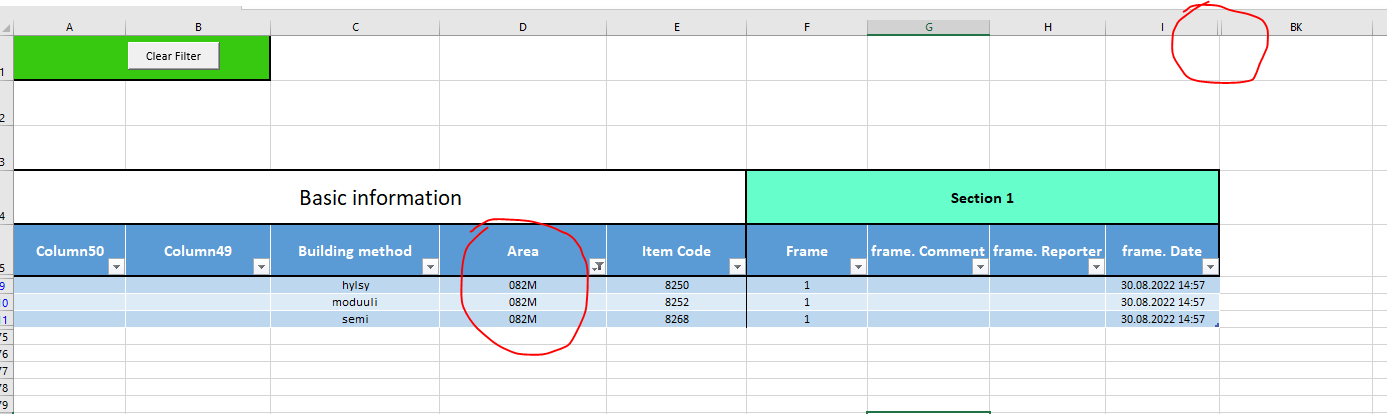
Sub B_11()
'
' Area-082M


    Sheets("Tasks").Select
' hiding unnecessary columns
    Columns("F:BI").Hidden = False
    Columns("J:BI").Hidden = True

' filter data to only area 082M
    ActiveSheet.ListObjects("Table2435").Range.AutoFilter Field:=4, Criteria1:= _
        "082M"
End Sub回答 1
Stack Overflow用户
发布于 2022-08-29 11:16:47
请试试下一条路。我只是认为你剩下的香肠代码都是一样的.
Option Explicit

Private Sub Worksheet_SelectionChange(ByVal Target As Range)
    Dim rng As Range
    If Target.Count > 1 Then Exit Sub 'if selection contains more than a cell, the code exists

    Set rng = Me.Range("B11:AA14,B16:AA17,B19:AA22,B24:AA27") 'the discontinuous range where the selection to trigger the event
    If Not Intersect(Target, rng) Is Nothing Then
        Dim MacroName As String
        MacroName = Split(Target.Address, "$")(1) & "_" & Target.Row 'build the macro to be called name

        Application.Run MacroName 'call existing macros
    End If
End Sub只有在选定必要范围内的单元格时,才会触发上述代码,然后生成要调用的现有子程序的名称并调用它(Application.Run MacroName)。
编辑的
下一个版本将调用单个Sub (而不是所有现有的),配置为根据选定的Target单元地址执行操作。我只将其配置为"F“列(LiteralP变量)。如果您尝试选择位于F:F列之后的单元格,它将发送一条电子邮件。
调整后的事件如下所示:
Private Sub Worksheet_SelectionChange(ByVal Target As Range)
    Dim rng As Range
    If Target.Count > 1 Then Exit Sub 'if selection contains more than a cell, the code exists

    Set rng = Me.Range("B11:AA14,B16:AA17,B19:AA22,B24:AA27") 'the discontinuous range where the selection to trigger the event
    If Not Intersect(Target, rng) Is Nothing Then
        doTheJob Target
    End If
End Sub所谓的Sub是这样的:
Sub doTheJob(Target As Range)
   Dim LiteralP As String, ws As Worksheet, tbl As ListObject
   Dim rngUnhide As Range, strRng As String, crit As String

        LiteralP = Split(Target.Address, "$")(1) 'extract the literal part of the Target address

        Set ws = Sheets("Hyttityöt"): Set tbl = ws.ListObjects("Table2435")
        ws.Columns("F:BI").Hidden = False    'common for all cases: unhide the respective columns range
       Select Case LiteralP                               'select specific filter criteria:
            Case "B"
                crit = "082M": If Target.Row = 21 Then strRng = "F:AK,AP:BI"
            Case "C"
                crit = "081M": If Target.Row = 21 Then strRng = "F:AC,AP:BI"
            Case "D"
                crit = "093M": If Target.Row = 21 Then strRng = "F:AK,AP:BI"
            Case "E"
                crit = "092M": If Target.Row = 21 Then strRng = "F:AC, AP:BI"
            Case "F"
                crit = "091M": If Target.Row = 21 Then strRng = "F:AK, AP:BI"

            ' complete the necessary Target literal part, up to AA
            Case Else
               MsgBox "Letter " & LiteralP & " has not been configured above...", vbInformation, "Not configured...": Exit Sub
       End Select
       Select Case Target.Row               'select the appropriate ranges to be hidden:
            Case 11: strRng = "J:BI"
            Case 12: strRng = "F:I,N:BI"
            Case 13: strRng = "F:M,R:BI"
            Case 14: strRng = "F:Q,F:BI"
            Case 16: strRng = "F:U,Z:BI"
            Case 17: strRng = "F:Y,AD:BI"
            Case 19: strRng = "F:AC,AH:BI"
            Case 20: strRng = "F:AG,AL:BI"
            'Case 21 looks specific for each letter address...
            Case 22: strRng = "A:O,AL:BI"
            Case 24: strRng = "F:AS,AX:BI"
            Case 25: strRng = "F:AW,BB:BI"
            Case 26: strRng = "F:BA,BF:BI"
            Case 27: strRng = "F:BI,F:BE"
        End Select

        ws.Range(strRng).EntireColumn.Hidden = True 'hide the above established columns range
        tbl.AutoFilter.ShowAllData                                     'show all filter data
        tbl.Range.AutoFilter Field:=4, Criteria1:=crit      'apply the filter for the fourth field
        If Target.Row = 13 Then tbl.Range.AutoFilter Field:=3, Criteria1:="SEMI"    'apply the second filter on the third column, different criteria
        If Target.Row = 14 Then tbl.Range.AutoFilter Field:=3, Criteria1:="HYLSY" 'apply the second filter on the third column, different criteria

        ws.Activate
End Sub代码将更加紧凑,在需要时更容易进行调整,并且只使用一次声明和设置的公共变量。我认为继续Sub配置应该不难,看看我已经做了什么。如果有什么不清楚的地方,如果你要求澄清的话,我会尽力澄清的.
https://stackoverflow.com/questions/73527737
复制相似问题
腾讯云开发者

Copyright © 2013 - 2026 Tencent Cloud. All Rights Reserved. 腾讯云 版权所有
深圳市腾讯计算机系统有限公司 ICP备案/许可证号:粤B2-20090059  粤公网安备44030502008569号
腾讯云计算(北京)有限责任公司 京ICP证150476号 | 京ICP备11018762号