
Jetpack组合检测拖动手势和检测交互源
Jetpack组合检测拖动手势和检测交互源
提问于 2022-08-25 13:18:18
我想要开发一个浮动拖放按钮使用jetpack组合,我还需要知道什么时候开始和用户拖动交互结束。
    Box(
        modifier = Modifier.fillMaxSize(),
        contentAlignment = Alignment.Center,
        content = {
            val interactionSource = remember { MutableInteractionSource() }
            val interactions = remember { mutableStateListOf<Interaction>() }
            LaunchedEffect(interactionSource) {
                interactionSource.interactions.collect { interaction ->
                    Log.i("dragInteraction", "-> $interaction")
                }
            }
            var offsetX by remember { mutableStateOf(0f) }
            var offsetY by remember { mutableStateOf(0f) }

            Surface(
                modifier = Modifier
                    .offset {
                        IntOffset(
                            x = offsetX.roundToInt(),
                            y = offsetY.roundToInt()
                        )
                    }
                    .size(60.dp)
                    .pointerInput(Unit) {
                        detectDragGestures { change, dragAmount ->
                            offsetX += dragAmount.x
                            offsetY += dragAmount.y
                            change.consume()
                        }
                    },
                interactionSource = interactionSource,
                onClick = {
                },
                content = {
                },
                color = Purple500
            )
        }
)在这段代码中,我的Surface移动得很慢,但是当我拖动它时,我无法得到DragInteraction.Start和DragInteraction.Stop!我得到的只有androidx.compose.foundation.interaction.PressInteraction$Press@c38442d androidx.compose.foundation.interaction.PressInteraction$Cancel@e6d1ef3
有什么建议吗?如何检测拖动状态?
回答 1
Stack Overflow用户
回答已采纳
发布于 2022-08-25 13:51:51
默认情况下,detectDragGestures不会发出DragInteraction。您应该发出DragInteraction.Start、DragInteraction.Stop、DragInteraction.Cancel。
作为
@OptIn(ExperimentalMaterial3Api::class)
@Composable
private fun DragInteractionSample() {
    Box(
        modifier = Modifier.fillMaxSize(),
        contentAlignment = Alignment.Center,
        content = {

            val interactionSource = remember { MutableInteractionSource() }
            val interactions = remember { mutableStateListOf<Interaction>() }
            var text by remember { mutableStateOf("") }

            LaunchedEffect(interactionSource) {
                interactionSource.interactions.collect { interaction ->
                    when (interaction) {
                        is DragInteraction.Start -> {
                            text = "Drag Start"
                        }
                        is DragInteraction.Stop -> {
                            text = "Drag Stop"
                        }
                        is DragInteraction.Cancel -> {
                            text = "Drag Cancel"
                        }
                    }
                }
            }

            val coroutineScope = rememberCoroutineScope()

            var offsetX by remember { mutableStateOf(0f) }
            var offsetY by remember { mutableStateOf(0f) }

            val modifier = Modifier
                .offset {
                    IntOffset(
                        x = offsetX.roundToInt(),
                        y = offsetY.roundToInt()
                    )
                }
                .size(60.dp)
                .pointerInput(Unit) {

                    var interaction: DragInteraction.Start? = null
                    detectDragGestures(
                        onDragStart = {
                            coroutineScope.launch {
                                interaction = DragInteraction.Start()
                                interaction?.run {
                                    interactionSource.emit(this)
                                }

                            }
                        },
                        onDrag = { change: PointerInputChange, dragAmount: Offset ->
                            offsetX += dragAmount.x
                            offsetY += dragAmount.y

                        },
                        onDragCancel = {
                            coroutineScope.launch {
                                interaction?.run {
                                    interactionSource.emit(DragInteraction.Cancel(this))
                                }
                            }
                        },
                        onDragEnd = {
                            coroutineScope.launch {
                                interaction?.run {
                                    interactionSource.emit(DragInteraction.Stop(this))
                                }
                            }
                        }
                    )
                }

            Surface(
                modifier = modifier,
                interactionSource = interactionSource,
                onClick = {},
                content = {},
                color = MaterialTheme.colorScheme.primary
            )

            Text(text = text)
        }
    )
}
结果
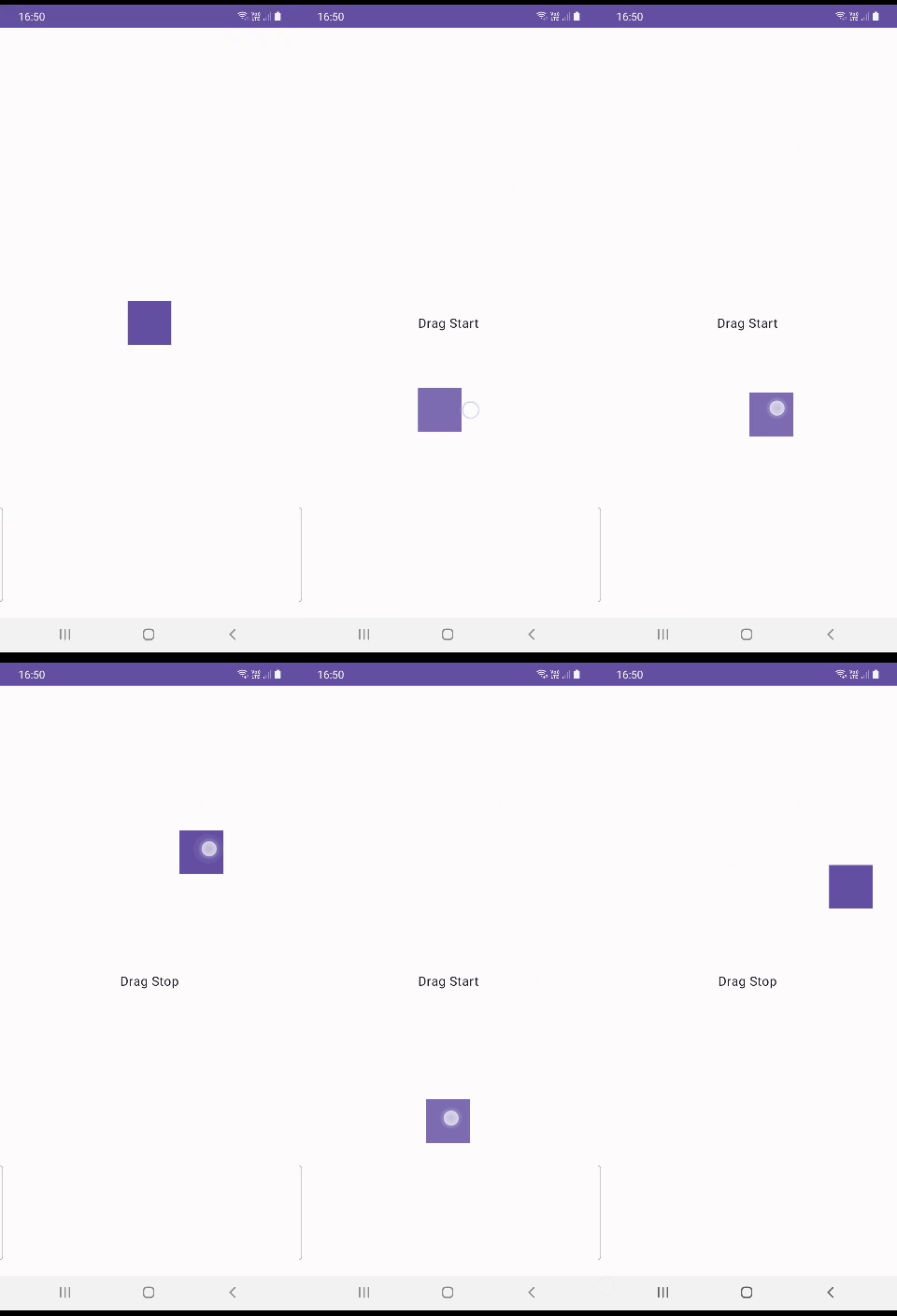
或者简单地创建一个enum类并将其设置为每个手势函数的MutableState。
enum class DragState {
 Idle, DragStart, Drag, DragEnd, DragCancel
}

var dragState by remember{mutableStateOf(Idle}
并在每次拖动回调时更改此状态。
页面原文内容由Stack Overflow提供。腾讯云小微IT领域专用引擎提供翻译支持
原文链接:
https://stackoverflow.com/questions/73488235
复制相关文章
相似问题
腾讯云开发者

Copyright © 2013 - 2026 Tencent Cloud. All Rights Reserved. 腾讯云 版权所有
深圳市腾讯计算机系统有限公司 ICP备案/许可证号:粤B2-20090059  粤公网安备44030502008569号
腾讯云计算(北京)有限责任公司 京ICP证150476号 | 京ICP备11018762号