
选择组件列表长文本问题
选择组件列表长文本问题
提问于 2022-08-24 10:01:13
我是Blazorise的初学者,我使用了选择组件,所以当我在选择列表中使用长文本时,选择列表没有正确显示,请查看附件中的图像。有任何解决方案来包装长文本选择选项吗?
图像描述
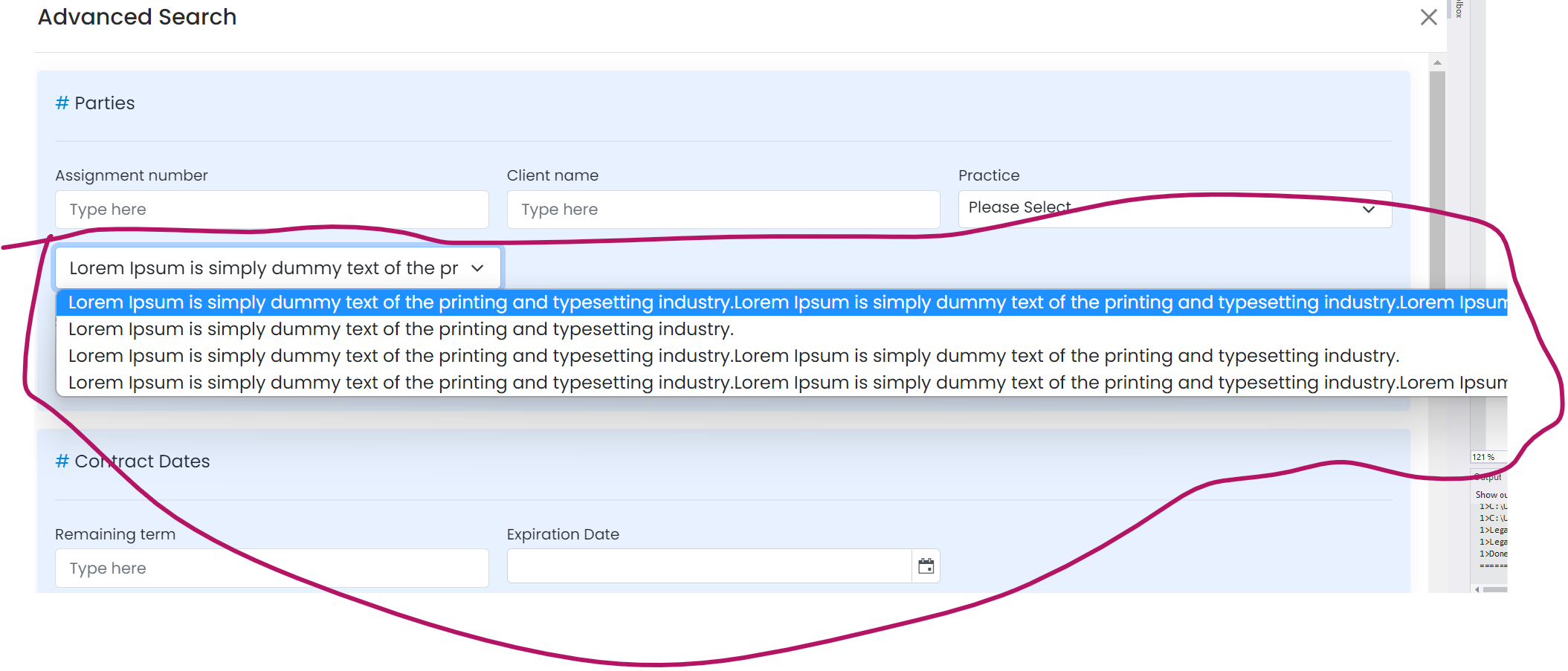
代码在这里
<Field ColumnSize="ColumnSize.Is4.OnTablet.Is12.OnMobile.Is12.OnDesktop.Is4.OnWidescreen.Is4.OnFullHD">
<Select TValue="int">
    <SelectItem Value="1">Lorem Ipsum is simply dummy text of the printing and typesetting industry.Lorem Ipsum is simply dummy text of the printing and typesetting industry.Lorem Ipsum is simply dummy text of the printing and typesetting industry.</SelectItem>
    <SelectItem Value="2">Lorem Ipsum is simply dummy text of the printing and typesetting industry.</SelectItem>
    <SelectItem Value="3">Lorem Ipsum is simply dummy text of the printing and typesetting industry.Lorem Ipsum is simply dummy text of the printing and typesetting industry.</SelectItem>
    <SelectItem Value="4">Lorem Ipsum is simply dummy text of the printing and tLorem Ipsum is simply dummy text of the printing and typesetting industry.Lorem Ipsum is simply dummy text of the printing and typesetting industry.Lorem Ipsum is simply dummy text of the printing and typesetting industry.</SelectItem>
</Select></Field>回答 1
Stack Overflow用户
发布于 2022-08-24 12:46:23
据我所知,浏览器忽略了<option>标签的样式,所以下面这样的CSS就不能工作了。
option {
    max-width: 100%;
    overflow: hidden;
    word-wrap: normal !important;
    white-space: normal;
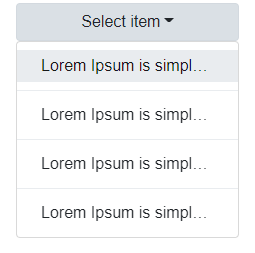
}作为解决办法,我建议使用下拉列表组件。下面是一个示例:
<Field ColumnSize="ColumnSize.Is4.OnTablet.Is12.OnMobile.Is12.OnDesktop.Is4.OnWidescreen.Is4.OnFullHD">
    <Dropdown>
        <DropdownToggle Color="Color.Light" Width="Width.Is100">
            @(_selectedValue.HasValue ? _selectedValue : "Select item")
        </DropdownToggle>
        <DropdownMenu Style="max-width: 100%;">
            <DropdownItem Value="1" Class="text-truncate" Clicked="() => OnItemClicked(1)">
                Lorem Ipsum is simply dummy text of the printing and typesetting industry.Lorem Ipsum is simply dummy text of the printing and typesetting industry.Lorem Ipsum is simply dummy text of the printing and typesetting industry.
            </DropdownItem>

            <DropdownDivider />

            <DropdownItem Value="2" Class="text-truncate" Clicked="() => OnItemClicked(2)">
                Lorem Ipsum is simply dummy text of the printing and typesetting industry.
            </DropdownItem>

            <DropdownDivider />

            <DropdownItem Value="3" Class="text-truncate" Clicked="() => OnItemClicked(3)">
                Lorem Ipsum is simply dummy text of the printing and typesetting industry.Lorem Ipsum is simply dummy text of the printing and typesetting industry.
            </DropdownItem>

            <DropdownDivider />

            <DropdownItem Value="4" Class="text-truncate" Clicked="() => OnItemClicked(4)">
                Lorem Ipsum is simply dummy text of the printing and tLorem Ipsum is simply dummy text of the printing and typesetting industry.Lorem Ipsum is simply dummy text of the printing and typesetting industry.Lorem Ipsum is simply dummy text of the printing and typesetting industry.
            </DropdownItem>
        </DropdownMenu>
    </Dropdown>
</Field>

@code {
    private int? _selectedValue;

    private void OnItemClicked(int value)
    {
        _selectedValue = value;
    }
}
结果:
页面原文内容由Stack Overflow提供。腾讯云小微IT领域专用引擎提供翻译支持
原文链接:
https://stackoverflow.com/questions/73471152
复制相关文章
相似问题
腾讯云开发者

Copyright © 2013 - 2026 Tencent Cloud. All Rights Reserved. 腾讯云 版权所有
深圳市腾讯计算机系统有限公司 ICP备案/许可证号:粤B2-20090059  粤公网安备44030502008569号
腾讯云计算(北京)有限责任公司 京ICP证150476号 | 京ICP备11018762号