
流浪汉没有启动
流浪汉没有启动
提问于 2022-08-24 09:59:58
我是新来的,对流浪汉有个问题。我安装了virtualbox和流浪者,这样我就可以使用laravel-家园了。我按照文章(虚拟化)中的说明做了所有的事情。当我试图引导流浪汉时,我会遇到这样的错误:
Traceback (most recent call last):
        17: from C:/HashiCorp/Vagrant/embedded/gems/2.3.0/gems/vagrant-2.3.0/bin/vagrant:214:in `<main>'
        16: from C:/HashiCorp/Vagrant/embedded/gems/2.3.0/gems/vagrant-2.3.0/bin/vagrant:214:in `new'
        15: from C:/HashiCorp/Vagrant/embedded/gems/2.3.0/gems/vagrant-2.3.0/lib/vagrant/environment.rb:189:in `initialize'
        14: from C:/HashiCorp/Vagrant/embedded/gems/2.3.0/gems/vagrant-2.3.0/lib/vagrant/environment.rb:998:in `process_configured_plugins'
        13: from C:/HashiCorp/Vagrant/embedded/gems/2.3.0/gems/vagrant-2.3.0/lib/vagrant/environment.rb:817:in `vagrantfile'
        12: from C:/HashiCorp/Vagrant/embedded/gems/2.3.0/gems/vagrant-2.3.0/lib/vagrant/environment.rb:817:in `new'
        11: from C:/HashiCorp/Vagrant/embedded/gems/2.3.0/gems/vagrant-2.3.0/lib/vagrant/vagrantfile.rb:31:in `initialize'
        10: from C:/HashiCorp/Vagrant/embedded/gems/2.3.0/gems/vagrant-2.3.0/lib/vagrant/config/loader.rb:116:in `load'
         9: from C:/HashiCorp/Vagrant/embedded/gems/2.3.0/gems/vagrant-2.3.0/lib/vagrant/config/loader.rb:116:in `each'
         8: from C:/HashiCorp/Vagrant/embedded/gems/2.3.0/gems/vagrant-2.3.0/lib/vagrant/config/loader.rb:119:in `block in load'
         7: from C:/HashiCorp/Vagrant/embedded/gems/2.3.0/gems/vagrant-2.3.0/lib/vagrant/config/loader.rb:119:in `each'
         6: from C:/HashiCorp/Vagrant/embedded/gems/2.3.0/gems/vagrant-2.3.0/lib/vagrant/config/loader.rb:126:in `block (2 levels) in load'
         5: from C:/HashiCorp/Vagrant/embedded/gems/2.3.0/gems/vagrant-2.3.0/lib/vagrant/config/v2/loader.rb:37:in `load'
         4: from C:/Users/me/Homestead/Vagrantfile:29:in `block in <top (required)>'
         3: from C:/HashiCorp/Vagrant/embedded/mingw64/lib/ruby/2.7.0/psych.rb:277:in `load'
         2: from C:/HashiCorp/Vagrant/embedded/mingw64/lib/ruby/2.7.0/psych.rb:390:in `parse'
         1: from C:/HashiCorp/Vagrant/embedded/mingw64/lib/ruby/2.7.0/psych.rb:456:in `parse_stream'
C:/HashiCorp/Vagrant/embedded/mingw64/lib/ruby/2.7.0/psych.rb:456:in `parse': (<unknown>): could not find expected ':' while scanning a simple key at line 6 column 1 (Psych::SyntaxError)
Homestead.yamel
---
ip: "192.168.5.20"
memory: 8192
cpus: 2
provider: virtualbox

authorize: c:/Users/me/.ssh/id_rsa.pub

keys:
    - c:/Users/me/.ssh/id_rsa


folders:
    - map: c:/workspace
      to: /home/vagrant/workspace
      type: nfs

sites:
    - map: code.test
      to: /home/vagrant/workspace/code
      php: "8.1"

    - map: cmsmy-pro.dev.local
      to: /home/vagrant/workspace/my-pro/public
      php: "7.2"
      type: cms-core

    - map: www.my-pro.com
      to: /home/vagrant/workspace/my-pro/public/www
      php: "7.2"
      type: cms-core

    - map: cmsmy-pro.dev.local
      to: /home/vagrant/workspace/cmsmy-pro/public
      php: "8.0"

    - map: phpmyadmin.mysql
      to: /home/vagrant/workspace/phpmyadmin
      php: "8.0"

databases:
    - homestead

features:
    - mysql: true
    - mariadb: false
    - postgresql: false
    - ohmyzsh: false
    - webdriver: false

services:
    - enabled:
          - "mysql"
#    - disabled:
#        - "postgresql@11-main"

#ports:
#    - send: 33234 # MySQL/MariaDB
#      to: 2500
#    - send: 5020
#      to: 5020
#    - send: 58720 # PostgreSQL
#      to: 5473
#    - send: 2314 # Mailhog
#      to: 4723
#    - send: 2341
#      to: 2341
#    - send: 58711
# to: 58711有人知道问题出在哪里吗?
回答 1
Stack Overflow用户
回答已采纳
发布于 2022-08-24 15:42:08
当我复制您的yaml时,我们可以看到有空间而不是空行
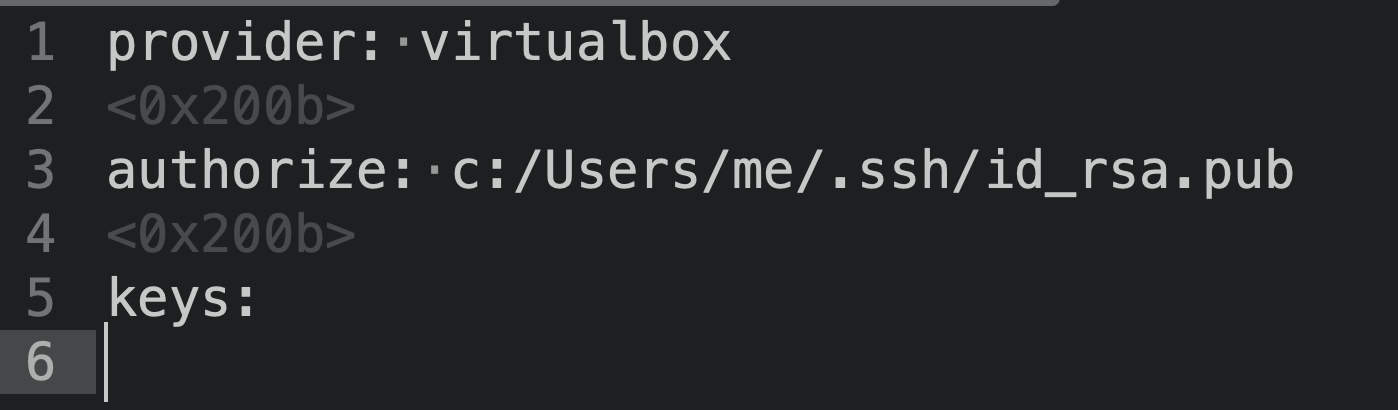
下面的yaml应该可以
---
ip: "192.168.5.20"
memory: 8192
cpus: 2
provider: virtualbox
authorize: c:/Users/me/.ssh/id_rsa.pub
keys:
- c:/Users/me/.ssh/id_rsa
folders:
- map: c:/workspace
to: /home/vagrant/workspace
type: nfs
sites:
- map: code.test
to: /home/vagrant/workspace/code
php: "8.1"
- map: cmsmy-pro.dev.local
to: /home/vagrant/workspace/my-pro/public
php: "7.2"
type: cms-core
- map: www.my-pro.com
to: /home/vagrant/workspace/my-pro/public/www
php: "7.2"
type: cms-core
- map: cmsmy-pro.dev.local
to: /home/vagrant/workspace/cmsmy-pro/public
php: "8.0"
- map: phpmyadmin.mysql
to: /home/vagrant/workspace/phpmyadmin
php: "8.0"
databases:
- homestead
features:
- mysql: true
- mariadb: false
- postgresql: false
- ohmyzsh: false
- webdriver: false
services:
- enabled:
- "mysql"
# - disabled:
# - "postgresql@11-main"
#ports:
# - send: 33234 # MySQL/MariaDB
# to: 2500
# - send: 5020
# to: 5020
# - send: 58720 # PostgreSQL
# to: 5473
# - send: 2314 # Mailhog
# to: 4723
# - send: 2341
# to: 2341
# - send: 58711
# to: 58711页面原文内容由Stack Overflow提供。腾讯云小微IT领域专用引擎提供翻译支持
原文链接:
https://stackoverflow.com/questions/73471139
复制相关文章
相似问题
腾讯云开发者

Copyright © 2013 - 2026 Tencent Cloud. All Rights Reserved. 腾讯云 版权所有
深圳市腾讯计算机系统有限公司 ICP备案/许可证号:粤B2-20090059  粤公网安备44030502008569号
腾讯云计算(北京)有限责任公司 京ICP证150476号 | 京ICP备11018762号