
在Xcode 13中找不到用于体系结构x86_64的符号
在Xcode 13中找不到用于体系结构x86_64的符号
提问于 2022-08-23 08:10:58
目前,我正致力于将firebase云消息传递服务集成到一个反应性本地移动应用程序中。我遵循了他们关于firebase集成的文档,并编辑了pod文件以使用框架。
当使用框架时。我发现了一个关于传递依赖的错误。这就是为什么我必须添加pre install do和$static_framework。
require_relative '../node_modules/react-native/scripts/react_native_pods'
require_relative '../node_modules/@react-native-community/cli-platform-ios/native_modules'

platform :ios, '11.0'

$RNFirebaseAsStaticFramework = true
target 'P2PMobileApp' do
  use_frameworks!

  $static_framework = ['FlipperKit', 'Flipper', 'Flipper-Folly', 'CocoaAsyncSocket', 'ComponentKit', 'DoubleConversion', 'glog', 'Flipper-PeerTalk', 'Flipper-RSocket', 'Yoga', 'YogaKit', 'CocoaLibEvent', 'OpenSSL-Universal', 'boost-for-react-native']

  pre_install do |installer|
    Pod::Installer::Xcode::TargetValidator.send(:define_method,:verify_no_static_framework_transitive_dependencies) {}
    installer.pod_targets.each do |pod|
      if $static_framework.include?(pod.name)
        def pod.build_type;
          Pod::BuildType.static_library
        end
      end
    end
  end
  config = use_native_modules!

  use_react_native!(
    :path => config[:reactNativePath],
    # to enable hermes on iOS, change `false` to `true` and then install pods
    :hermes_enabled => false
  )

  pod 'RNVectorIcons', :path => '../node_modules/react-native-vector-icons'

  target 'P2PMobileAppTests' do
    inherit! :complete
    # Pods for testing
  end

  # Enables Flipper.
  #
  # Note that if you have use_frameworks! enabled, Flipper will not work and
  # you should disable the next line.
  # use_flipper!()

  post_install do |installer|
    react_native_post_install(installer)
    __apply_Xcode_12_5_M1_post_install_workaround(installer)
  end
end现在,当我尝试使用react-native run-ios运行应用程序时,我出现了以下错误
Undefined symbols for architecture x84_64:
  "google::LogMessage::LogMessage(char const*, int, int)", referenced from:
    __react_native_log_default in react_native_log.o
  "google::LogMessageFatal::LogMessageFatal()", referenced from:
    __react_native_log_default in react_native_log.o
...Note:我已经用arch -x86_64 pod install完成了吊舱安装,因为我正在开发一个带有M1芯片的mini。
我试图用以下解决方案来解决这个问题。但他们中没有一个
- 用xcode链接二进制文件
- 改变架构
- 更改pod安装的体系结构(然后我得到了与arm64相关的相同问题)
- 将glog从
$static_framwork变量中删除(然后对双重转换模块出现相同的Undefined symbols for architecture x84_64:问题)
不过,我还是被构建失败所困扰。在这方面的任何帮助都将受到高度赞赏。
回答 1
Stack Overflow用户
发布于 2022-08-23 08:26:42
如果您使用的是M1芯片,那么可以通过以下步骤解析它:
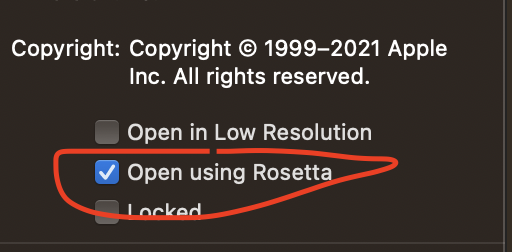
转到应用程序>右键单击Xcode > Get信息>选择Open使用Rosetta重启系统
另一种解决方案是添加库。
您可以通过以下方式添加它:
- 单击左侧窗格左上角的项目(蓝色图标)。
- 在中间窗格中,单击“生成阶段”选项卡。
- 在“链接二进制与库”下,点击加号按钮。
- 从列表中找到YOUR_FRAMEFOERK.framework并点击Add。
页面原文内容由Stack Overflow提供。腾讯云小微IT领域专用引擎提供翻译支持
原文链接:
https://stackoverflow.com/questions/73455215
复制相关文章
相似问题
腾讯云开发者

Copyright © 2013 - 2026 Tencent Cloud. All Rights Reserved. 腾讯云 版权所有
深圳市腾讯计算机系统有限公司 ICP备案/许可证号:粤B2-20090059  粤公网安备44030502008569号
腾讯云计算(北京)有限责任公司 京ICP证150476号 | 京ICP备11018762号