
部署lambda边缘函数时无法读取未定义(读取'startsWith')错误的属性
部署lambda边缘函数时无法读取未定义(读取'startsWith')错误的属性
提问于 2022-08-22 17:25:09
在AWS中,我使用CloudFront源文件配置S3。S3配置为客户主密钥(CMK)的服务器端加密。由于S3与CMK加密的耦合面问题,我们必须按照本AWS条款中的建议使用Lambda@Edge函数,下面的Node代码是从本文链接的
    // Declare constants reqiured for the signature process
const crypto = require('crypto');
const emptyHash = 'e3b0c44298fc1c149afbf4c8996fb92427ae41e4649b934ca495991b7852b855';
const signedHeadersGeneric = 'host;x-amz-content-sha256;x-amz-date;x-amz-security-token';
// CloudFront includes the x-amz-cf-id header in the signature for custom origins
const signedHeadersCustomOrigin = 'host;x-amz-cf-id;x-amz-content-sha256;x-amz-date;x-amz-security-token';
// Retrieve the temporary IAM credentials of the function that were granted by
// the Lambda@Edge service based on the function permissions. In this solution, the function
// is given permissions to read from S3 and decrypt using the KMS key.
const { AWS_ACCESS_KEY_ID, AWS_SECRET_ACCESS_KEY, AWS_SESSION_TOKEN } = process.env;

// Since the function is configured to be executed on origin request events, the handler
// is executed every time CloudFront needs to go back to the origin, which is S3 here.
exports.handler = async event => {

    // Retrieve the original request that CloudFront was going to send to S3
    const request = event.Records[0].cf.request;

    // The request object has different properties depending on the type of
    // origin that is being used. Account for that here.
    let originType = '';
    if (request.origin.hasOwnProperty('s3'))
        originType = 's3';
    else if (request.origin.hasOwnProperty('custom'))
        originType = 'custom';
    else
        throw("Unexpected origin type. Expected 's3' or 'custom'. Got: " + JSON.stringify(request.origin));

    // Create a JSON object with the fields that should be included in the Sigv4 request,
    // including the X-Amz-Cf-Id header that CloudFront adds to every request forwarded
    // upstream. This header is exposed to Lambda@Edge in the event object
    const sigv4Options = {
        method: request.method,
        path: request.origin[originType].path + request.uri,
        credentials: {
            accessKeyId: AWS_ACCESS_KEY_ID,
            secretAccessKey: AWS_SECRET_ACCESS_KEY,
            sessionToken: AWS_SESSION_TOKEN
        },
        host: request.headers['host'][0].value,
        xAmzCfId: event.Records[0].cf.config.requestId,
        originType: originType
    };

    // Compute the signature object that includes the following headers: X-Amz-Security-Token, Authorization,
    // X-Amz-Date, X-Amz-Content-Sha256, and X-Amz-Security-Token
    const signature = signV4(sigv4Options);

    // Finally, add the signature headers to the request before it is sent to S3
    for(var header in signature){
        request.headers[header.toLowerCase()] = [{
            key: header,
            value: signature[header].toString()
        }];
    }

    return request;
};


// Helper functions to sign the request using AWS Signature Version 4
// This helper only works for S3, using GET/HEAD requests, without query strings
// https://docs.aws.amazon.com/general/latest/gr/sigv4_signing.html
function signV4(options) {
    // Infer the region from the host header
    const region = options.host.split('.')[2];
    // Create the canonical request
    const date = (new Date()).toISOString().replace(/[:-]|\.\d{3}/g, '');
    let canonicalHeaders = '';
    let signedHeaders = '';
    if (options.originType == 's3') {
        canonicalHeaders = ['host:'+options.host, 'x-amz-content-sha256:'+emptyHash, 'x-amz-date:'+date, 'x-amz-security-token:'+options.credentials.sessionToken].join('\n');
        signedHeaders = signedHeadersGeneric;
    } else {
        canonicalHeaders = ['host:'+options.host, 'x-amz-cf-id:'+options.xAmzCfId, 'x-amz-content-sha256:'+emptyHash, 'x-amz-date:'+date, 'x-amz-security-token:'+options.credentials.sessionToken].join('\n');
        signedHeaders = signedHeadersCustomOrigin;
    }
    const canonicalURI = encodeRfc3986(encodeURIComponent(decodeURIComponent(options.path).replace(/\+/g, ' ')).replace(/%2F/g, '/'));
    const canonicalRequest = [options.method, canonicalURI, '', canonicalHeaders + '\n', signedHeaders,emptyHash].join('\n');
    // Create string to sign
    const credentialScope = [date.slice(0, 8), region, 's3/aws4_request'].join('/');
    const stringToSign = ['AWS4-HMAC-SHA256', date, credentialScope, hash(canonicalRequest, 'hex')].join('\n');
    // Calculate the signature
    const signature = hmac(hmac(hmac(hmac(hmac('AWS4' + options.credentials.secretAccessKey, date.slice(0, 8)), region), "s3"), 'aws4_request'), stringToSign, 'hex');
    // Form the authorization header
    const authorizationHeader = ['AWS4-HMAC-SHA256 Credential=' + options.credentials.accessKeyId + '/' + credentialScope,'SignedHeaders=' + signedHeaders,'Signature=' + signature].join(', ');

    // return required headers for Sigv4 to be added to the request to S3
    return {
        'Authorization': authorizationHeader,
        'X-Amz-Content-Sha256' : emptyHash,
        'X-Amz-Date': date,
        'X-Amz-Security-Token': options.credentials.sessionToken
    };
}

function encodeRfc3986(urlEncodedStr) {
  return urlEncodedStr.replace(/[!'()*]/g, c => '%' + c.charCodeAt(0).toString(16).toUpperCase())
}

function hash(string, encoding) {
  return crypto.createHash('sha256').update(string, 'utf8').digest(encoding)
}

function hmac(key, string, encoding) {
  return crypto.createHmac('sha256', key).update(string, 'utf8').digest(encoding)
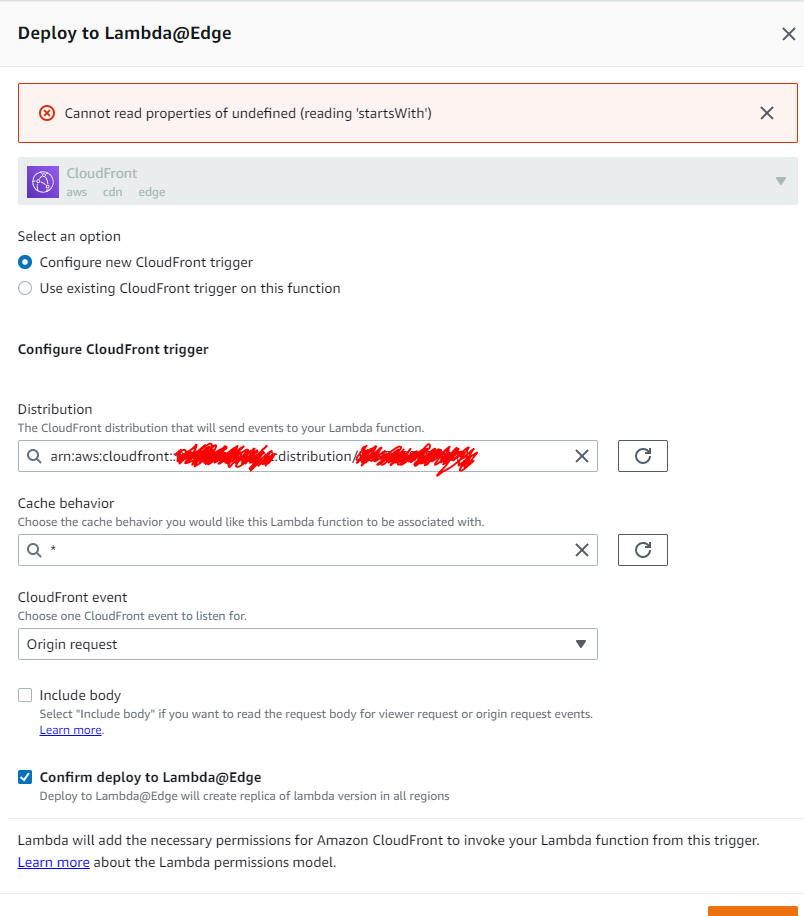
}但是,当我尝试使用建议的Node代码部署lambda@edge函数时,它会抛出错误Cannot read properties of undefined (reading 'startsWith')。
这里有什么问题
回答 1
Stack Overflow用户
发布于 2022-10-24 15:03:53
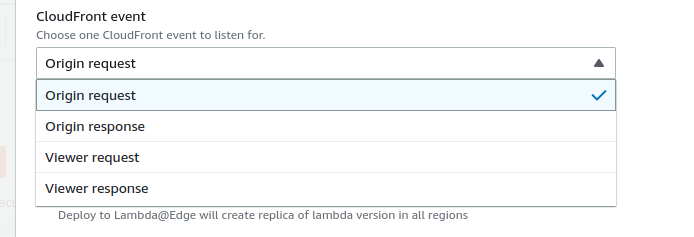
选择下拉“查看器响应”或“原始响应”,然后返回到“原始请求”。
页面原文内容由Stack Overflow提供。腾讯云小微IT领域专用引擎提供翻译支持
原文链接:
https://stackoverflow.com/questions/73448888
复制相关文章
相似问题
腾讯云开发者

Copyright © 2013 - 2026 Tencent Cloud. All Rights Reserved. 腾讯云 版权所有
深圳市腾讯计算机系统有限公司 ICP备案/许可证号:粤B2-20090059  粤公网安备44030502008569号
腾讯云计算(北京)有限责任公司 京ICP证150476号 | 京ICP备11018762号