
VBA excel搜索工具
VBA excel搜索工具
提问于 2022-08-20 19:43:22
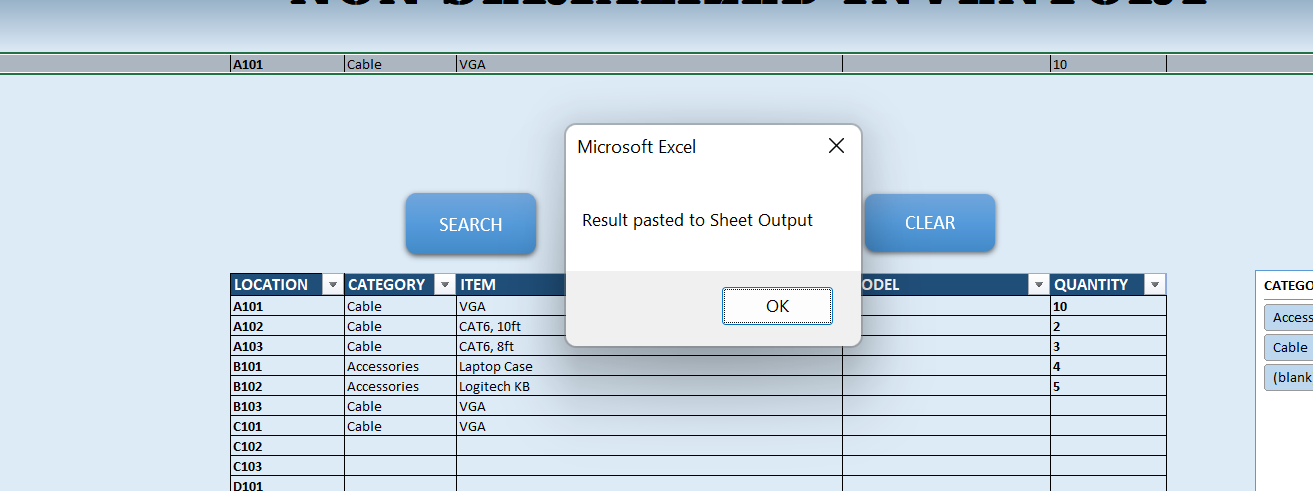
尝试对我正在工作的excel工作表(VBA)执行搜索工具。到目前为止,每次搜索文本时,它都只过滤第一行,而不过滤任何具有我所寻找的值的行。我添加了一张图片来显示它返回的内容以及代码。我是否需要更改代码,让它搜索工作表中的所有数据,而不是让它只显示一行?任何帮助都是非常感谢的。
仅搜索第一行的结果:
Sub SearchAllSheets()
Dim ws As Worksheet, OutputWs As Worksheet
Dim rFound As Range
Dim strName As String
Dim count As Long, LastRow As Long
Dim IsValueFound As Boolean

IsValueFound = False
Set OutputWs = Worksheets("sheet1")    '---->change the sheet name as required
LastRow = OutputWs.Cells(Rows.count, "A").End(xlUp).Row

On Error Resume Next
strName = InputBox("What are you looking for?")
If strName = "" Then Exit Sub
For Each ws In Worksheets
    If ws.Name <> "Output" Then
        With ws.UsedRange
            Set rFound = .Find(What:=strName, After:=.Cells(1, 1), LookIn:=xlValues, LookAt:=xlWhole)
            If Not rFound Is Nothing Then
                Application.Goto rFound, True
                IsValueFound = True
                'MsgBox rFound.Row
                rFound.EntireRow.Copy
                OutputWs.Cells(LastRow + 1, 1).PasteSpecial xlPasteAll
                Application.CutCopyMode = False
                LastRow = LastRow + 1
            End If
        End With
    End If
Next ws
On Error GoTo 0
If IsValueFound Then
   OutputWs.Select
   MsgBox "Result pasted to Sheet Output"
Else
    MsgBox "Value not found"
End If
End Sub回答 1
Stack Overflow用户
发布于 2022-08-21 02:39:25
试试这个:
Sub SearchAllSheets()

    Dim ws As Worksheet, OutputWs As Worksheet
    Dim rFound As Range, IsValueFound As Boolean
    Dim strName As String
    Dim count As Long, LastRow As Long

    Set OutputWs = Worksheets("Output")    '---->change the sheet name as required
    LastRow = OutputWs.Cells(Rows.count, "A").End(xlUp).row

    strName = Trim(InputBox("What are you looking for?"))
    If strName = "" Then Exit Sub
    For Each ws In Worksheets
        If ws.Name <> OutputWs.Name Then
            Debug.Print "Checking " & ws.Name
            Set rFound = FindAll(ws.UsedRange, strName)
            If Not rFound Is Nothing Then
                Set rFound = rFound.EntireRow
                count = rFound.Cells.count / Columns.count 'how many matched rows?
                Debug.Print "Found " & count & " rows"
                rFound.Copy OutputWs.Cells(LastRow + 1, 1)
                LastRow = LastRow + count
                IsValueFound = True
            End If
        End If
    Next ws

    If IsValueFound Then
       OutputWs.Select
       MsgBox "Result(s) pasted to Sheet " & OutputWs.Name
    Else
        MsgBox "Value not found"
    End If

End Sub

'find all cells in range `rng` with value `val` and return as a range
Public Function FindAll(rng As Range, val As String) As Range
    Dim rv As Range, f As Range
    Dim addr As String

    Set f = rng.Find(what:=val, After:=rng.Cells(rng.Cells.count), _
        LookIn:=xlValues, LookAt:=xlWhole, SearchOrder:=xlByRows, _
        SearchDirection:=xlNext, MatchCase:=False)
    If Not f Is Nothing Then addr = f.Address()

    Do Until f Is Nothing
        If rv Is Nothing Then
            Set rv = f
        Else
            Set rv = Application.Union(rv, f)
        End If
        Set f = rng.FindNext(After:=f)
        If f.Address() = addr Then Exit Do
    Loop
    Set FindAll = rv
End Function页面原文内容由Stack Overflow提供。腾讯云小微IT领域专用引擎提供翻译支持
原文链接:
https://stackoverflow.com/questions/73429661
复制相关文章
相似问题
腾讯云开发者

Copyright © 2013 - 2026 Tencent Cloud. All Rights Reserved. 腾讯云 版权所有
深圳市腾讯计算机系统有限公司 ICP备案/许可证号:粤B2-20090059  粤公网安备44030502008569号
腾讯云计算(北京)有限责任公司 京ICP证150476号 | 京ICP备11018762号