
如何在Azure管道中使用appsettings.json中的替代变量?
我为一些剧作家测试了一个NUnit测试项目,在那里我正在测试一个需要登录的网页。因为它需要登录,所以我需要使用一些用户名和密码。这些测试都是作为发布管道的一部分运行的,但也应该可以通过端点获得,这样就可以作为CRON作业来触发它们。我的整个解决方案如下所示:
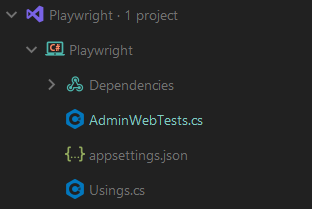
对于像这样的appsettings.json:
{
  "TestUser": {
    "Username": "",
    "Password": ""
  }
}在测试类AdminWebTests.cs中,通过注入ConfigurationBuilder并读取appsettings.json文件,通过构造函数设置测试中使用的用户名和密码:
public class AdminWebTests : PageTest
{
    private readonly string _testUserName;
    private readonly string _testUserPassword;

    public AdminWebTests()
    {
        var configuration = new ConfigurationBuilder()
            .SetBasePath(Directory.GetCurrentDirectory())
            .AddJsonFile(@"appsettings.json", false, false)
            .Build();

        _testUserName = configuration.GetSection("TestUser:Username").Value;
        _testUserPassword = configuration.GetSection("TestUser:Password").Value;
    }
}
这在本地非常有效,但我也需要它在管道中工作。因此,在我的管道脚本中,我包含了包含要替换的变量的变量组和替换变量的FileTransform任务:
# ASP.NET
# Build and test ASP.NET projects.
# Add steps that publish symbols, save build artifacts, deploy, and more:
# https://learn.microsoft.com/azure/devops/pipelines/apps/aspnet/build-aspnet-4

resources:
  pipelines:
    - pipeline: playwright
      source: some-other-pipeline
      branch: master
      trigger:
        branches:
          - master

jobs:
  - job: Delay
    pool: Server
    steps:
      - task: Delay@1
        inputs:
          delayForMinutes: "1"

  - job: Build
    dependsOn: Delay
    condition: succeeded()

    pool:
      vmImage: "windows-latest"

    variables:
      solution: "packages/tests/playwright/*.sln"
      buildPlatform: "Any CPU"
      buildConfiguration: "Release"
      root_playwright: "packages/tests/playwright"
      group: playwright-ci

    steps:
      - task: UseDotNet@2
        displayName: "Set SDK version"
        inputs:
          packageType: "sdk"
          version: "6.0.x"
          includePreviewVersions: true

      - task: NuGetToolInstaller@1
        displayName: "Install nuget"
        inputs:
          checkLatest: true

      - task: NuGetCommand@2
        displayName: "Restore"
        inputs:
          command: "restore"
          restoreSolution: $(solution)

      - task: FileTransform@1
        inputs:
          folderPath: "$(root_playwright)/Playwright"
          fileType: "json"
          targetFiles: "appsettings.json"

      - task: DotNetCoreCLI@2
        displayName: "Build"
        inputs:
          command: "build"
          projects: $(solution)
          arguments: "--configuration $(buildconfiguration) --no-restore"

      - task: PowerShell@2
        displayName: Download Playwright Browsers
        inputs:
          targetType: inline
          script: |
            cd $(root_playwright)/Playwright
            dotnet build
            dotnet tool install --global Microsoft.Playwright.CLI
            playwright install

      - task: dotnetcorecli@2
        displayName: "Test"
        inputs:
          command: "test"
          projects: |
            $(root_playwright)/Playwright/*.csproj
arguments: '--configuration $(buildconfiguration) --no-build --collect "code coverage"'现在的问题是,appsettings.json文件中的变量似乎没有被替换。事实上,配置似乎根本没有被读取。因为如果我试图打印_testUserName和_testUserPassword设置为的任何值,它们都是空的。如果我在代码中设置了它们,并且不通过配置读取它们,那么这些值就会被打印为实际的用户名和密码,这样我就知道日志/打印可以正常工作。无论我将什么放在代码中的appsettings.json文件中,在管道上运行变量时,变量都是空的,但在本地可以正常工作。appsettings.json被复制到输出目录,管道日志在FileTransform步骤中声明JSON variable substitution applied successfully.。我错过了什么吗?
更新:我尝试发布构建工件,发现变量appsettings.json文件实际上没有被替换,但仍然保持原样。我还尝试将FileTransform阶段放在构建阶段之后,并在bin/Release/net6.0目录中输出的appsettings.json上运行转换,但没有帮助。
回答 2
Stack Overflow用户
发布于 2022-08-19 20:57:09
您可以从市场上使用替换令牌任务。https://marketplace.visualstudio.com/items?itemName=qetza.replacetokens
如果对变量使用$(),则更不像这样:
- task: replacetokens@5
  inputs:
    targetFiles: '**/appsettings.json'
    encoding: 'auto'
    tokenPattern: 'azpipelines'
    writeBOM: false
    actionOnMissing: 'warn'
    keepToken: false
    actionOnNoFiles: 'continue'
    enableTransforms: false
    enableRecursion: false
    useLegacyPattern: false
enableTelemetry: trueStack Overflow用户
发布于 2022-08-22 14:15:26
因此,我只是在管道脚本的variables部分中对变量组名使用了错误的语法。正确的语法是:
variables:
- group: playwright-ci
不
variables:
group: playwright-ci同样重要的是,group变量是本节中的第一个变量。
https://stackoverflow.com/questions/73413011
复制相似问题
腾讯云开发者

Copyright © 2013 - 2026 Tencent Cloud. All Rights Reserved. 腾讯云 版权所有
深圳市腾讯计算机系统有限公司 ICP备案/许可证号:粤B2-20090059  粤公网安备44030502008569号
腾讯云计算(北京)有限责任公司 京ICP证150476号 | 京ICP备11018762号