
有关剩余时间的信息将不会出现。为什么?
有关剩余时间的信息将不会出现。为什么?
提问于 2022-08-19 00:18:20
HTML5电池状态API (重做,代码如下所示)有一个问题。剩下的时间(直到电池耗尽)没有出现。我尝试从JavaScript上的原始项目复制CodePen。这是行不通的。我查了密码没发现有什么问题。没有显示错误。原文:https://codepen.io/lnfnunes/pen/mEZzBa CodePen
const $batteryInfo = document.querySelector('.battery-manager .info');
const $charging = $batteryInfo.querySelector('.battery-charging');
const $level = $batteryInfo.querySelector('.battery-level');
const $remaining = $batteryInfo.querySelector('.battery-remaining');

const $battery = document.querySelector('.battery-manager .battery');
const $batteryLevel = $battery.querySelector('.level');

navigator.getBattery()
  .then(function(battery) {
    (function init() {
      updateChargeInfo();
      updateLevelInfo();
      updateDischargingInfo();

      battery.addEventListener('chargingchange', updateChargeInfo);
      battery.addEventListener('levelchange', updateLevelInfo);
      battery.addEventListener('dischargingtimechange', updateDischargingInfo);
    }());

    function updateChargeInfo() {
      let $value = $charging.querySelector('.value');
      $value.innerHTML = (battery.charging ? 'Plugged IN, charging...' : 'Plugged OUT, not charging!');

      $battery.classList.remove('battery--is-plugged');
      if (battery.charging) {
        $battery.classList.add('battery--is-plugged');
      }
    }
    function updateLevelInfo() {
      let $value = $level.querySelector('.value');
      let perc = battery.level * 100;
      $value.innerHTML = (perc.toFixed(0) + '%');

      let percStep = perc - perc % 1;
  $batteryLevel.classList.add('level--' + percStep);
    }
    function updateDischargingInfo() {
      let $value = $remaining.querySelector('.value-time');
      $value.innerHTML = ~~battery.dischargingTime > 0 ? moment.duration(battery.dischargingTime, 'seconds')
                               .format('h[h] m[m]') : '--';
    }
  }
);h1, div {
font-family: Roboto;
color: #ffffff;
}
.battery-manager {
padding: 0 20px;
margin-bottom: 30px;
}
.battery-manager > .info {
margin-bottom: 15px;
}
.battery {
position: relative;
width: 156px;
height: 72px;
border: 4px solid #ffffff;
border-radius: 0px;
padding: 3px;
}
.battery:before {
content: "";
display: block;
position: absolute;
top: 50%;
right: -16.6px;
margin-top: -18px;
width: 40px;
height: 36px;
background: #ffffff;
clip: rect(0, 36px, 36px, 23.4px);
border-radius: 0%;
}
.battery > .level {
width: 0%;
height: 100%;
background: #ffffff;
border-radius: 1px;
}
.battery > .level--0 {
width: 0%;
background-image: linear-gradient(to left, #cf1500, #e61700);
}
.battery > .level--1 {
width: 1%;
background-image: linear-gradient(to left, #cf1500, #e61700);
}
.battery > .level--2 {
width: 2%;
background-image: linear-gradient(to left, #cf1500, #e61700);
}
.battery > .level--3 {
width: 3%;
background-image: linear-gradient(to left, #cf1500, #e61700);
}
.battery > .level--4 {
width: 4%;
background-image: linear-gradient(to left, #cf1500, #e61700);
}
.battery > .level--5 {
width: 5%;
background-image: linear-gradient(to left, #cf1500, #e61700);
}
.battery > .level--6 {
width: 6%;
background-image: linear-gradient(to left, #cf1500, #e61700);
}
.battery > .level--7 {
width: 7%;
background-image: linear-gradient(to left, #cf1500, #e61700);
}
.battery > .level--8 {
width: 8%;
background-image: linear-gradient(to left, #cf1500, #e61700);
}
.battery > .level--9 {
width: 9%;
background-image: linear-gradient(to left, #cf1500, #e61700);
}
.battery > .level--10 {
width: 10%;
background-image: linear-gradient(to left, #cf1500, #e61700);
}
.battery > .level--11 {
width: 11%;
background-image: linear-gradient(to left, #cf1500, #e61700);
}
.battery > .level--12 {
width: 12%;
background-image: linear-gradient(to left, #cf1500, #e61700);
}
.battery > .level--13 {
width: 13%;
background-image: linear-gradient(to left, #cf1500, #e61700);
}
.battery > .level--14 {
width: 14%;
background-image: linear-gradient(to left, #cf1500, #e61700);
}
.battery > .level--15 {
width: 15%;
background-image: linear-gradient(to left, #cf1500, #e61700);
background-color: #ff5722;
}
.battery > .level--16 {
width: 16%;
background-image: linear-gradient(to bottom right,#bfbfbf, #a1a1a1);
}
.battery > .level--17 {
width: 17%;
background-image: linear-gradient(to bottom right,#bfbfbf, #a1a1a1);
}
.battery > .level--18 {
width: 18%;
background-image: linear-gradient(to bottom right,#bfbfbf, #a1a1a1);
}
.battery > .level--19 {
width: 19%;
background-image: linear-gradient(to bottom right,#bfbfbf, #a1a1a1);
}
.battery > .level--20 {
width: 20%;
background-image: linear-gradient(to bottom right,#bfbfbf, #a1a1a1);
}
.battery > .level--21 {
width: 21%;
background-image: linear-gradient(to bottom right,#bfbfbf, #a1a1a1);
}
.battery > .level--22 {
width: 22%;
background-image: linear-gradient(to bottom right,#bfbfbf, #a1a1a1);
}
.battery > .level--23 {
width: 23%;
background-image: linear-gradient(to bottom right,#bfbfbf, #a1a1a1);
}
.battery > .level--24 {
width: 24%;
background-image: linear-gradient(to bottom right,#bfbfbf, #a1a1a1);
}
.battery > .level--25 {
width: 25%;
background-image: linear-gradient(to bottom right,#bfbfbf, #a1a1a1);
}
.battery > .level--26 {
width: 26%;
background-image: linear-gradient(to bottom right,#bfbfbf, #a1a1a1);
}
.battery > .level--27 {
width: 27%;
background-image: linear-gradient(to bottom right,#bfbfbf, #a1a1a1);
}
.battery > .level--28 {
width: 28%;
background-image: linear-gradient(to bottom right,#bfbfbf, #a1a1a1);
}
.battery > .level--29 {
width: 29%;
background-image: linear-gradient(to bottom right,#bfbfbf, #a1a1a1);
}
.battery > .level--30 {
width: 30%;
background-image: linear-gradient(to bottom right,#bfbfbf, #a1a1a1);
}
.battery > .level--31 {
width: 31%;
background-image: linear-gradient(to bottom right,#bfbfbf, #a1a1a1);
}
.battery > .level--32 {
width: 32%;
background-image: linear-gradient(to bottom right,#bfbfbf, #a1a1a1);
}
.battery > .level--33 {
width: 33%;
background-image: linear-gradient(to bottom right,#bfbfbf, #a1a1a1);
}
.battery > .level--34 {
width: 34%;
background-image: linear-gradient(to bottom right,#bfbfbf, #a1a1a1);
}
.battery > .level--35 {
width: 35%;
background-image: linear-gradient(to bottom right,#bfbfbf, #a1a1a1);
}
.battery > .level--36 {
width: 36%;
background-image: linear-gradient(to bottom right,#bfbfbf, #a1a1a1);
}
.battery > .level--37 {
width: 37%;
background-image: linear-gradient(to bottom right,#bfbfbf, #a1a1a1);
}
.battery > .level--38 {
width: 38%;
background-image: linear-gradient(to bottom right,#bfbfbf, #a1a1a1);
}
.battery > .level--39 {
width: 39%;
background-image: linear-gradient(to bottom right,#bfbfbf, #a1a1a1);
}
.battery > .level--40 {
width: 40%;
background-image: linear-gradient(to bottom right,#bfbfbf, #a1a1a1);
}
.battery > .level--41 {
width: 41%;
background-image: linear-gradient(to bottom right,#bfbfbf, #a1a1a1);
}
.battery > .level--42 {
width: 42%;
background-image: linear-gradient(to bottom right,#bfbfbf, #a1a1a1);
}
.battery > .level--43 {
width: 43%;
background-image: linear-gradient(to bottom right,#bfbfbf, #a1a1a1);
}
.battery > .level--44 {
width: 44%;
background-image: linear-gradient(to bottom right,#bfbfbf, #a1a1a1);
}
.battery > .level--45 {
width: 45%;
background-image: linear-gradient(to bottom right,#bfbfbf, #a1a1a1);
}
.battery > .level--46 {
width: 46%;
background-image: linear-gradient(to bottom right,#bfbfbf, #a1a1a1);
}
.battery > .level--47 {
width: 47%;
background-image: linear-gradient(to bottom right,#bfbfbf, #a1a1a1);
}
.battery > .level--48 {
width: 48%;
background-image: linear-gradient(to bottom right,#bfbfbf, #a1a1a1);
}
.battery > .level--49 {
width: 49%;
background-image: linear-gradient(to bottom right,#bfbfbf, #a1a1a1);
}
.battery > .level--50 {
width: 50%;
background-image: linear-gradient(to left, #3ec93e, #43d943);
}
.battery > .level--51 {
width: 51%;
background-image: linear-gradient(to left, #3ec93e, #43d943);
}
.battery > .level--52 {
width: 52%;
background-image: linear-gradient(to left, #3ec93e, #43d943);
}
.battery > .level--53 {
width: 53%;
background-image: linear-gradient(to left, #3ec93e, #43d943);
}
.battery > .level--54 {
width: 54%;
background-image: linear-gradient(to left, #3ec93e, #43d943);
}
.battery > .level--55 {
width: 55%;
background-image: linear-gradient(to left, #3ec93e, #43d943);
}
.battery > .level--56 {
width: 56%;
background-image: linear-gradient(to left, #3ec93e, #43d943);
}
.battery > .level--57 {
width: 57%;
background-image: linear-gradient(to left, #3ec93e, #43d943);
}
.battery > .level--58 {
width: 58%;
background-image: linear-gradient(to left, #3ec93e, #43d943);
}
.battery > .level--59 {
width: 59%;
background-image: linear-gradient(to left, #3ec93e, #43d943);
}
.battery > .level--60 {
width: 60%;
background-image: linear-gradient(to left, #3ec93e, #43d943);
}
.battery > .level--61 {
width: 61%;
background-image: linear-gradient(to left, #3ec93e, #43d943);
}
.battery > .level--62 {
width: 62%;
background-image: linear-gradient(to left, #3ec93e, #43d943);
}
.battery > .level--63 {
width: 63%;
background-image: linear-gradient(to left, #3ec93e, #43d943);
}
.battery > .level--64 {
width: 64%;
background-image: linear-gradient(to left, #3ec93e, #43d943);
}
.battery > .level--65 {
width: 65%;
background-image: linear-gradient(to left, #3ec93e, #43d943);
}
.battery > .level--66 {
width: 66%;
background-image: linear-gradient(to left, #3ec93e, #43d943);
}
.battery > .level--67 {
width: 67%;
background-image: linear-gradient(to left, #3ec93e, #43d943);
}
.battery > .level--68 {
width: 68%;
background-image: linear-gradient(to left, #3ec93e, #43d943);
}
.battery > .level--69 {
width: 69%;
background-image: linear-gradient(to left, #3ec93e, #43d943);
}
.battery > .level--70 {
width: 70%;
background-image: linear-gradient(to left, #3ec93e, #43d943);
}
.battery > .level--71 {
width: 71%;
background-image: linear-gradient(to left, #3ec93e, #43d943);
}
.battery > .level--72 {
width: 72%;
background-image: linear-gradient(to left, #3ec93e, #43d943);
}
.battery > .level--73 {
width: 73%;
background-image: linear-gradient(to left, #3ec93e, #43d943);
}
.battery > .level--74 {
width: 74%;
background-image: linear-gradient(to left, #3ec93e, #43d943);
}
.battery > .level--75 {
width: 75%;
background-image: linear-gradient(to left, #3ec93e, #43d943);
}
.battery > .level--76 {
width: 76%;
background-image: linear-gradient(to left, #3ec93e, #43d943);
}
.battery > .level--77 {
width: 77%;
background-image: linear-gradient(to left, #3ec93e, #43d943);
}
.battery > .level--78 {
width: 78%;
background-image: linear-gradient(to left, #3ec93e, #43d943);
}
.battery > .level--79 {
width: 79%;
background-image: linear-gradient(to left, #3ec93e, #43d943);
}
.battery > .level--80 {
width: 80%;
background-image: linear-gradient(to left, #3ec93e, #43d943);
}
.battery > .level--81 {
width: 81%;
background-image: linear-gradient(to left, #3ec93e, #43d943);
}
.battery > .level--82 {
width: 82%;
background-image: linear-gradient(to left, #3ec93e, #43d943);
}
.battery > .level--83 {
width: 83%;
background-image: linear-gradient(to left, #3ec93e, #43d943);
}
.battery > .level--84 {
width: 84%;
background-image: linear-gradient(to left, #3ec93e, #43d943);
}
.battery > .level--85 {
width: 85%;
background-image: linear-gradient(to left, #3ec93e, #43d943);
}
.battery > .level--86 {
width: 86%;
background-image: linear-gradient(to left, #3ec93e, #43d943);
}
.battery > .level--87 {
width: 87%;
background-image: linear-gradient(to left, #3ec93e, #43d943);
}
.battery > .level--88 {
width: 88%;
background-image: linear-gradient(to left, #3ec93e, #43d943);
}
.battery > .level--89 {
width: 89%;
background-image: linear-gradient(to left, #3ec93e, #43d943);
}
.battery > .level--90 {
width: 90%;
background-image: linear-gradient(to left, #3ec93e, #43d943);
}
.battery > .level--91 {
width: 91%;
background-image: linear-gradient(to left, #3ec93e, #43d943);
}
.battery > .level--92 {
width: 92%;
background-image: linear-gradient(to left, #3ec93e, #43d943);
}
.battery > .level--93 {
width: 93%;
background-image: linear-gradient(to left, #3ec93e, #43d943);
}
.battery > .level--94 {
width: 94%;
background-image: linear-gradient(to left, #3ec93e, #43d943);
}
.battery > .level--95 {
width: 95%;
background-image: linear-gradient(to left, #3ec93e, #43d943);
}
.battery > .level--96 {
width: 96%;
background-image: linear-gradient(to left, #3ec93e, #43d943);
}
.battery > .level--97 {
width: 97%;
background-image: linear-gradient(to left, #3ec93e, #43d943);
}
.battery > .level--98 {
width: 98%;
background-image: linear-gradient(to left, #3ec93e, #43d943);
}
.battery > .level--99 {
width: 99%;
background-image: linear-gradient(to left, #3ec93e, #43d943);
}
.battery > .level--100 {
width: 100%;
background-image: linear-gradient(to left, #3ec93e, #43d943);
}
.battery > .bolt, .battery > .bolt--border {
display: none;
width: 0;
height: 0;
border: 6px solid transparent;
border-bottom: 24px solid #ffffff;
position: absolute;
transform: rotateZ(27deg);
top: calc(50% - 24px);
left: calc(50% - 5px);
}
.battery > .bolt:after, .battery > .bolt--border:after {
content: "";
width: 0;
height: 0;
border: 6px solid transparent;
border-top: 24px solid #ffffff;
position: absolute;
margin-top: 18px;
}
.battery--is-plugged .bolt,
.battery--is-plugged .bolt--border {
display: block;
}
.select {
color: #ffa900;
background-color: #000000;
}<body bgcolor="#232323">
<h1>Battery</h1>
<div class="battery-manager">
<div class="info">
<div class="battery-charging"> <span class="value">
</span>
</div>
<div class="battery-since-full-charge">
</div>
<div class="battery-level">
Battery Level: <span class="value"></span>
</div>
<div class="battery-remaining">
Remaining time until battery runs out: <span class="value-time"></span>
</div>
</div>
<div class="battery">
<div class="level"></div>
<div class="bolt--border"></div>
<div class="bolt"></div>
<br>
</div>
</div>
<div class="container">
<div class="wrap">
</div>
</div>
</body>
回答 1
Stack Overflow用户
发布于 2022-08-19 01:11:23
为了这个,忘掉力矩持续时间吧。
如所述:
工期没有定义的开始日期和结束日期。他们是无敌的。
和
使用moment#diff计算两个时刻之间的天数或年份要比使用持续时间要好得多。
现在在你的例子中.
最好设置一个新的矩对象,将它的时间强制到午夜(00:00),并将battery.dischargingTime (秒)添加到其中。
然后将其格式化为字符串。
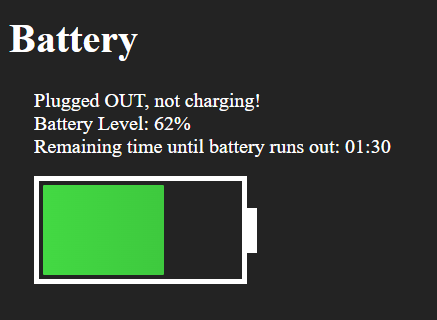
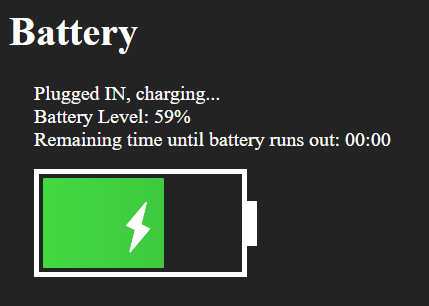
通过下面的解决方案,我在Windows11-Chrome104-Asus GL504G上得到了这个
谢谢你的提问,我也会用好的代码;)
拔出装置:
插接装置:
const $batteryInfo = document.querySelector('.battery-manager .info');
const $charging = $batteryInfo.querySelector('.battery-charging');
const $level = $batteryInfo.querySelector('.battery-level');
const $remaining = $batteryInfo.querySelector('.battery-remaining');
const $battery = document.querySelector('.battery-manager .battery');
const $batteryLevel = $battery.querySelector('.level');
navigator.getBattery()
.then(function(battery) {
(function init() {
updateChargeInfo();
updateLevelInfo();
updateDischargingInfo();
battery.addEventListener('chargingchange', updateChargeInfo);
battery.addEventListener('levelchange', updateLevelInfo);
battery.addEventListener('dischargingtimechange', updateDischargingInfo);
}());
function updateChargeInfo() {
let $value = $charging.querySelector('.value');
$value.innerHTML = (battery.charging ? 'Plugged IN, charging...' : 'Plugged OUT, not charging!');
$battery.classList.remove('battery--is-plugged');
if (battery.charging) {
$battery.classList.add('battery--is-plugged');
}
}
function updateLevelInfo() {
let $value = $level.querySelector('.value');
let perc = battery.level * 100;
$value.innerHTML = (perc.toFixed(0) + '%');
let percStep = perc - perc % 1;
$batteryLevel.classList.add('level--' + percStep);
}
function updateDischargingInfo() {
let $value = $remaining.querySelector('.value-time');
let dischargingTime = ~~battery.dischargingTime || 0;
console.log("dischargingTime in seconds:", dischargingTime);
// Use a new moment object.
// Set its time to midnight (00:00)
// Then add the seconds from the battery information
// And finally... Format it to be displayed.
let formattedTime = moment()
.set("hour", 0)
.set("minute", 0)
.add(dischargingTime, "seconds")
.format("HH:mm");
console.log("formattedTime", formattedTime);
$value.innerHTML = formattedTime;
}
});.as-console * {
color: black !important;
}
h1,
div {
font-family: Roboto;
color: #ffffff;
}
.battery-manager {
padding: 0 20px;
margin-bottom: 30px;
}
.battery-manager>.info {
margin-bottom: 15px;
}
.battery {
position: relative;
width: 156px;
height: 72px;
border: 4px solid #ffffff;
border-radius: 0px;
padding: 3px;
}
.battery:before {
content: "";
display: block;
position: absolute;
top: 50%;
right: -16.6px;
margin-top: -18px;
width: 40px;
height: 36px;
background: #ffffff;
clip: rect(0, 36px, 36px, 23.4px);
border-radius: 0%;
}
.battery>.level {
width: 0%;
height: 100%;
background: #ffffff;
border-radius: 1px;
}
.battery>.level--0 {
width: 0%;
background-image: linear-gradient(to left, #cf1500, #e61700);
}
.battery>.level--1 {
width: 1%;
background-image: linear-gradient(to left, #cf1500, #e61700);
}
.battery>.level--2 {
width: 2%;
background-image: linear-gradient(to left, #cf1500, #e61700);
}
.battery>.level--3 {
width: 3%;
background-image: linear-gradient(to left, #cf1500, #e61700);
}
.battery>.level--4 {
width: 4%;
background-image: linear-gradient(to left, #cf1500, #e61700);
}
.battery>.level--5 {
width: 5%;
background-image: linear-gradient(to left, #cf1500, #e61700);
}
.battery>.level--6 {
width: 6%;
background-image: linear-gradient(to left, #cf1500, #e61700);
}
.battery>.level--7 {
width: 7%;
background-image: linear-gradient(to left, #cf1500, #e61700);
}
.battery>.level--8 {
width: 8%;
background-image: linear-gradient(to left, #cf1500, #e61700);
}
.battery>.level--9 {
width: 9%;
background-image: linear-gradient(to left, #cf1500, #e61700);
}
.battery>.level--10 {
width: 10%;
background-image: linear-gradient(to left, #cf1500, #e61700);
}
.battery>.level--11 {
width: 11%;
background-image: linear-gradient(to left, #cf1500, #e61700);
}
.battery>.level--12 {
width: 12%;
background-image: linear-gradient(to left, #cf1500, #e61700);
}
.battery>.level--13 {
width: 13%;
background-image: linear-gradient(to left, #cf1500, #e61700);
}
.battery>.level--14 {
width: 14%;
background-image: linear-gradient(to left, #cf1500, #e61700);
}
.battery>.level--15 {
width: 15%;
background-image: linear-gradient(to left, #cf1500, #e61700);
background-color: #ff5722;
}
.battery>.level--16 {
width: 16%;
background-image: linear-gradient(to bottom right, #bfbfbf, #a1a1a1);
}
.battery>.level--17 {
width: 17%;
background-image: linear-gradient(to bottom right, #bfbfbf, #a1a1a1);
}
.battery>.level--18 {
width: 18%;
background-image: linear-gradient(to bottom right, #bfbfbf, #a1a1a1);
}
.battery>.level--19 {
width: 19%;
background-image: linear-gradient(to bottom right, #bfbfbf, #a1a1a1);
}
.battery>.level--20 {
width: 20%;
background-image: linear-gradient(to bottom right, #bfbfbf, #a1a1a1);
}
.battery>.level--21 {
width: 21%;
background-image: linear-gradient(to bottom right, #bfbfbf, #a1a1a1);
}
.battery>.level--22 {
width: 22%;
background-image: linear-gradient(to bottom right, #bfbfbf, #a1a1a1);
}
.battery>.level--23 {
width: 23%;
background-image: linear-gradient(to bottom right, #bfbfbf, #a1a1a1);
}
.battery>.level--24 {
width: 24%;
background-image: linear-gradient(to bottom right, #bfbfbf, #a1a1a1);
}
.battery>.level--25 {
width: 25%;
background-image: linear-gradient(to bottom right, #bfbfbf, #a1a1a1);
}
.battery>.level--26 {
width: 26%;
background-image: linear-gradient(to bottom right, #bfbfbf, #a1a1a1);
}
.battery>.level--27 {
width: 27%;
background-image: linear-gradient(to bottom right, #bfbfbf, #a1a1a1);
}
.battery>.level--28 {
width: 28%;
background-image: linear-gradient(to bottom right, #bfbfbf, #a1a1a1);
}
.battery>.level--29 {
width: 29%;
background-image: linear-gradient(to bottom right, #bfbfbf, #a1a1a1);
}
.battery>.level--30 {
width: 30%;
background-image: linear-gradient(to bottom right, #bfbfbf, #a1a1a1);
}
.battery>.level--31 {
width: 31%;
background-image: linear-gradient(to bottom right, #bfbfbf, #a1a1a1);
}
.battery>.level--32 {
width: 32%;
background-image: linear-gradient(to bottom right, #bfbfbf, #a1a1a1);
}
.battery>.level--33 {
width: 33%;
background-image: linear-gradient(to bottom right, #bfbfbf, #a1a1a1);
}
.battery>.level--34 {
width: 34%;
background-image: linear-gradient(to bottom right, #bfbfbf, #a1a1a1);
}
.battery>.level--35 {
width: 35%;
background-image: linear-gradient(to bottom right, #bfbfbf, #a1a1a1);
}
.battery>.level--36 {
width: 36%;
background-image: linear-gradient(to bottom right, #bfbfbf, #a1a1a1);
}
.battery>.level--37 {
width: 37%;
background-image: linear-gradient(to bottom right, #bfbfbf, #a1a1a1);
}
.battery>.level--38 {
width: 38%;
background-image: linear-gradient(to bottom right, #bfbfbf, #a1a1a1);
}
.battery>.level--39 {
width: 39%;
background-image: linear-gradient(to bottom right, #bfbfbf, #a1a1a1);
}
.battery>.level--40 {
width: 40%;
background-image: linear-gradient(to bottom right, #bfbfbf, #a1a1a1);
}
.battery>.level--41 {
width: 41%;
background-image: linear-gradient(to bottom right, #bfbfbf, #a1a1a1);
}
.battery>.level--42 {
width: 42%;
background-image: linear-gradient(to bottom right, #bfbfbf, #a1a1a1);
}
.battery>.level--43 {
width: 43%;
background-image: linear-gradient(to bottom right, #bfbfbf, #a1a1a1);
}
.battery>.level--44 {
width: 44%;
background-image: linear-gradient(to bottom right, #bfbfbf, #a1a1a1);
}
.battery>.level--45 {
width: 45%;
background-image: linear-gradient(to bottom right, #bfbfbf, #a1a1a1);
}
.battery>.level--46 {
width: 46%;
background-image: linear-gradient(to bottom right, #bfbfbf, #a1a1a1);
}
.battery>.level--47 {
width: 47%;
background-image: linear-gradient(to bottom right, #bfbfbf, #a1a1a1);
}
.battery>.level--48 {
width: 48%;
background-image: linear-gradient(to bottom right, #bfbfbf, #a1a1a1);
}
.battery>.level--49 {
width: 49%;
background-image: linear-gradient(to bottom right, #bfbfbf, #a1a1a1);
}
.battery>.level--50 {
width: 50%;
background-image: linear-gradient(to left, #3ec93e, #43d943);
}
.battery>.level--51 {
width: 51%;
background-image: linear-gradient(to left, #3ec93e, #43d943);
}
.battery>.level--52 {
width: 52%;
background-image: linear-gradient(to left, #3ec93e, #43d943);
}
.battery>.level--53 {
width: 53%;
background-image: linear-gradient(to left, #3ec93e, #43d943);
}
.battery>.level--54 {
width: 54%;
background-image: linear-gradient(to left, #3ec93e, #43d943);
}
.battery>.level--55 {
width: 55%;
background-image: linear-gradient(to left, #3ec93e, #43d943);
}
.battery>.level--56 {
width: 56%;
background-image: linear-gradient(to left, #3ec93e, #43d943);
}
.battery>.level--57 {
width: 57%;
background-image: linear-gradient(to left, #3ec93e, #43d943);
}
.battery>.level--58 {
width: 58%;
background-image: linear-gradient(to left, #3ec93e, #43d943);
}
.battery>.level--59 {
width: 59%;
background-image: linear-gradient(to left, #3ec93e, #43d943);
}
.battery>.level--60 {
width: 60%;
background-image: linear-gradient(to left, #3ec93e, #43d943);
}
.battery>.level--61 {
width: 61%;
background-image: linear-gradient(to left, #3ec93e, #43d943);
}
.battery>.level--62 {
width: 62%;
background-image: linear-gradient(to left, #3ec93e, #43d943);
}
.battery>.level--63 {
width: 63%;
background-image: linear-gradient(to left, #3ec93e, #43d943);
}
.battery>.level--64 {
width: 64%;
background-image: linear-gradient(to left, #3ec93e, #43d943);
}
.battery>.level--65 {
width: 65%;
background-image: linear-gradient(to left, #3ec93e, #43d943);
}
.battery>.level--66 {
width: 66%;
background-image: linear-gradient(to left, #3ec93e, #43d943);
}
.battery>.level--67 {
width: 67%;
background-image: linear-gradient(to left, #3ec93e, #43d943);
}
.battery>.level--68 {
width: 68%;
background-image: linear-gradient(to left, #3ec93e, #43d943);
}
.battery>.level--69 {
width: 69%;
background-image: linear-gradient(to left, #3ec93e, #43d943);
}
.battery>.level--70 {
width: 70%;
background-image: linear-gradient(to left, #3ec93e, #43d943);
}
.battery>.level--71 {
width: 71%;
background-image: linear-gradient(to left, #3ec93e, #43d943);
}
.battery>.level--72 {
width: 72%;
background-image: linear-gradient(to left, #3ec93e, #43d943);
}
.battery>.level--73 {
width: 73%;
background-image: linear-gradient(to left, #3ec93e, #43d943);
}
.battery>.level--74 {
width: 74%;
background-image: linear-gradient(to left, #3ec93e, #43d943);
}
.battery>.level--75 {
width: 75%;
background-image: linear-gradient(to left, #3ec93e, #43d943);
}
.battery>.level--76 {
width: 76%;
background-image: linear-gradient(to left, #3ec93e, #43d943);
}
.battery>.level--77 {
width: 77%;
background-image: linear-gradient(to left, #3ec93e, #43d943);
}
.battery>.level--78 {
width: 78%;
background-image: linear-gradient(to left, #3ec93e, #43d943);
}
.battery>.level--79 {
width: 79%;
background-image: linear-gradient(to left, #3ec93e, #43d943);
}
.battery>.level--80 {
width: 80%;
background-image: linear-gradient(to left, #3ec93e, #43d943);
}
.battery>.level--81 {
width: 81%;
background-image: linear-gradient(to left, #3ec93e, #43d943);
}
.battery>.level--82 {
width: 82%;
background-image: linear-gradient(to left, #3ec93e, #43d943);
}
.battery>.level--83 {
width: 83%;
background-image: linear-gradient(to left, #3ec93e, #43d943);
}
.battery>.level--84 {
width: 84%;
background-image: linear-gradient(to left, #3ec93e, #43d943);
}
.battery>.level--85 {
width: 85%;
background-image: linear-gradient(to left, #3ec93e, #43d943);
}
.battery>.level--86 {
width: 86%;
background-image: linear-gradient(to left, #3ec93e, #43d943);
}
.battery>.level--87 {
width: 87%;
background-image: linear-gradient(to left, #3ec93e, #43d943);
}
.battery>.level--88 {
width: 88%;
background-image: linear-gradient(to left, #3ec93e, #43d943);
}
.battery>.level--89 {
width: 89%;
background-image: linear-gradient(to left, #3ec93e, #43d943);
}
.battery>.level--90 {
width: 90%;
background-image: linear-gradient(to left, #3ec93e, #43d943);
}
.battery>.level--91 {
width: 91%;
background-image: linear-gradient(to left, #3ec93e, #43d943);
}
.battery>.level--92 {
width: 92%;
background-image: linear-gradient(to left, #3ec93e, #43d943);
}
.battery>.level--93 {
width: 93%;
background-image: linear-gradient(to left, #3ec93e, #43d943);
}
.battery>.level--94 {
width: 94%;
background-image: linear-gradient(to left, #3ec93e, #43d943);
}
.battery>.level--95 {
width: 95%;
background-image: linear-gradient(to left, #3ec93e, #43d943);
}
.battery>.level--96 {
width: 96%;
background-image: linear-gradient(to left, #3ec93e, #43d943);
}
.battery>.level--97 {
width: 97%;
background-image: linear-gradient(to left, #3ec93e, #43d943);
}
.battery>.level--98 {
width: 98%;
background-image: linear-gradient(to left, #3ec93e, #43d943);
}
.battery>.level--99 {
width: 99%;
background-image: linear-gradient(to left, #3ec93e, #43d943);
}
.battery>.level--100 {
width: 100%;
background-image: linear-gradient(to left, #3ec93e, #43d943);
}
.battery>.bolt,
.battery>.bolt--border {
display: none;
width: 0;
height: 0;
border: 6px solid transparent;
border-bottom: 24px solid #ffffff;
position: absolute;
transform: rotateZ(27deg);
top: calc(50% - 24px);
left: calc(50% - 5px);
}
.battery>.bolt:after,
.battery>.bolt--border:after {
content: "";
width: 0;
height: 0;
border: 6px solid transparent;
border-top: 24px solid #ffffff;
position: absolute;
margin-top: 18px;
}
.battery--is-plugged .bolt,
.battery--is-plugged .bolt--border {
display: block;
}
.select {
color: #ffa900;
background-color: #000000;
}<script src="https://cdnjs.cloudflare.com/ajax/libs/moment.js/2.29.4/moment.min.js"></script>
<body bgcolor="#232323">
<h1>Battery</h1>

<div class="battery-manager">
  <div class="info">
    <div class="battery-charging"> <span class="value">
</span>
    </div>
    <div class="battery-since-full-charge">

</div>
    <div class="battery-level">
      Battery Level: <span class="value"></span>
    </div>
    <div class="battery-remaining">
      Remaining time until battery runs out: <span class="value-time"></span>
    </div>
  </div>

  <div class="battery">
    <div class="level"></div>
    <div class="bolt--border"></div>
    <div class="bolt"></div>
    <br>
  </div>
</div>
<div class="container">
  <div class="wrap">

  </div>
</div>
</body>
--
只是为了这个演示说明:
- 添加了丢失的瞬间库
- 添加了一个CSS规则来恢复片段的控制台文本颜色。
页面原文内容由Stack Overflow提供。腾讯云小微IT领域专用引擎提供翻译支持
原文链接:
https://stackoverflow.com/questions/73410669
复制相关文章
相似问题
腾讯云开发者

Copyright © 2013 - 2026 Tencent Cloud. All Rights Reserved. 腾讯云 版权所有
深圳市腾讯计算机系统有限公司 ICP备案/许可证号:粤B2-20090059  粤公网安备44030502008569号
腾讯云计算(北京)有限责任公司 京ICP证150476号 | 京ICP备11018762号