
用于telegraf的opc-ua输入插件读取成功,但没有显示任何数据。
用于telegraf的opc-ua输入插件读取成功,但没有显示任何数据。
提问于 2022-08-16 23:41:08
我的计划是使用telegraf从wago中读取opc数据作为输入,并将数据作为输出发送到我的进水数据库。其他插件也可以工作,比如mqtt plugin...so,我可以验证是否正确地设置了进水数据库。
在我的telegraf.config里..。
# Retrieve data from OPCUA devices
[[inputs.opcua]]
  name = "opcua"
  endpoint = "opc.tcp://192.168.178.97:4840"
  connect_timeout = "10s"
  request_timeout = "5s"
  security_policy = "None"
  security_mode = "None"
  auth_method = "UserName"
  username = "admin"
  password = "wago"

  [[inputs.opcua.group]]
    namespace ="4"
    identifier_type ="s"
    nodes = [
      {name="IIoTgateway_xHeartbeat", namespace="4", identifier_type="s", identifier="|var|WAGO 750-8212 PFC200 G2 2ETH RS.Application.GVL_STATUS_PRG.IIoTgateway_xHeartbeat"},
]
使用工具UA专家.我可以验证xHeartbeat每1s改变一次.
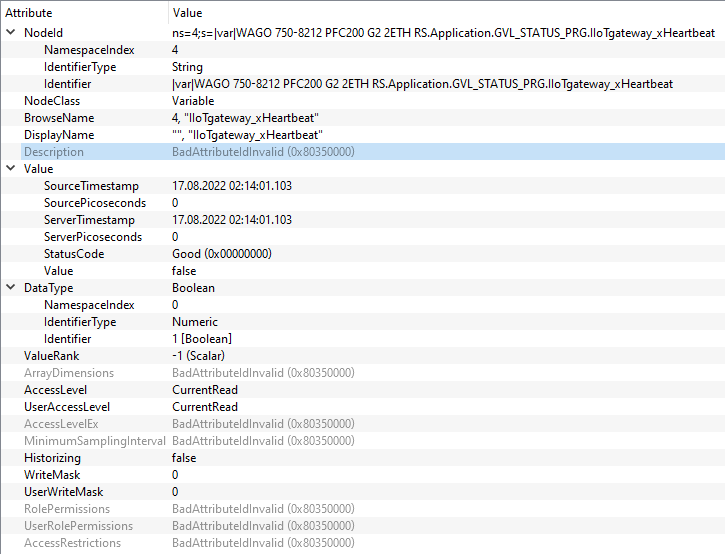
telegraf插件的日志看起来也不错..。

登录到数据库(进水数据库),我看到了变量,但没有任何更改.这里怎么了?在telegraf的文档中,有一个语句...about将namespaceIndex ..number从0设置为3....could,这就是问题所在,因为my namespaceIndex是4吗?
回答 1
Stack Overflow用户
发布于 2022-08-19 12:35:45
配置文件。
[global_tags]
[agent]
  interval = "500ms"
  round_interval = true
  metric_batch_size = 1000
  metric_buffer_limit = 10000
  collection_jitter = "0s"
  flush_interval = "10s"
  flush_jitter = "0s"
  precision = "0s"
  hostname = ""
  omit_hostname = false
###############################################################################
#                            OUTPUT PLUGINS                                   #
###############################################################################
[[outputs.influxdb_v2]]
  urls = ["http://${DOCKER_INFLUXDB_INIT_HOST}:${DOCKER_INFLUXDB_INIT_PORT}"]
  token = "$DOCKER_INFLUXDB_INIT_ADMIN_TOKEN"
  organization = "$DOCKER_INFLUXDB_INIT_ORG"
  bucket = "$DOCKER_INFLUXDB_INIT_BUCKET"
###############################################################################
#                            AGGREGATOR PLUGINS                               #
###############################################################################

###############################################################################
#                            INPUT PLUGINS                                    #
###############################################################################
# Retrieve data from OPCUA devices
[[inputs.opcua]]
  name = "opcua"
  endpoint = "opc.tcp://192.168.178.97:4840"
  connect_timeout = "10s"
  request_timeout = "5s"
  security_policy = "None"
  security_mode = "None"
  auth_method = "UserName"
  username = "admin"
  password = "wago"

  [[inputs.opcua.group]]
    namespace ="4"
    identifier_type ="s"
    nodes = [
      {name="IIoTgateway_xHeartbeat", namespace="4", identifier_type="s",     identifier="|var|WAGO 750-8212 PFC200 G2 2ETH RS.Application.GVL_STATUS_PRG.IIoTgateway_xHeartbeat"},
      {name="IIoTgateway_xDoorSwitch", namespace="4", identifier_type="s", identifier="|var|WAGO 750-8212 PFC200 G2 2ETH RS.Application.GVL_IIOT_BOX_INPUTS.IIoTgateway_xDoorSwitch"},
    ]

  [[outputs.file]]
  ## Files to parse each interval.  Accept standard unix glob matching rules,
  ## as well as ** to match recursive files and directories.
    files = ["./tmp/metrics.out"]
    data_format = "influx"
    rotation_interval = "24h"
    rotation_max_archives = 10
在通过登录到container...data来检查./tmp/emeics.out文件之后,正确的.确保在流动中
from(bucket: "telegrafmqtt")
  |> range(start: v.timeRangeStart, stop: v.timeRangeStop)
  |> filter(fn: (r) => r["_measurement"] == "opcua")
  |> filter(fn: (r) => r["_field"] == "IIoTgateway_xHeartbeat")
|> toInt()
toInt()终于成功了.现在我看到了第1秒钟的心跳
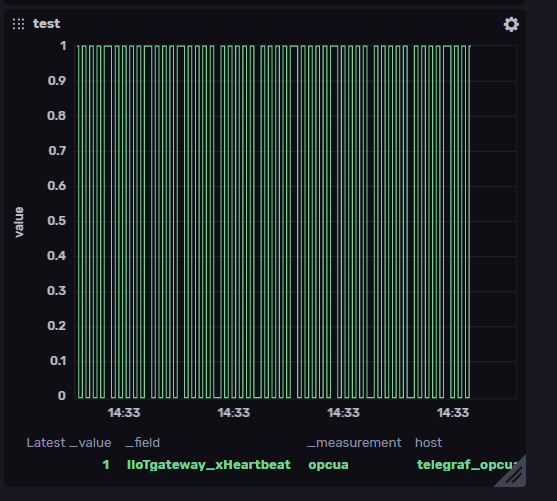
最后,least...do不使用标准密码wago,而admin...this只是为了确保testing...also确保OPC连接的安全.
页面原文内容由Stack Overflow提供。腾讯云小微IT领域专用引擎提供翻译支持
原文链接:
https://stackoverflow.com/questions/73381420
复制相关文章
相似问题
腾讯云开发者

Copyright © 2013 - 2026 Tencent Cloud. All Rights Reserved. 腾讯云 版权所有
深圳市腾讯计算机系统有限公司 ICP备案/许可证号:粤B2-20090059  粤公网安备44030502008569号
腾讯云计算(北京)有限责任公司 京ICP证150476号 | 京ICP备11018762号