
两个坐标atan与atan2之间的javascript角
我正在处理一组对象。每个数组记录新的X、newY、oldX、oldY。
从这一点出发,我试图使用理论和Math.atan()来计算每个新坐标之间的角度。但它们似乎产生了不同的结果,我不知道我应该使用哪一种。
const allCoOrdinate = [{
    "newX": 455.845577,
    "newY": 383.3440431,
    "oldX": 460.8,
    "oldY": 360
}, {
    "newX": 500.2485855,
    "newY": 444.4595412,
    "oldX": 537.6,
    "oldY": 360
}, {
    "newX": 500.2485855,
    "newY": 520.0024514,
    "oldX": 614.4,
    "oldY": 360
}, {
    "newX": 455.845577,
    "newY": 581.1179495,
    "oldX": 691.2,
    "oldY": 360
}, {
    "newX": 384,
    "newY": 604.4619926,
    "oldX": 768,
    "oldY": 360
}, {
    "newX": 312.154423,
    "newY": 581.1179495,
    "oldX": 844.8,
    "oldY": 360
}, {
    "newX": 267.7514145,
    "newY": 520.0024514,
    "oldX": 921.6,
    "oldY": 360
}, {
    "newX": 267.7514145,
    "newY": 444.4595412,
    "oldX": 998.4,
    "oldY": 360
}, {
    "newX": 312.154423,
    "newY": 383.3440431,
    "oldX": 1075.2,
    "oldY": 360
}, {
    "newX": 384,
    "newY": 360,
    "oldX": 1152,
    "oldY": 360
}];

allCoOrdinate.map((a) => {
    const diffY = a.newY - a.oldY;
    const diffX = a.newX - a.oldX;
    const angleAtan = Math.atan(diffY / diffX) * (180 / Math.PI);
    const angleAtan2 = Math.atan2(diffY, diffX) * (180 / Math.PI);
    a.diffY = diffY, a.diffX = diffX, a.angleAtan = angleAtan, a.angleAtan2 = angleAtan2;
})

console.log(allCoOrdinate);<!DOCTYPE html>
<html lang="en">
<head>
<meta charset="UTF-8">
<meta http-equiv="X-UA-Compatible" content="IE=edge">
<meta name="viewport" content="width=device-width, initial-scale=1.0">
<title>Document</title>
</head>
<body>
<div id="container" class="svg-container"></div>
<svg>
</svg>
</body>
</html>
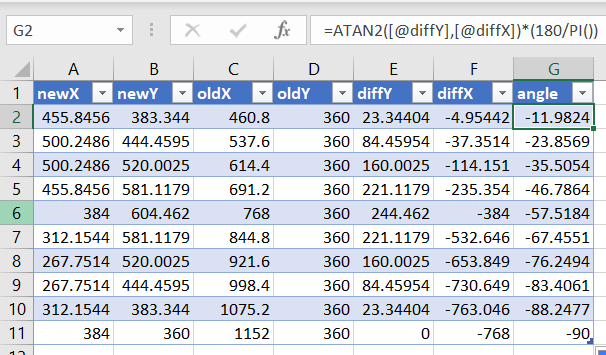
Excel会产生这个。
我想要javascript中的输出,但是对于我应该使用什么语法来获得准确的结果感到非常困惑。
回答 2
Stack Overflow用户
发布于 2022-08-16 01:53:38
atan函数在范围-Pi/2..Pi/2 (-90.90度)中给出了值,而atan2用于全圆范围-Pi..Pi (查看Math描述中的规范)。
你可以看到,当角度在第二和第三节的时候,你的结果差正好是180=Pi。
因此,结果是正确的,你只需要正确地解释它们。用于矢量(方向!)我们需要全范围的角度,而线可以用atan提供的半程角值来描述。
Stack Overflow用户
发布于 2022-08-21 22:53:29
使用atan2() --使用atan(),您可能输入123/0并陷入数学问题。
“准确的结果”--这取决于。如果是城市,两位小数点对lat/lng来说就足够了;如果你需要区分你女儿和她亲吻的男人的GPS位置,那么小数点就有6位了。
atan2结果中的小数位数是骗子--我们需要看看它将被用来做什么。
如果您正在计算机监视器上绘制图形,那么到处都应该有4个重要的数字。
oldY = 360 --这有点像一个角度,而不是y值?
https://stackoverflow.com/questions/73365529
复制相似问题
腾讯云开发者

Copyright © 2013 - 2026 Tencent Cloud. All Rights Reserved. 腾讯云 版权所有
深圳市腾讯计算机系统有限公司 ICP备案/许可证号:粤B2-20090059  粤公网安备44030502008569号
腾讯云计算(北京)有限责任公司 京ICP证150476号 | 京ICP备11018762号