
如何使用闪亮的处理程序将R函数的输出传递到闪亮代码的JS部分?
我对R有一些经验,但对JS知之甚少。下面的可复制代码使用JS运行包jsTreeR,以便用户可以定制构建层次结构树。该代码允许用户将元素从树的“菜单”部分拖放到下面的“拖动此处生成树”部分,其中拖动的项及其拖放顺序反映在右上角呈现的第一个dataframe中。
我想将R/dplyr addLabel()自定义函数的“选择”输出(在运行代码时显示在第二次呈现的数据each中的addLabel()输出)注入到树的每个元素中,如下所示,使用一个闪亮的处理程序。我在代码的JS部分使用Shiny.setInputValue()向R服务器发送值,生成第一个呈现的数据,但现在我需要弄清楚如何使用一个闪亮的处理程序从R服务器向用户/JS部分发送值。我在下面的代码中尝试了Shiny.addCustomMessageHandler(),但是它不起作用。我做错了什么?
我一直在参考https://shiny.rstudio.com/articles/communicating-with-js.html来解释处理程序,但是他们的例子太复杂了,我无法理解。(编辑:参见注释以获得对更好解释来源的引用。)
这说明了我想要做的事情(我按这个顺序拖拽/丢弃了Bog/Bog/Hog/Hog/Bog /Bog):
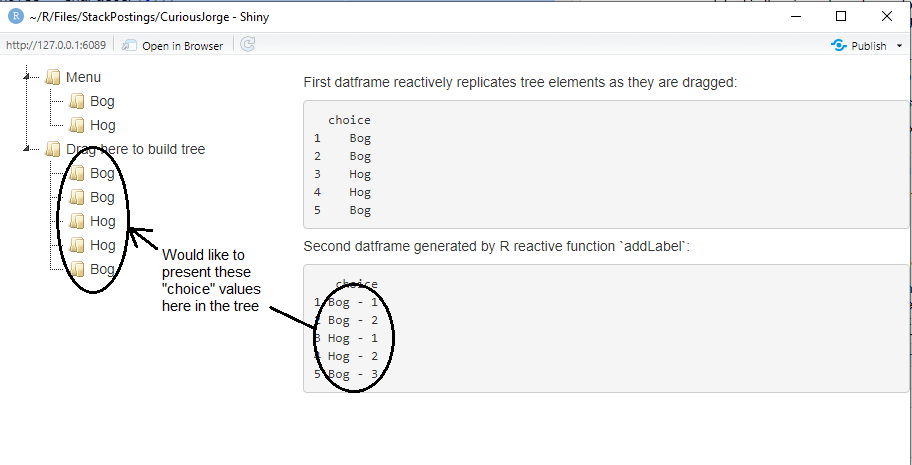
可复制代码(在运行下面的代码之前,请参阅下面进一步修改的代码)
library(jsTreeR)
library(shiny)

nodes <- list(
  list(
    text = "Menu",
    state = list(opened = TRUE),
    children = list(
      list(text = "Bog",type = "moveable"),
      list(text = "Hog",type = "moveable")
    )
  ),
  list(
    text = "Drag here to build tree",
    type = "target",
    state = list(opened = TRUE)
  )
)

dnd <- list(
  always_copy = TRUE,
  inside_pos = "last",
  is_draggable = JS(
    "function(node) {",
    "  return node[0].type === 'moveable';",
    "}"
  )
)

mytree <- jstree(
  nodes,
  dragAndDrop = TRUE, dnd = dnd,
  checkCallback = checkCallback,
  contextMenu = list(items = customMenu),
  types = list(moveable = list(), target = list())
)

script <- '

$(document).ready(function(){
  $("#mytree").on("copy_node.jstree", function(e, data){
    var orgid = data.original.id;
    var node    = data.node;
    var id      = node.id;
    var basename= node.text;
    var text    = basename;
    Shiny.setInputValue("choice", text, {priority: "event"});
    var instance  = data.new_instance;
    instance.rename_node(node, text);
    node.type     = "item";
    Shiny.addCustomMessageHandler("injectLabel",function(addLabel){
      node.basename = addLabel;
      });
    node.orgid    = orgid;
    var tree        = $("#mytree").jstree(true);
  });
});
'

ui <- fluidPage(
  tags$div(class = "header", checked = NA,tags$p(tags$script(HTML(script)))),
  fluidRow(
    column(width = 4,jstreeOutput("mytree")),
    column(width = 8,fluidRow(
      h5("First datframe reactively replicates tree elements as they are dragged:"),
      verbatimTextOutput("choices"),
      h5("Second datframe generated by R reactive function `addLabel`:"),
      verbatimTextOutput("choices2")
      )
    )
  )
)

server <- function(input, output, session){
  output[["mytree"]] <- renderJstree(mytree)

  Choices <- reactiveVal(data.frame(choice = character(0)))

  observeEvent(input[["choice"]], {Choices(rbind(Choices(), data.frame(choice = input[["choice"]])))} )

  output[["choices"]] <- renderPrint({Choices()})

  addLabel <- reactive({if(nrow(Choices()>0)){
    addLabel <- Choices()
    addLabel <- addLabel %>%
    group_by(choice) %>%
    mutate(choiceCount = row_number()) %>%
    ungroup() %>%
    mutate(choice = paste(choice,"-",choiceCount)) %>%
    select(-choiceCount)
    addLabel
  }})

  output[["choices2"]] <- renderPrint({
    if(nrow(Choices())>0) {as.data.frame(addLabel())}
    else {cat('Waiting for drag and drop to begin')}
  })

  observe({
    session$sendCustomMessage("injectLabel", addLabel()) # send addLabel to the browser for inserting into the tree
  })

 }

shinyApp(ui=ui, server=server)下面的是经过修正的工作代码,反映了Mikko的解决方案。请注意,如果不将checkCallback = checkCallback和contextMenu = list(items = customMenu)行从mytree <- jstree()对象中移除并将dplyr添加到库中,上面的OP代码就无法工作。OP代码只在我的机器上运行,因为checkCallback和contextMenu已经从运行完整的应用程序加载到内存中;其中一个令人讨厌的周期性夜间重新启动(用于更新一些无关紧要的软件,比如打印机驱动程序)清除了我的内存,如果没有下面包含的修复程序,OP代码将无法运行:
library(dplyr)
library(jsTreeR)
library(shiny)

nodes <- list(
  list(
    text = "Menu",
    state = list(opened = TRUE),
    children = list(
      list(text = "Bog",type = "moveable"),
      list(text = "Hog",type = "moveable")
    )
  ),
  list(
    text = "Drag here to build tree",
    type = "target",
    state = list(opened = TRUE)
  )
)

dnd <- list(
  always_copy = TRUE,
  inside_pos = "last",
  is_draggable = JS(
    "function(node) {",
    "  return node[0].type === 'moveable';",
    "}"
  )
)

mytree <- jstree(
  nodes,
  dragAndDrop = TRUE, dnd = dnd,
  types = list(moveable = list(), target = list())
)

script <- '

$(document).ready(function(){
  $("#mytree").on("copy_node.jstree", function(e, data){
    var orgid = data.original.id;
    var node    = data.node;
    var id      = node.id;
    var basename= node.text;
    var text    = basename;
    // the JS shiny code below sends tree data to the server for output to the first dataframe
    Shiny.setInputValue("choice", text, {priority: "event"});
    var instance  = data.new_instance;
    instance.rename_node(node, text);
    node.type     = "item";
    // the shiny handler below receives newLabel from the server for injecting labels to tree
    Shiny.addCustomMessageHandler("injectLabel", function(newLabel) {
      instance.rename_node(node, newLabel);
    });
    node.orgid    = orgid;
    var tree        = $("#mytree").jstree(true);
  });
});
'
ui <- fluidPage(
  tags$div(class = "header", checked = NA,tags$p(tags$script(HTML(script)))),
  fluidRow(
    column(width = 4,jstreeOutput("mytree")),
    column(width = 8,fluidRow(
      h5("First datframe reactively replicates tree elements as they are dragged:"),
      verbatimTextOutput("choices"),
      h5("Second datframe generated by R reactive function `addLabel`:"),
      verbatimTextOutput("choices2")
      )
    )
  )
)

server <- function(input, output, session){
  output[["mytree"]] <- renderJstree(mytree)

  Choices <- reactiveVal(data.frame(choice = character(0)))

  observeEvent(input[["choice"]], {Choices(rbind(Choices(), data.frame(choice = input[["choice"]])))} )

  output[["choices"]] <- renderPrint({Choices()})

  addLabel <- reactive({if(nrow(Choices()>0)){
    addLabel <- Choices()
    addLabel <- addLabel %>%
    group_by(choice) %>%
    mutate(choiceCount = row_number()) %>%
    ungroup() %>%
    mutate(choice = paste(choice,"-",choiceCount)) %>%
    select(-choiceCount)
    addLabel
  }})

  output[["choices2"]] <- renderPrint({
    if(nrow(Choices())>0) {as.data.frame(addLabel())}
    else {cat('Waiting for drag and drop to begin')}
  })

  # shiny handler sends the new label to the client (UI) inside JS code
  observe({
    newLabel <- tail(addLabel()$choice, 1)
    session$sendCustomMessage("injectLabel", newLabel)
  })

 }

shinyApp(ui=ui, server=server)回答 1
Stack Overflow用户
发布于 2022-08-11 12:27:58
由于您在copy_node.jstree事件处理程序中添加了消息处理程序,所以每次发生新的复制事件时都会覆盖该处理程序。在本例中,这可能很好:您可以通过重命名上次复制的节点来始终使用它来处理来自R的injectLabel消息。不过,您需要实际在闪亮的消息处理程序中进行重命名。就像这样:
Shiny.addCustomMessageHandler("injectLabel", function(newLabel) {
    instance.rename_node(node, newLabel);
});
现在,您还需要考虑应该从R向浏览器发送哪些数据,这里只需要最新复制的节点的新名称。相应地更改有效载荷:
observe({
  newLabel <- tail(addLabel()$choice, 1)
  session$sendCustomMessage("injectLabel", newLabel)
})
通过这两个更改,您的应用程序应该可以按预期工作。
https://stackoverflow.com/questions/73318190
复制相似问题
腾讯云开发者

Copyright © 2013 - 2026 Tencent Cloud. All Rights Reserved. 腾讯云 版权所有
深圳市腾讯计算机系统有限公司 ICP备案/许可证号:粤B2-20090059  粤公网安备44030502008569号
腾讯云计算(北京)有限责任公司 京ICP证150476号 | 京ICP备11018762号