
Vite HMR没有检测到嵌套在子文件夹下的组件的更改
Vite HMR没有检测到嵌套在子文件夹下的组件的更改
提问于 2022-08-10 22:00:04
在Vue + Vite项目中,我的文件夹结构如下所示
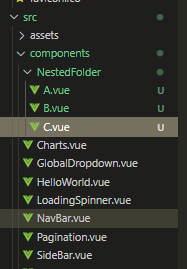
问题是vite没有检测到A.vue或B.vue中的更改(B.vue),即组件文件夹中NestedFolder下嵌套的组件。其他地方都很好。
我的vite.config.js是这样的,
import { fileURLToPath, URL } from 'node:url'

import { defineConfig } from 'vite'
import vue from '@vitejs/plugin-vue'

// https://vitejs.dev/config/
export default defineConfig({
  plugins: [
    vue()
  ],
  resolve: {
    alias: {
      '@': fileURLToPath(new URL('./src', import.meta.url)),
      '@public': fileURLToPath(new URL('./public', import.meta.url))
    }
  },
  server: {
    proxy: {
      '/api': {
        target: 'XXX',
        changeOrigin: true,
        secure: false,
        ws: true,
      }
    }
  }
})
我尝试过按照vite HMR文档定制HMR函数,让它使用这个文件发送完整的重新加载。
...
plugins: [
    vue(),
    {
      name: 'custom-hmr',
      enforce: 'post',
      // HMR
      handleHotUpdate({ file, server }) {
        if (file.endsWith('.vue')) {
          console.log('reloading json file...');

          server.ws.send({
            type: 'reload',
            path: '*'
          });
        }
      },
    }
  ], ...
我查看了vite的HMR文档,但不知道如何在使用自定义hmr函数时将更新事件发送到vite
如能就如何解决这一问题提出任何帮助/建议,将不胜感激。
回答 2
Stack Overflow用户
发布于 2022-08-27 12:58:19
好吧我解决了问题。问题不在于嵌套文件夹。Vite似乎忽略了使用绝对路径导入的组件。
例如,Vite不检测导入的组件中的更改,如:
import Dropdown from '@/components/GlobalDropdown.vue'
//@ resolves to /src
但是检测到进口的变化是相对的:
import LoadingSpinner from '../LoadingSpinner.vue'我找不到任何能解决这个问题的设置。但是,拥有组件导入的相对路径解决了这个问题。这是问题吗?
Stack Overflow用户
发布于 2022-12-01 13:50:02
我认为问题是您做了一个caseSensitive错误,请检查您的路径是否正确,我有类似的问题,这是一个字母的大写。
页面原文内容由Stack Overflow提供。腾讯云小微IT领域专用引擎提供翻译支持
原文链接:
https://stackoverflow.com/questions/73313176
复制相关文章
相似问题
腾讯云开发者

Copyright © 2013 - 2026 Tencent Cloud. All Rights Reserved. 腾讯云 版权所有
深圳市腾讯计算机系统有限公司 ICP备案/许可证号:粤B2-20090059  粤公网安备44030502008569号
腾讯云计算(北京)有限责任公司 京ICP证150476号 | 京ICP备11018762号