
Configset配置命令没有按顺序执行cloudformation
Configset配置命令没有按顺序执行cloudformation
提问于 2022-08-10 07:21:19
这是cloudformationinit的元数据
{
  "Metadata": {
    "AWS::CloudFormation::Init": {
      "configSets": {
        "setup": [
          "setup_docker",
          "setup_redis"
        ]
      },
      "setup_docker": {
        "commands": {
          "install_docker": {
            "command": {
              "Fn::Join": ["", ["amazon-linux-extras install docker"]]
            }
          },
          "start_docker": {
            "command": { "Fn::Join": ["", ["service docker start"]] }
          },
          "start_on_restart": {
            "command": { "Fn::Join": ["", ["systemctl enable docker"]] }
          }
        }
      },
      "setup_redis": {
        "commands": {
          "install_redis": {
            "command": {
              "Fn::Join": ["", ["amazon-linux-extras install redis6"]]
            }
          },
          "change_redis_6379_protected_mode": {
            "command": {
              "Fn::Join": [
                "",
                [
                  "sed -i 's/protected-mode yes/protected-mode no/' /etc/redis/redis.conf"
                ]
              ]
            }
          },
          "change_redis_6379_daemonize": {
            "command": {
              "Fn::Join": [
                "",
                ["sed -i 's/daemonize no/daemonize yes/' /etc/redis/redis.conf"]
              ]
            }
          },
          "start_redis": {
            "command": { "Fn::Join": ["", ["systemctl start redis"]] }
          }
        }
      }
    }
  }
}当我执行这个模板时,先执行install_docker,setup_docker命令,然后执行start_docker,然后执行start_on_restart命令,但是setup_redis命令没有执行,前两个命令被跳过,第三个命令被执行,它抛出一个错误/etc/redis/redis.conf文件,未找到。
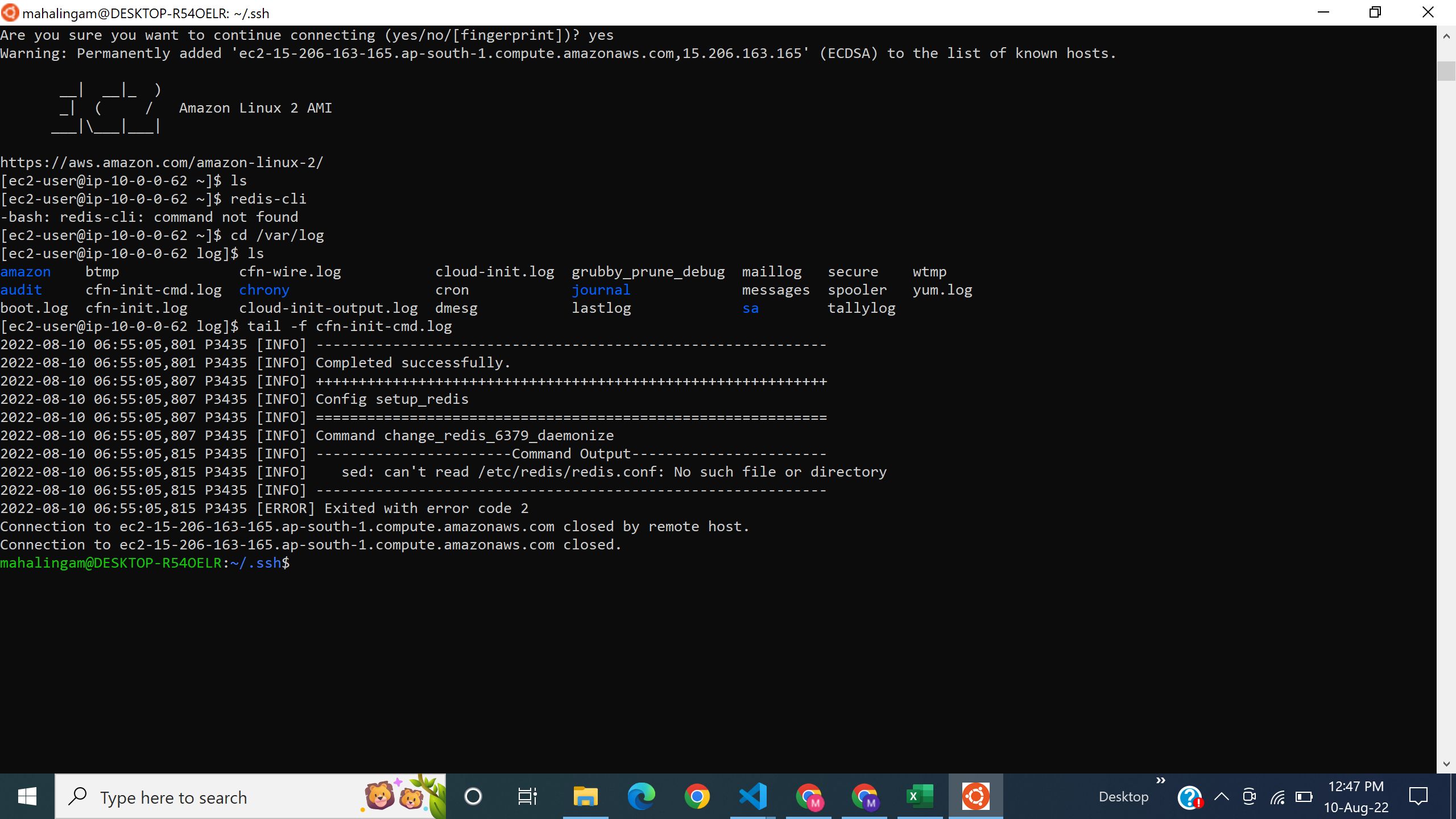
为什么会发生这种事?命令仅包装在setup_redis对象中,解决方案是什么?
提前感谢
如果我将更新的安装部分分离成单独的配置,它是否正常工作,这是否意味着命令不会按顺序执行?为什么命令不按顺序执行?
{
  "Metadata": {
    "AWS::CloudFormation::Init": {
      "configSets": {
        "setup": ["setup_redis", "modify_files"]
      },
      "setup_redis": {
        "commands": {
          "install_redis": {
            "command": {
              "Fn::Join": ["", ["amazon-linux-extras install redis6"]]
            }
          }
        }
      },
      "modify_files": {
        "commands": {
          "change_redis_6379_protected_mode": {
            "command": {
              "Fn::Join": [
                "",
                [
                  "sed -i 's/protected-mode yes/protected-mode no/' /etc/redis/redis.conf"
                ]
              ]
            }
          },
          "change_redis_6379_daemonize": {
            "command": {
              "Fn::Join": [
                "",
                ["sed -i 's/daemonize no/daemonize yes/' /etc/redis/redis.conf"]
              ]
            }
          },
          "start_redis": {
            "command": { "Fn::Join": ["", ["systemctl start redis"]] }
          }
        }
      }
    }
  },
  "Properties": {
    "ImageId": {
      "Ref": "AMI"
    },
    "KeyName": {
      "Ref": "Key"
    },
    "InstanceType": {
      "Ref": "InstanceTypeParameter"
    },
    "SubnetId": {
      "Ref": "SubnetIdParameter"
    },
    "SecurityGroupIds": {
      "Ref": "SecurityGroupIdsParameter"
    },
    "PrivateIpAddress": "10.0.0.57",
    "UserData": {
      "Fn::Base64": {
        "Fn::Join": [
          "",
          [
            "#!/bin/bash -xe",
            "\n",
            "yum update -y",
            "\n",
            "/opt/aws/bin/cfn-init -v",
            " --stack ",
            { "Ref": "AWS::StackName" },
            " --resource DevInstance",
            " --configsets setup",
            " --region ",
            { "Ref": "AWS::Region" },
            "\n",
            "/opt/aws/bin/cfn-signal -e $?",
            " --stack ",
            { "Ref": "AWS::StackName" },
            " --resource DevInstance",
            " --region ",
            { "Ref": "AWS::Region" },
            "\n"
          ]
        ]
      }
    }
  }
}回答 1
Stack Overflow用户
回答已采纳
发布于 2022-08-12 18:49:27
命令按名称按字母顺序处理。因此,在您的原始配置中,它们将按照以下顺序执行:
- change_redis_6379_daemonize
- change_redis_6379_protected_mode
- install_redis
- start_redis
将安装部分分离出来使其首先执行是正确的解决方案。
页面原文内容由Stack Overflow提供。腾讯云小微IT领域专用引擎提供翻译支持
原文链接:
https://stackoverflow.com/questions/73302215
复制相关文章
相似问题
腾讯云开发者

Copyright © 2013 - 2026 Tencent Cloud. All Rights Reserved. 腾讯云 版权所有
深圳市腾讯计算机系统有限公司 ICP备案/许可证号:粤B2-20090059  粤公网安备44030502008569号
腾讯云计算(北京)有限责任公司 京ICP证150476号 | 京ICP备11018762号