
当文件的类型受到antd中Dragger组件的限制时,如何获取该文件的信息?
当文件的类型受到antd中Dragger组件的限制时,如何获取该文件的信息?
提问于 2022-08-09 16:01:03
我有一个如下所示的Dragger组件
const { Dragger } = Upload

<Dragger
  {...{
    onChange: (file) => {
      console.log({ file });
    },
    multiple: false,
    onRemove,
    beforeUpload,
    fileList: EMPTY_ARRAY,
    accept: fileTypeRestriction,
  }}>
  <p className="ant-upload-hint">Drag file here</p>
  <p className="ant-upload-hint">or</p>
  <Spacer y="md" />
  <Button>Select file</Button>
</Dragger>当用户拖动一个未被接受的文件时,我无法获得该文件被拒绝的反馈。我需要能够告诉用户,由于文件类型,文件被拒绝了,但是我在Dragger组件中看不到这样做的方法。
beforeUpload & onChange只在文件类型为可接受的情况下才返回。还有其他方法来捕捉拖动事件吗?
回答 1
Stack Overflow用户
发布于 2022-08-10 08:09:48
检查下面的示例
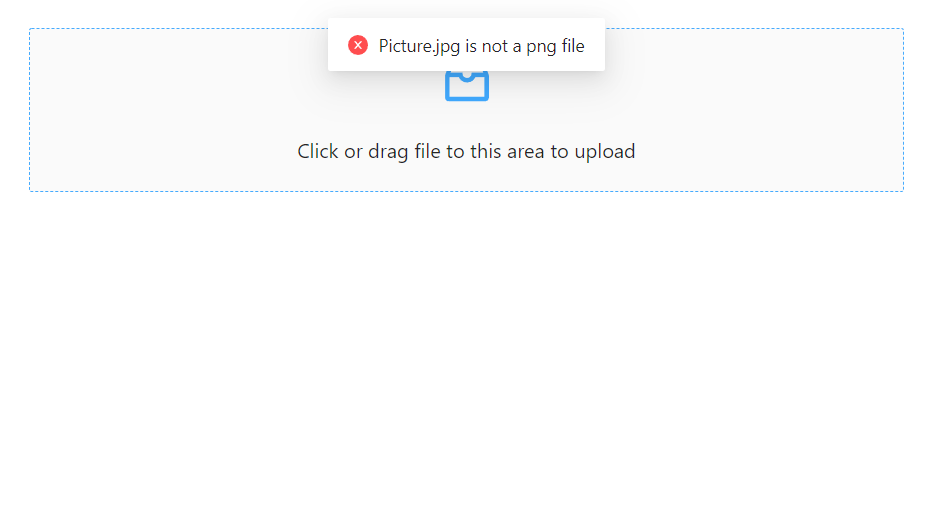
下面的代码在上传之前检查文件类型,并在用户拖放不正确类型的文件时显示错误。
beforeUpload: (file) => {
  const isPNG = file.type === 'image/png';
  if (!isPNG) {
    message.error(`${file.name} is not a png file`);
  }
  return isPNG || Upload.LIST_IGNORE;
},
App.js
import React from 'react';
import 'antd/dist/antd.css';
import './index.css';
import { InboxOutlined } from '@ant-design/icons';
import { message, Upload } from 'antd';

const { Dragger } = Upload;
const props = {
  name: 'file',
  multiple: true,
  action: 'https://www.mocky.io/v2/5cc8019d300000980a055e76',

  beforeUpload: (file) => {
    const isPNG = file.type === 'image/png';
    if (!isPNG) {
      message.error(`${file.name} is not a png file`);
    }
    return isPNG || Upload.LIST_IGNORE;
  },

  onChange(info) {
    const { status } = info.file;

    if (status !== 'uploading') {
      console.log(info.file, info.fileList);
    }

    if (status === 'done') {
      message.success(`${info.file.name} file uploaded successfully.`);
    } else if (status === 'error') {
      message.error(`${info.file.name} file upload failed.`);
    }
  },

  onDrop(e) {
    console.log('Dropped files', e.dataTransfer.files);
  },
};

const App = () => (
  <Dragger {...props}>
    <p className="ant-upload-drag-icon">
      <InboxOutlined />
    </p>
    <p className="ant-upload-text">Click or drag file to this area to upload</p>
  </Dragger>
);

export default App;
截图:
页面原文内容由Stack Overflow提供。腾讯云小微IT领域专用引擎提供翻译支持
原文链接:
https://stackoverflow.com/questions/73294837
复制相关文章
相似问题
腾讯云开发者

Copyright © 2013 - 2026 Tencent Cloud. All Rights Reserved. 腾讯云 版权所有
深圳市腾讯计算机系统有限公司 ICP备案/许可证号:粤B2-20090059  粤公网安备44030502008569号
腾讯云计算(北京)有限责任公司 京ICP证150476号 | 京ICP备11018762号