
推荐用于Shopware的PhpStorm配置?
我注意到在Shopware JavaScript插件中键入以下内容时,JavaScript类没有解析:
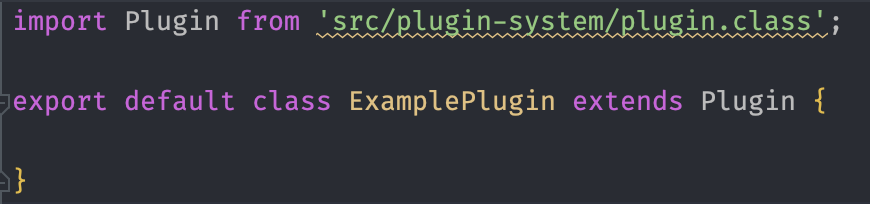
这让我思考。有没有办法解决这个问题而不是解决问题?对于PhpStorm中的Shopware开发还有其他配置建议吗?我已经在Shopware Academy后端课程和文档中见过一些,但是还可能有更多吗?
回答 1
Stack Overflow用户
发布于 2022-08-09 12:35:30
更新的答案,快速解决方案
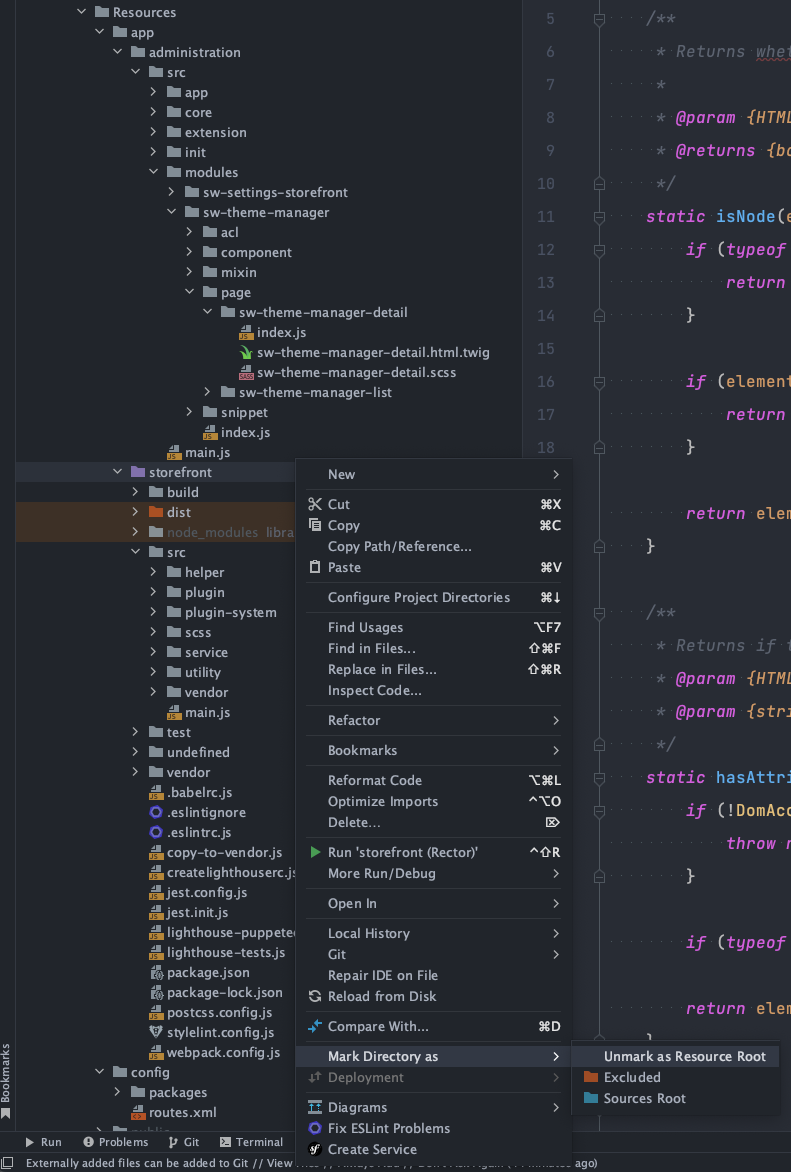
在项目目录树“查找src/Storefront/Resources/app/storefront”中,右键单击文件夹Mark directory as、Resource Root。这将使别名模块解析。
旧的答案,可能的永久修复
理论上,PhpStorm应该能够解析src/Storefront/Resources/app/storefront/webpack.config.js中定义的别名。
但是,它无法分析该文件:
Webpack
Can't analyze webpack.config.js: coding assistance will ignore module resolution rules in this file.
Possible reasons: this file is not a valid webpack configuration file or its format is not currently supported by the IDE.
Error details: Definition file does not exists我发现原因是src/Storefront/Resources/app/storefront/webpack.config.js的第465行
const injector = new WebpackPluginInjector('var/plugins.json', webpackConfig, 'storefront');用以下行替换该行使使用别名的模块可解析:
const injector = new WebpackPluginInjector(path.resolve(projectRootPath, 'var/plugins.json'), webpackConfig, 'storefront');如果您正在使用开发模板,而Shopware mono-repo位于platform diretory中,则此更改将使Webpack转而寻找platform/var/plugins.json。因此,要么复制或符号链接var/plugins.json到该位置。
这显然只是暂时的解决办法,最终需要妥善解决。
顺便提一句:到目前为止,administration的单独administration也没有被PhpStorm分析过。因此,这不会修复管理中的PhpStorm的不可解析别名。
https://stackoverflow.com/questions/73289866
复制相似问题
腾讯云开发者

Copyright © 2013 - 2026 Tencent Cloud. All Rights Reserved. 腾讯云 版权所有
深圳市腾讯计算机系统有限公司 ICP备案/许可证号:粤B2-20090059  粤公网安备44030502008569号
腾讯云计算(北京)有限责任公司 京ICP证150476号 | 京ICP备11018762号