
我不能在2d游戏中实现所谓的像素照明。
我不能在2d游戏中实现所谓的像素照明。
提问于 2022-08-08 11:54:20
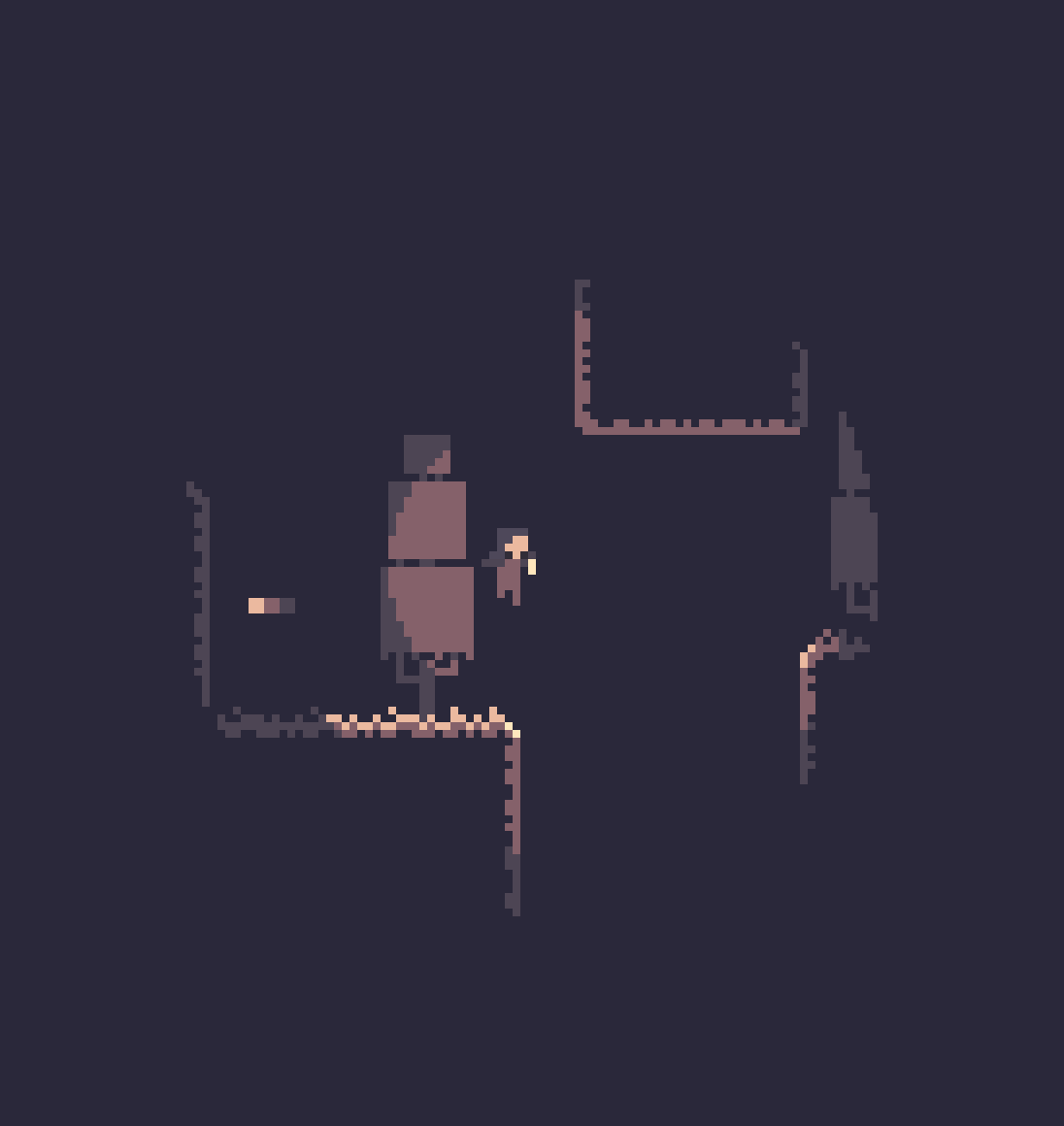
我正在创建一个2D统一游戏,我的想法是使像素照明。也就是说,当你接近灯笼时,物体会改变颜色(根据调色板)。我想要得到的效果如下所示(到目前为止这是一幅图)。我不知道怎样才能实现这样的“照明”,起初我想用着色图来实现,但由于我的愚蠢,我做不到。(我尝试了更多的选择,但我从未成功地实施我的计划)为此,我请求那些知道的人的帮助。
回答 1
Stack Overflow用户
发布于 2022-08-08 13:31:21
我没有使用2d照明,所以我不确定,但我有一个旧的后处理着色器,可以像素化和使用有限的颜色托盘,为默认的渲染管道,可能对您工作。
着色器:
Shader "Custom/PixelPallet"
{
    Properties
    {
        _MainTex ("Texture", 2D) = "white" {}
        _ColorTheme("Theme", 2D) = "white" {}
    }
    SubShader
    {
        Tags { "RenderType"="Opaque" }
        LOD 100

        Pass
        {
            CGPROGRAM
            #pragma vertex vert
            #pragma fragment frag

            #include "UnityCG.cginc"

            struct appdata
            {
                float4 vertex : POSITION;
                float2 uv : TEXCOORD0;
            };

            struct v2f
            {
                float2 uv : TEXCOORD0;
                float4 vertex : SV_POSITION;
            };

            sampler2D _MainTex;
            sampler2D _ColorTheme;
            float4 _MainTex_ST;

            int _PixelDensity;
            float2 _ScreenAspectRatioMultiplier;
            float2 _SpriteAspectRatioMultiplier;

            v2f vert (appdata v)
            {
                v2f o;
                o.vertex = UnityObjectToClipPos(v.vertex);
                o.uv = TRANSFORM_TEX(v.uv, _MainTex);
                return o;
            }

            fixed4 frag (v2f i) : SV_Target
            {
                float2 pixelScaling = _PixelDensity * _ScreenAspectRatioMultiplier;
                float2 pixelCoord = round(i.uv * pixelScaling)/ pixelScaling;
                fixed4 value = tex2D(_MainTex, pixelCoord);
                float2 coord = float2(value.r,value.g);
                return tex2D(_ColorTheme, coord);
            }
            ENDCG
        }
    }
}
后处理脚本:
using UnityEngine;

public class PostEfect : MonoBehaviour
{
    private Material mat;
    public Texture texture;
    public int pixelDensity = 80;

    void Start()
    {
        mat = new Material(Shader.Find("Custom/PixelPallet"));
        mat.SetTexture("_ColorTheme", texture);
    }

    void OnRenderImage(RenderTexture src, RenderTexture dest)
    {
        Vector2 aspectRatioData;
        if (Screen.height > Screen.width)
            aspectRatioData = new Vector2((float)Screen.width / Screen.height, 1);
        else
            aspectRatioData = new Vector2(1, (float)Screen.height / Screen.width);
        mat.SetVector("_ScreenAspectRatioMultiplier", aspectRatioData);
        mat.SetInt("_PixelDensity", pixelDensity);

        // Read pixels from the source RenderTexture, apply the material, copy the updated results to the destination RenderTexture
        Graphics.Blit(src, dest, mat);
    }
}
只要把脚本放在相机上,选择一个带有点过滤器的彩色托盘精灵就行了。根据您的需要调整像素密度。
页面原文内容由Stack Overflow提供。腾讯云小微IT领域专用引擎提供翻译支持
原文链接:
https://stackoverflow.com/questions/73277478
复制相关文章
相似问题
腾讯云开发者

Copyright © 2013 - 2026 Tencent Cloud. All Rights Reserved. 腾讯云 版权所有
深圳市腾讯计算机系统有限公司 ICP备案/许可证号:粤B2-20090059  粤公网安备44030502008569号
腾讯云计算(北京)有限责任公司 京ICP证150476号 | 京ICP备11018762号