
示意图流程图中箭头位置
示意图流程图中箭头位置
提问于 2022-08-05 19:01:05
我对Python和原理图很陌生。我正在尝试将流程图的"end“与"activity 6”连接起来。
然而,箭头从侧面出来(红色箭头,和错误的位置),我试图让它从盒子的下方(黑色箭头,正确的位置)出来。
有人能帮我吗?
pip install schemdraw
import schemdraw
import schemdraw.elements as elm

with schemdraw.Drawing() as d:
    d.config(fontsize=14)
    d += (b := flow.Start(w=6, h=2).label('Start'))
    d += flow.Arrow().down(d.unit/2)

    d += (step1 := flow.Box(w=8, h=2).label('Thing 1').fill(''))
    d += flow.Arrow().down(d.unit/2)
    d += (step2 := flow.Box(w=8, h=2).label('Thing 2').fill(''))
    d += flow.Arrow().down(d.unit/2)
    d += (step3 := flow.Box(w=8, h=2).label('Thing 3').fill(''))

    d += flow.Arrow().down(d.unit/2)
    d += (step4 := flow.Box(w=8, h=2).label('Thing 4').fill(''))
    d += flow.Arrow().down(d.unit/2)
    d += (step5 := flow.Box(w=8, h=2).label('Thing 5').fill(''))
    d += flow.Arrow().down(d.unit/2)
    d += (step6 := flow.Box(w=8, h=2).label('Thing 6').fill(''))


    # Activities
    d += flow.Arrow().right(d.unit/2).at(step1.E)
    d += (act1 := flow.Box(w=8, h=2).anchor('W').label('activity 1').fill(''))

    d += flow.Arrow().right(d.unit/2).at(step2.E)
    d += (act2 := flow.Box(w=8, h=2).anchor('W').label('activity 2').fill(''))

    d += flow.Arrow().right(d.unit/2).at(step3.E)
    d += (act3 := flow.Box(w=8, h=2).anchor('W').label('activity 3').fill(''))

    d += flow.Arrow().right(d.unit/2).at(step4.E)
    d += (act4 := flow.Box(w=8, h=2).anchor('W').label('activity 4').fill(''))

    d += flow.Arrow().right(d.unit/2).at(step5.E)
    d += (act5 := flow.Box(w=8, h=2).anchor('W').label('activity 5').fill(''))

    d += flow.Arrow().right(d.unit/2).at(step6.E)
    d += (act6 := flow.Box(w=8, h=2).anchor('W').label('activity 6').fill(''))

    # May be here!!!
    d += flow.Arrow().down()
    d += flow.Start(w=8, h=2).anchor('W').label('End')

    d += (phase1 := elm.EncircleBox([step1, step2, step3, act1, act2, act3], padx=.8).linestyle('--').linewidth(2).color('red'))
    d += (phase2 := elm.EncircleBox([step4, step5, act4, act5], padx=.8).linestyle('--').linewidth(2).color('blue'))
    d += (phase3 := elm.EncircleBox([step6, act6], padx=.8).linestyle('--').linewidth(2).color('green'))
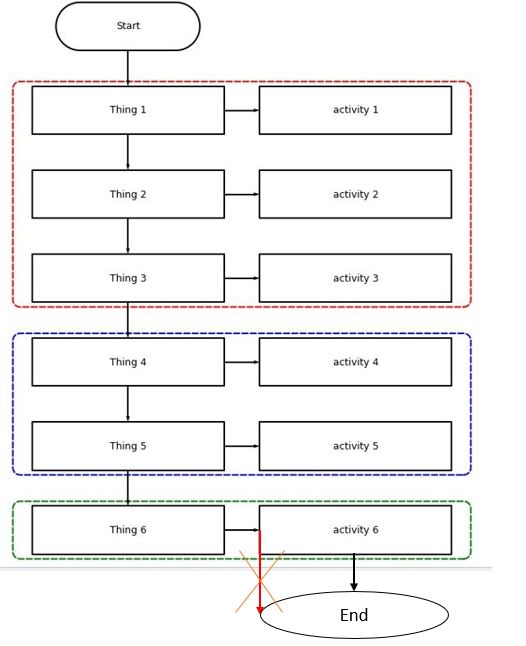
提前感谢!
回答 1
Stack Overflow用户
发布于 2022-08-07 05:02:19
你可以用这段代码。
 d += flow.Arrow().down().at(act6.S)
d +=flow.Terminal(w=6, h=2).label('End')页面原文内容由Stack Overflow提供。腾讯云小微IT领域专用引擎提供翻译支持
原文链接:
https://stackoverflow.com/questions/73254260
复制相关文章
相似问题
腾讯云开发者

Copyright © 2013 - 2026 Tencent Cloud. All Rights Reserved. 腾讯云 版权所有
深圳市腾讯计算机系统有限公司 ICP备案/许可证号:粤B2-20090059  粤公网安备44030502008569号
腾讯云计算(北京)有限责任公司 京ICP证150476号 | 京ICP备11018762号