
如何使用python selenium在Ubuntu服务器上使用代理实现无头、未检测到的铬浏览器的自动化
我正在自动化python上的一个任务,以访问一个我无法访问的网站。此浏览器或应用程序可能不是安全的尝试使用不同的浏览器。作为一种解决方案,我使用的是一个未被检测到的带有代理的铬浏览器。
当自动化开始时,我们会收到一个代理认证警报:“代理中的签名需要用户名和密码。您到这个站点的连接不是私有的。
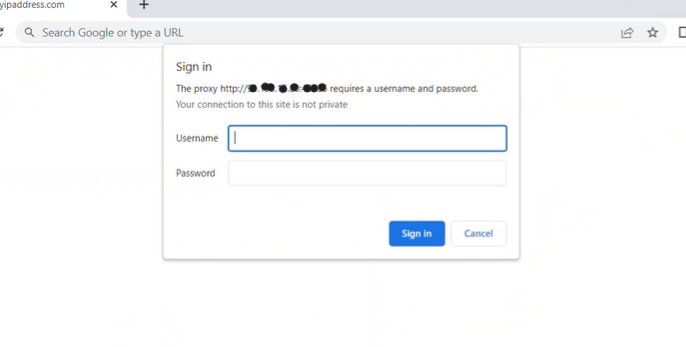
为了处理这个问题,我使用了库PyAutoGui。这将填充代理的用户名和密码,整个自动化都是成功的。
问题是,--我想在ubuntu服务器上运行它--我必须对它使用无头,但是pyautogui不能在无头铬上工作。它检测到屏幕上打开的窗口,并在那里抛出用户名和密码(在我的例子中是PYCHARM的代码脚本)。因此,由于代理没有通过身份验证,因为它没有获得所需的值,所以该页不会加载,而且selenium自动化会抛出一个错误,原因是它期望在页面上显示的元素。
File "C:\Users\username\PycharmProjects\ProjectName\venv\lib\site-packages\selenium\webdriver\support\wait.py", line 90, in until
    raise TimeoutException(message, screen, stacktrace)
selenium.common.exceptions.TimeoutException: Message:
Stacktrace:
我曾尝试过这些解决方案,但未能找到这三种方法都能发挥作用的地方:
- 未被检测的浏览器
- 用代理
- 无头运行
我尝试了很多东西,大部分是在未被检测到的显色剂问题中共享的,但是当谈到无头解决方案时,所有这些解决方案都失败了。
硒似乎没有使用selenium警报进行访问!
这是我的代码(某些部分是伪的)
import pandas as pd
from imap_tools import MailBox, AND
import re
# No Headless, Proxy, undetected
from selenium.webdriver.common.by import By
from selenium.webdriver.support.ui import WebDriverWait
from selenium.webdriver.support import expected_conditions as EC
import time
from threading import Thread
import pyautogui
from selenium.webdriver.chrome.options import Options
import chromedriver_autoinstaller
import undetected_chromedriver as uc
from seleniumwire import webdriver
from seleniumwire import webdriver

# host_ip = "xx.xxx.xx.xx"
host_ip = "x.xxx.xxx.xxx"
port = "xxxxx"
proxy_username = "xxxxxxxx"
proxy_password = "xxxxxxxx"
ipCheckURL="http://whatismyip.com"

URL=undetectedCheckUrl


def enter_proxy_auth(proxy_username, proxy_password):
    time.sleep(3)
    pyautogui.typewrite(proxy_username)
    pyautogui.press('tab')
    time.sleep(5)
    pyautogui.typewrite(proxy_password)
    pyautogui.press('enter')
    time.sleep(15)

def visitWebsiteAndAutomateAndReturnAValue(driver, url):

    driver.get(URL)
    #Do some Automation
    return Value


    chrome_options = Options()
    chrome_options.add_argument('--proxy-server={}'.format(host_ip + ":" + port))
    ucdriver = uc.Chrome(options=chrome_options, use_subprocess=True)
    x1 = Thread(target=visitWebsiteAndAutomateAndReturnAValue, args=(ucdriver, url))
    x2 = Thread(target=enter_proxy_auth, args=(proxy_username, proxy_password))
    x1.start()
    x2.start()
    value = x1.join()
    x2.join()
    print(value)
到目前为止,在类似的帖子中,我还没有找到解决方案,但人们只是在维基百科上发布了关于网络安全或互联网如何工作的知识。如果你知道我如何处理这件事,我会很感激的。
回答 1
Stack Overflow用户
发布于 2022-08-02 09:59:46
尝试使用带硒丝,它支持代理进行身份验证。
from seleniumwire import webdriver
options = {
    'proxy': {
        'https': 'https://user:pass@192.168.10.100:8888',
    }
}
driver = webdriver.Chrome(seleniumwire_options=options)https://stackoverflow.com/questions/73177764
复制相似问题
腾讯云开发者

Copyright © 2013 - 2026 Tencent Cloud. All Rights Reserved. 腾讯云 版权所有
深圳市腾讯计算机系统有限公司 ICP备案/许可证号:粤B2-20090059  粤公网安备44030502008569号
腾讯云计算(北京)有限责任公司 京ICP证150476号 | 京ICP备11018762号