
VBA按单元格值打印工作表
VBA按单元格值打印工作表
提问于 2022-07-28 14:09:47
我在这里看到了一些与主题有关的问题,但不够具体,所以我可以用我所掌握的知识来推断我需要什么。我有一个宏,可以打印5张不同的单张,每次打印4次,但我希望能够选择用下面(a1:b5)这样的表格打印哪一张,这样我就可以选择多页,但我不知道如何打印。
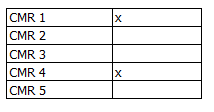
我现在用的是:
Sub PrintRow1()
'Prints CMR 1 to 5

Sheets("CMR 1").PrintOut , Copies:=4
Sheets("CMR 2").PrintOut , Copies:=4
Sheets("CMR 3").PrintOut , Copies:=4
Sheets("CMR 4").PrintOut , Copies:=4
Sheets("CMR 5").PrintOut , Copies:=4
End Sub回答 2
Stack Overflow用户
回答已采纳
发布于 2022-07-29 17:32:56
打印标记工作表
Sub PrintFlaggedWorksheets()

    ' Reference the workbook ('wb').
    Dim wb As Workbook: Set wb = ThisWorkbook ' workbook containing this code

    ' Reference the source worksheet ('sws') (containing the 'table').
    Dim sws As Worksheet: Set sws = wb.Worksheets("Sheet1")

    ' Write the values from the source range to a 2D one-based array,
    ' the source array ('sData').
    Dim sData() As Variant: sData = sws.Range("A1:B5").Value

    ' Declare additional variables used the first time in the loop.
    Dim dws As Worksheet ' Destination Worksheet
    Dim sr As Long ' Source Row
    Dim dwsCount As Long ' Number of Printed Worksheets

    ' Loop through the rows of the source array.
    For sr = 1 To UBound(sData, 1)
        ' Check if the value in the current row of the second column is an 'x'.
        If StrComp(CStr(sData(sr, 2)), "x", vbTextCompare) = 0 Then ' do print
            ' Attempt to reference the destination worksheet using the value
            ' in the current row of the first column as the worksheet's name.
            On Error Resume Next ' defer error trapping (ignore errors)
                Set dws = wb.Worksheets(CStr(sData(sr, 1)))
            On Error GoTo 0 ' turn off error trapping
            ' Check if a reference has been created.
            If Not dws Is Nothing Then ' the destination worksheet exists; print
                dws.PrintOut Copies:=4 ' print
                dwsCount = dwsCount + 1 ' count
                Set dws = Nothing ' reset the destination worksheet variable
            'Else ' the destination worksheet doesn't exist; do nothing
            End If
        'Else ' don't print
        End If
    Next sr

    ' Inform.
    MsgBox "Worksheets printed: " & dwsCount, vbInformation

End SubStack Overflow用户
发布于 2022-07-28 17:11:44
下面的代码很容易理解和适应您的需要。
Sub PrintSelectedSheet()
    Dim ShNum As Integer, ShName As String

    ShNum = InputBox("Select the sheet you want to print:" & vbCrLf & _
                    "1 for CMR 1" & vbCrLf & _
                    "2 for CMR 2" & vbCrLf & _
                    "3 for CMR 3" & vbCrLf & _
                    "4 for CMR 4" & vbCrLf & _
                    "5 for CMR 5", _
                    "Sheet selection")
    Select Case ShNum
        Case Is = 1
            ShName = "CMR 1"
        Case Is = 2
            ShName = "CMR 2"
        Case Is = 3
            ShName = "CMR 3"
        Case Is = 4
            ShName = "CMR 4"
        Case Is = 5
            ShName = "CMR 5"
        Case Else
            ShName = ""
    End Select

    If ShName <> "" Then
        Sheets(ShName).PrintOut , Copies:=4
    Else
        MsgBox "Wrong selection", vbCritical
    End If
End Sub页面原文内容由Stack Overflow提供。腾讯云小微IT领域专用引擎提供翻译支持
原文链接:
https://stackoverflow.com/questions/73154282
复制相关文章
相似问题
腾讯云开发者

Copyright © 2013 - 2026 Tencent Cloud. All Rights Reserved. 腾讯云 版权所有
深圳市腾讯计算机系统有限公司 ICP备案/许可证号:粤B2-20090059  粤公网安备44030502008569号
腾讯云计算(北京)有限责任公司 京ICP证150476号 | 京ICP备11018762号