
HTML画布-调整多个元素作为一个层的不透明度
HTML画布-调整多个元素作为一个层的不透明度
提问于 2022-07-27 21:09:25
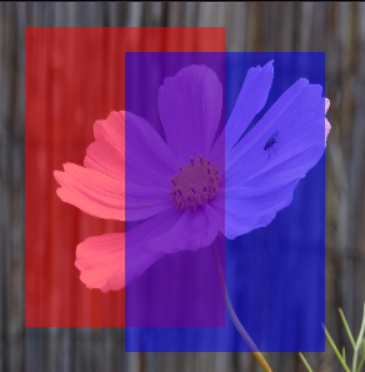
我试图找到一种方法在HTML画布上绘制多个元素,然后同时调整它们的所有不透明性。例如,这个代码示例绘制两个重叠的矩形,globalAlpha设置为0.5,因此它们是半透明的。
我看到的是:
我想看到的是:
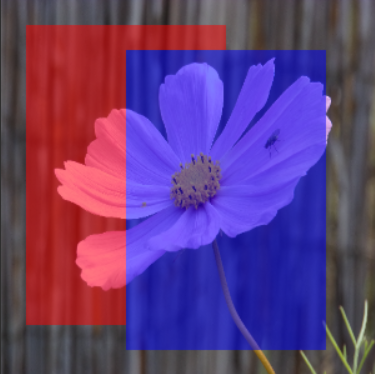
换句话说,我想画出一组元素,然后一次性调整它们的alpha/不透明度。在上面的例子中,我希望蓝色和红色的重叠部分显示为蓝色,因为蓝色的矩形是第二幅。
我想要这个解决方案适用于图像,形状,任何画布绘画真的。
有人知道如何使用HTML画布来完成这个任务吗?
回答 1
Stack Overflow用户
发布于 2022-07-27 21:44:40
你必须分解这个过程
1-创建所有绘图的画布( alpha 100%)
2把平展的图纸放一边
3清理帆布
4获取图片并将其添加到画布中
5套阿尔法至50%
6添加带有alpha的tmp扁平绘图。
const cnv = document.createElement("canvas");
cnv.width = 300;
cnv.height = 300;
const ctx = cnv.getContext("2d");

document.body.appendChild(cnv);


// Draw red rectangle
ctx.fillStyle = "#f00";
ctx.fillRect(20, 20, cnv.width - 140, cnv.height - 60);

// Draw blue rectangle
ctx.fillStyle = "#00f";
ctx.fillRect(100, 40, cnv.width - 140, cnv.height - 60);


//aside the draw in flatten layer
let tmp = new Image();
tmp.src = cnv.toDataURL();

// clear the canvas
ctx.clearRect(0, 0, cnv.width, cnv.height);

// apply bg
ctx.fillStyle = "#000";
ctx.fillRect(0, 0, cnv.width, cnv.height);

const image = new Image(); // Using optional size for image
image.src = "https://img.photographyblog.com/reviews/kodak_pixpro_fz201/photos/kodak_pixpro_fz201_01.jpg";
image.onload = () => {
  // Draw background image
  ctx.drawImage(image, 0, 0);
  ctx.drawImage(image, 0, 0, cnv.width, cnv.width);

  // Set alpha to 0.5
  ctx.globalAlpha = 0.5;

  //overlay with the tmp flatten img with 50%
  ctx.drawImage(tmp, 0, 0, cnv.width, cnv.width);

}
页面原文内容由Stack Overflow提供。腾讯云小微IT领域专用引擎提供翻译支持
原文链接:
https://stackoverflow.com/questions/73144647
复制相关文章
相似问题
腾讯云开发者

Copyright © 2013 - 2026 Tencent Cloud. All Rights Reserved. 腾讯云 版权所有
深圳市腾讯计算机系统有限公司 ICP备案/许可证号:粤B2-20090059  粤公网安备44030502008569号
腾讯云计算(北京)有限责任公司 京ICP证150476号 | 京ICP备11018762号