
如何显示特定元素vue js的信息?
如何显示特定元素vue js的信息?
提问于 2022-07-27 15:42:12
你好早上好,我有这个问题,我有两个桌子,一个主表,有一个按钮,打开一个弹出与第二个表。你有什么想法?如果我单击第一个表和第一个选项的按钮,它只需要向我显示该元素的信息,在弹出窗口中,我创建了一个console.log(item.id),它很好地显示了该元素的数据,但是当我打开弹出时,它显示了所有的数据。这一定是我忽略的东西,非常感谢
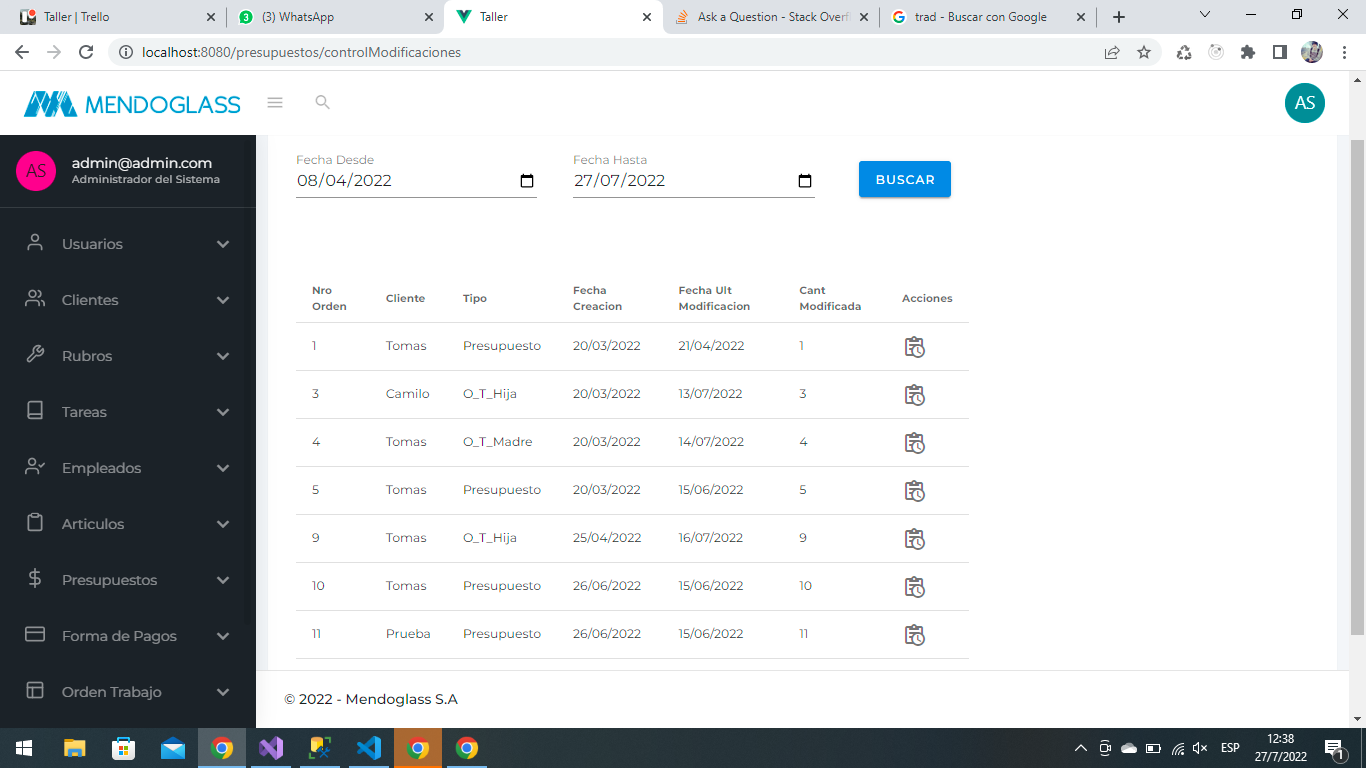
<template>
 <v-card>
  <v-card-title>
  Control Modificaciones
  </v-card-title>
  <v-card-text>
  <v-row>
    <v-col cols="12" md="3" class="ml-3">
      <v-text-field
        v-model="fechaDesde"
        type="date"
        label="Fecha Desde"
        :rules="[(v) => !!v || 'Este campo es requiredo']"
        required
      ></v-text-field>
    </v-col>
    <v-col cols="12" md="3" class="ml-3">
      <v-text-field
        v-model="fechaHasta"
        type="date"
        label="Fecha Hasta"
        :rules="[(v) => !!v || 'Este campo es requiredo']"
        required
      ></v-text-field>
    </v-col>
    <v-btn color="info" title="Crear" class="mt-6 ml-8" @click="buscar()">
      Buscar
    </v-btn>
  </v-row>
   </v-card-text>
  <v-row>
  <v-col cols="8" md="8" class="ml-3">
    <v-card-text>
      <v-simple-table>
        <template>
          <thead>
            <tr>
              <th class="text-left">Nro Orden</th>
              <th class="text-left">Cliente</th>
              <th class="text-left">Tipo</th>
              <th class="text-left">Fecha Creacion</th>
              <th class="text-left">Fecha Ult Modificacion</th>
              <th class="text-left">Cant Modificada</th>
              <th class="text-left">Acciones</th>
            </tr>
          </thead>
          <tbody>
            <tr v-for="item in list" :key="item.id">
              <td>{{ item.numero }}</td>
              <td>{{ item.cliente.nombre }}</td>
              <td>{{ item.tipoPresupuestoString }}</td>
              <td>{{ formatDate(item.fechaAlta) }}</td>
              <td>{{ formatDate(item.fechaModificacion) }}</td>
              <td>{{ item.numero }}</td>
              <td>
                <v-icon
                  title="Historial del presupuesto"
                  @click="abrirPopupListadoPresupuestoHistorial(item)"
                  >mdi-clipboard-text-clock-outline</v-icon
                >
              </td>
            </tr>
          </tbody>
        </template>
      </v-simple-table>
    </v-card-text>
  </v-col>
</v-row>

<v-row>
  <v-col cols="12" md="12" class="ml-3">
    <v-dialog
      v-model="popupPresupuestoHistorial"
      class="ml-10"
      max-width="800px"
      max-height="700px"
    >
      <v-card>
        <v-card-title class="text-h3 dark lighten-2">
          Listado de Presupuesto Historial.
        </v-card-title>
        <v-card-text>
          <v-simple-table>
            <template>
              <thead>
                <tr>
                  <th class="text-left">Fecha</th>
                  <th class="text-left">Comentario</th>
                  <th class="text-left">Usuario</th>
                  <th class="text-left">Datos Generales</th>
                  <th class="text-left">Articulos Nuevos</th>
                  <th class="text-left">Articulos Modifados</th>
                  <th class="text-left">Articulos Eliminados</th>
                  <th class="text-left">Acciones</th>
                </tr>
              </thead>
              <tbody>
                <tr v-for="item in list" :key="item.id">
                  <td>{{ formatDate(item.fecha) }}</td>
                  <td>{{ item.observacion }}</td>
                  <td>{{ item.usuario.name }}</td>
                  <td>{{ item.datosCabecera }}</td>
                  <td>{{ item.articulosNuevos }}</td>
                  <td>
                    {{ item.articulosModificados }}
                  </td>
                  <td>
                    {{ item.articulosEliminados }}
                  </td>
                  <td></td>
                </tr>
              </tbody>
            </template>
          </v-simple-table>
        </v-card-text>
        <v-card-actions>
          <v-spacer></v-spacer>
          <v-btn
            text
            color="primary"
            @click="popupPresupuestoHistorial = false"
          >
            Cancelar
          </v-btn>
        </v-card-actions>
      </v-card>
    </v-dialog>
  </v-col>
</v-row>
</v-card>
</template>

<script>
import moment from "moment";
import PresupuestoServices from "../../services/PresupuestoServices";
import Swal from "sweetalert2";

export default {
name: "ControlModificaciones",
data() {
return {
  fechaHasta: null,
  fechaDesde: null,
  list: [],
  popupPresupuestoHistorial: false,
 };
 },
 created() {
 this.presupuestoServices = new PresupuestoServices();
 },
 mounted() {},
 methods: {
 showSuccess(message) {
  this.$toastr.Add({
    name: "UniqueToastName",
    title: "Success Message",
    msg: message,
    type: "success",
  });
},
showError(message) {
  this.$toastr.Add({
    name: "UniqueToastName",
    title: "Error Message",
    msg: message,
    type: "error",
  });
},
formatDate(value) {
  return value ? moment(value).format("DD/MM/YYYY") : "";
},
buscar() {
  if (this.fechaDesde == null && this.fechaHasta == null) {
    Swal.fire("Primero debes seleccionar las fechas.");
    return;
  }
  const fechaDesde = this.fechaDesde != null ? this.fechaDesde : null;
  const fechaHasta = this.fechaHasta != null ? this.fechaHasta : null;

  Swal.fire({
    title: "Espere unos momentos ...",
    showConfirmButton: false,
  });
  this.presupuestoServices
    .controlModificaciones(fechaDesde, fechaHasta)
    .then((data) => {
      Swal.close();
      this.list = data;
    })
    .catch((error) => {
      Swal.close();
      this.showError(error.response.data);
    });
},
  abrirPopupListadoPresupuestoHistorial(item) {
  this.popupPresupuestoHistorial = true;
  console.log(item.id);
  // this.list[0].presupuestoHistorial = item.id;
  },
  },
  };
</script>回答 2
Stack Overflow用户
发布于 2022-07-27 16:13:43
看起来,在弹出窗口中,您呈现的内容与主表中的内容相同。请查看弹出窗口中的以下一行:
<tr v-for="item in list" :key="item.id">这一行基本上循环了整个项目列表,根本没有使用您选择的项目。
向数据函数中添加一个新属性以存储所选项。将选定的项分配给该属性,并在弹出窗口中使用它来呈现所需的任何详细信息。
Stack Overflow用户
发布于 2022-07-28 05:43:01
观测:
- 在
v-dialog中,而不是迭代整个list。您必须根据在abrirPopupListadoPresupuestoHistorial方法中传递的项id从列表数组中筛选出该对象,然后在<v-dialog>中使用该对象来显示仅基于所选记录的数据。 - 因为您将只在对话框中显示选定的项目详细信息。您可以直接绑定筛选过的对象,而不是使用v-for,因为它总是包含所选的
item.id详细信息。您可以使用Array.find()方法来获取基于id传递的对象。
演示(只是为了演示目的,我将条目ID作为3)传递给
new Vue({
  el: '#app',
  vuetify: new Vuetify(),
  data () {
    return {
      popupPresupuestoHistorial: false,
      list: [{
        id: 1,
        observacion: 'observacion 1',
        name: 'name 1'
      }, {
        id: 2,
        observacion: 'observacion 2',
        name: 'name 2'
      }, {
        id: 3,
        observacion: 'observacion 3',
        name: 'name 3'
      }, {
        id: 4,
        observacion: 'observacion 4',
        name: 'name 4'
      }, {
        id: 5,
        observacion: 'observacion 5',
        name: 'name 5'
      }],
      dialogList: []
    }
  },
  methods: {
    openDialog(itemID) {
     this.popupPresupuestoHistorial = true;
     this.dialogList = this.list.find(({ id }) => id === itemID)
    }
  }
})<script src="https://cdnjs.cloudflare.com/ajax/libs/vue/2.5.17/vue.js"></script>
<script src="https://unpkg.com/vuetify@2.6.7/dist/vuetify.min.js"></script>
<link rel="stylesheet" href="https://unpkg.com/vuetify@2.6.7/dist/vuetify.min.css"/>
<div id="app">
<v-app id="inspire">
<v-btn @click="openDialog(3)">Open Item 1 Details</v-btn>
<div class="text-center">
<v-dialog
v-model="popupPresupuestoHistorial"
class="ml-10"
max-width="800px"
max-height="700px"
>
<v-card>
<v-card-title class="text-h3 dark lighten-2">
Listado de Presupuesto Historial.
</v-card-title>
<v-card-text>
<v-simple-table>
<template>
<thead>
<tr>
<th class="text-left">Comentario</th>
<th class="text-left">Usuario</th>
</tr>
</thead>
<tbody>
<tr>
<td>{{ dialogList.observacion }}</td>
<td>{{ dialogList.name }}</td>
</tr>
</tbody>
</template>
</v-simple-table>
</v-card-text>
<v-card-actions>
<v-spacer></v-spacer>
<v-btn
text
color="primary"
@click="popupPresupuestoHistorial = false"
>
Cancelar
</v-btn>
</v-card-actions>
</v-card>
</v-dialog>
</div>
</v-app>
</div>
页面原文内容由Stack Overflow提供。腾讯云小微IT领域专用引擎提供翻译支持
原文链接:
https://stackoverflow.com/questions/73140905
复制相关文章
相似问题
腾讯云开发者

Copyright © 2013 - 2026 Tencent Cloud. All Rights Reserved. 腾讯云 版权所有
深圳市腾讯计算机系统有限公司 ICP备案/许可证号:粤B2-20090059  粤公网安备44030502008569号
腾讯云计算(北京)有限责任公司 京ICP证150476号 | 京ICP备11018762号