
如何将不同的字体和大小巧妙地分配给标题和轴?
如何将不同的字体和大小巧妙地分配给标题和轴?
提问于 2022-07-26 21:43:33
我试图分别设置轴和标题的字体/大小。对于标题:字体= Ariel和大小= 12。对于Axis:字体= Times和size = 20。我使用下面的代码来完成它。
fig.update_layout(font=dict(family='Times New Roman',size=20,\
title=dict(font=dict(family='Ariel', size=12)))
当我这样做,只有字体改变将生效,它将改变一切,但标题从来不做任何事情。谢谢你,祝你今天愉快
回答 2
Stack Overflow用户
回答已采纳
发布于 2022-07-27 02:23:13
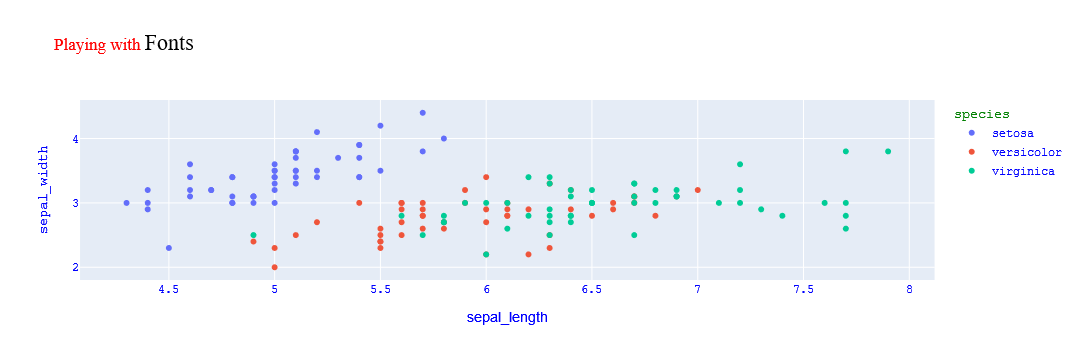
在官方引用中有更改标题、轴标等的例子。基于这个例子,我进一步更改了标题的部分颜色和大小。此技巧将引用这里。
import plotly.express as px

df = px.data.iris()
fig = px.scatter(df, x="sepal_length", y="sepal_width", color="species",
                title="Playing with <span style='font-size:22px;color:black;'>Fonts</span>")
fig.update_layout(
    font_family="Courier New",
    font_color="blue",
    title_font_family="Times New Roman",
    title_font_color="red",
    legend_title_font_color="green"
)
fig.update_xaxes(title_font_family="Arial")
fig.show()
Stack Overflow用户
发布于 2022-11-12 09:21:48
若要设置轴刻度属性,可以提供包含以下一个或多个键的dict:
fig.update_xaxes(tickfont=dict(family="CMU Sans Serif Demi Condensed",
                                 size=<SIZE>,
                                color=<COLOUR>) )

fig.update_yaxes(tickfont=dict(family="Lucida Console",
                                 size=<SIZE>,
color=<COLOUR>) )页面原文内容由Stack Overflow提供。腾讯云小微IT领域专用引擎提供翻译支持
原文链接:
https://stackoverflow.com/questions/73130052
复制相关文章
相似问题
腾讯云开发者

Copyright © 2013 - 2026 Tencent Cloud. All Rights Reserved. 腾讯云 版权所有
深圳市腾讯计算机系统有限公司 ICP备案/许可证号:粤B2-20090059  粤公网安备44030502008569号
腾讯云计算(北京)有限责任公司 京ICP证150476号 | 京ICP备11018762号