
在blazor中用模板化网格组件显示扩展折叠的通用数据
在blazor中用模板化网格组件显示扩展折叠的通用数据
提问于 2022-07-26 17:09:45
我已经在blazor中创建了一个模板化组件,并且实现了展开折叠,行单击以显示额外的详细信息。我能够显示/隐藏一个字符串,但不能实现一个逻辑,在这个逻辑中,我可以从一个泛型对象中获取详细信息,并在扩展区域内显示。
Grid.razor代码-
@typeparam TItem

@if (Items == null)
{
    <p><em>Loading...</em></p>
}
else {
    <div style="position:relative; float: right; margin: 0rem 10rem 3rem 0rem;">
        <button type="button" class="button" @onclick="DownloadFileFromStream">Export To Excel</button>
    </div>

    <table class="table table-hover">
        <thead>
            <tr>
                <th>
                    <input type="checkbox" id="chkAll" checked="@SelectMain" @onchange="ChangeCheckboxState"/>
                </th>
                @Columns(default(TItem))
            </tr>
        </thead>
        <tbody>

            @foreach (var item in Items) {
                //need to pass one parameter to grid component to give unique id to each toggle handler.
                var property = item.GetType().GetProperty("CamLocationId").GetValue(item);
                var id = $"chk{counter}";
                <CascadingValue Value="item">
                    <tr style="cursor:pointer" id=@counter @onclick="@(() => ToggleDetails((int)property))">
                        <td class="col-checkbox chkColumn quarter">
                           <input type="checkbox" id="@id" checked="@SelectAll" @onchange="ChangeCheckboxSingle"/>
                        </td>
                        @Columns(item)

                    </tr>
                    <tr style="@(_eventIds.Contains((int)property) ? "display:table-row;" : "display:none;")">
                        <td colspan="5">@ExpandableContent</td>
                    </tr>
                </CascadingValue>
                counter++;
            }
        </tbody>
    </table>
}

@code {
    [Inject]
    public IJSRuntime JsRuntime { get; set; }

    [Parameter]
    public IList<TItem> Items { get; set; }
    public List<int> _eventIds { get; set; }

    [Parameter]
    public RenderFragment<TItem>? Columns { get; set; }
    public bool SelectAll { get; set; } = false;
    public bool SelectMain { get; set; } = false;
    int counter = 1;
    public bool IsRowExpanded { get; set; } = false;

    public string ExpandableContent { get; set; } = "Lorem Ipsum bla bla bla bla";

    protected override async Task OnInitializedAsync()
    {
        _eventIds = new List<int>();

        Type myType = Items.GetType();
        IList<PropertyInfo> props = new List<PropertyInfo>(myType.GetProperties());

        foreach (PropertyInfo prop in props)
        {
            //object propValue = prop.GetValue(Items, null);
            // Do something with propValue
        }
    }
}
Column.razor代码-
@typeparam TItem

@if (Item == null) {

    <th class="sort-th offset-6 border-left pl-4">@Label
        <select name="@Name"  @onchange = "@(() => SortTable(Name))" style="width: 1rem;">
            <option hidden></option>
            <option value="asc">Sort By Ascending</option>
            <option value="desc">Sort By Descending</option>
        </select>
    </th>
}
else if (ChildContent == null) {
    var property = typeof(TItem).GetProperty(Name);
    @if(property.Name == "Status")
    {
        var styleVal = @property.GetValue(Item).ToString() == "Published" ? "background: #8fd400; font-weight:600;" : "background: #DCDCDC; cursor:pointer; color:blue; text-decoration:underline;";
        <td><span style=@styleVal>@property.GetValue(Item).ToString()</span></td>
    }
    else
    {
        <td>@property.GetValue(Item).ToString()</td>
    }

}
else {
    <td>@ChildContent</td>
}

@code {

    [Parameter]
    public string Name { get; set; } // Property name

    [Parameter]
    public string Label { get; set; } // Property title

    [Parameter]
    public string StyleClass { get; set; } // Property StyleClass

    [CascadingParameter]
    public TItem Item { get; set; }

    [Parameter]
    public RenderFragment? ChildContent { get; set; }
    [Parameter]
    public EventCallback<(string, bool)> SortEvent { get; set; }
    private static bool isSortedAscending;
    private static string activeSortColumn;

    private async Task SortTable(string columnName)
    {
        if (columnName != activeSortColumn)
        {

            isSortedAscending = true;
            activeSortColumn = columnName;

        }
        else
        {
            if (isSortedAscending)
            {

            }
            else
            {

            }

            isSortedAscending = !isSortedAscending;
        }
        await SortEvent.InvokeAsync((columnName, isSortedAscending));
    }
}
我正在从另一页中消耗这个组件-
<Grid Items="addresses" TItem="Address">
        <Columns>
            <Column Name="CompanyName" Label="Company Name" SortEvent="@((args)=> SortEvent(args.Item1,args.Item2))"/>
            <Column Name="CustomerId" Label="Customer ID" SortEvent="@((args)=> SortEvent(args.Item1,args.Item2))"/>
            <Column Name="CamLocationId" Label="Cam Location ID" SortEvent="@((args)=> SortEvent(args.Item1,args.Item2))"/>
            <Column Name="OmegaId" Label="Omega ID" SortEvent="@((args)=> SortEvent(args.Item1,args.Item2))"/>
            <Column Name="ContactId" Label="Contact ID" SortEvent="@((args)=> SortEvent(args.Item1,args.Item2))"/>
            <Column Name="Country" Label="Country" SortEvent="@((args)=> SortEvent(args.Item1,args.Item2))"/>
            <Column Name="Email" Label="Email" SortEvent="@((args)=> SortEvent(args.Item1,args.Item2))"/>
            <Column Name="Status" Label="Status" SortEvent="@((args)=> SortEvent(args.Item1,args.Item2))"/>
        </Columns>
    </Grid>
模型类代码-
public class Address
    {
        public string CompanyName { get; set; }
        public long CustomerId { get; set; }
        public int CamLocationId { get; set; }
        public int OmegaId { get; set; }
        public int ContactId { get; set; }
        public string Country { get; set; }
        public string Email { get; set; }
        public string Status { get; set; }
        public AddressDetails AddressDetails { get; set; }
        public ContactDetails ContactDetails { get; set; }
    }

    public class AddressDetails
    {
        public string AddressLine1 { get; set; }
        public string AddressLine2 { get; set; }
        public string City { get; set; }
        public string State { get; set; }
        public int Zip { get; set; }
    }
    public class ContactDetails
    {
        public string Attention { get; set; }
        public string Department { get; set; }
        public string Email { get; set; }
        public int Phone { get; set; }
        public int Fax { get; set; }
    }
现在,在
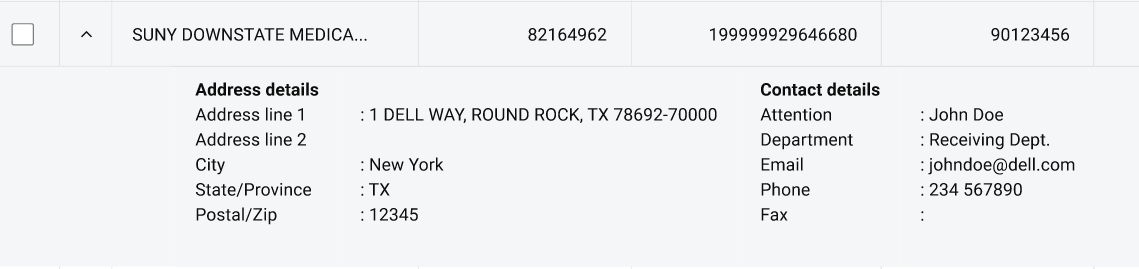
中,我只想一般性地显示AddressDetails和ContactDetails属性,而不是Grid.razor中的@ExpandableContent,这样如果我可以传递任何其他类型,在展开/折叠时以以下方式显示:
回答 1
Stack Overflow用户
回答已采纳
发布于 2022-08-02 09:32:57
通过RenderFragment参数的帮助和c#代码中很少的一些调整,我就能够做到这一点:
@typeparam TItem

@if (Items == null)
{
    <p><em>Loading...</em></p>
}
else {
    <div style="position:relative; float: right; margin: 0rem 10rem 3rem 0rem;">
        <button type="button" class="button" @onclick="DownloadFileFromStream">Export To Excel</button>
    </div>

    <table class="table table-hover">
        <thead>
            <tr>
                <th>
                    <input type="checkbox" id="chkAll" style="@(DisplaySelection() == true ? "" : "display:none;")"
                        checked="@SelectMain" @onchange="ChangeCheckboxState"/>
                </th>

                @Columns(default(TItem))
            </tr>
        </thead>
        <tbody>

            @foreach (var item in Items) {
                //Type myType = item.GetType();
                var property1 = (TItem)item;
                //need to pass one parameter to grid component to give unique id to each toggle handler.
                var property = item.GetType().GetProperty(UniqueId).GetValue(item);
                var id = $"chk{counter}";
                <CascadingValue Value="item">
                    <tr id=@counter>
                        <td class="col-checkbox chkColumn quarter">
                           <input style="@(DisplaySelection() == true ? "" : "display:none;")" type="checkbox" id="@id" checked="@SelectAll" @onchange="ChangeCheckboxSingle"/>
                           <div style="cursor:pointer" id="dialog2" class="triangle_down1" @onclick="@(() => ToggleDetails((int)property))"></div>
                        </td>

                        @Columns(item)
                    </tr>
                    <tr style="@(_eventIds.Contains((int)property) ? "display:table-row;" : "display:none;")">
                        @*use following to iterate
                        item.GetType().GetProperty("AddressDetails").GetValue(item)*@
                        <td colspan="10">@ExpansionData(item)</td>
                    </tr>
                </CascadingValue>
                counter++;
            }
        </tbody>
    </table>
声明了泛型组件中的一个参数和维护展开折叠in的列表:
[Parameter]
public RenderFragment<TItem>? ExpansionData { get; set; }
public List<int> _eventIds { get; set; }

private void ToggleDetails(int eventId)
{
    if (_eventIds.Contains(eventId))
        _eventIds.Remove(eventId);
    else
        _eventIds.Add(eventId);
    //JsRuntime.InvokeVoidAsync("alert", eventId);
    StateHasChanged();
}
我以这种方式将值传递给ExpansionData呈现片段参数:
<ExpansionData>
            <table style="width:100%">
                <tr>
                    <td colspan="3">
                        <table>
                            <tr><td>AddressLine1: @context.AddressDetails.AddressLine1</td></tr>
                            <tr><td>AddressLine2: @context.AddressDetails.AddressLine2</td></tr>
                            <tr><td>City: @context.AddressDetails.City</td></tr>
                            <tr><td>State: @context.AddressDetails.State</td></tr>
                            <tr><td>Zip: @context.AddressDetails.Zip</td></tr>
                        </table>
                    </td>
                    <td colspan="3">
                        <table>
                            <tr><td>Attention: @context.ContactDetails.Attention</td></tr>
                            <tr><td>Department: @context.ContactDetails.Department</td></tr>
                            <tr><td>Email: @context.ContactDetails.Email</td></tr>
                            <tr><td>Phone: @context.ContactDetails.Phone</td></tr>
                            <tr><td>Fax: @context.ContactDetails.Fax</td></tr>
                        </table>
                    </td>
                </tr>
            </table>

        </ExpansionData>
这是输出:

页面原文内容由Stack Overflow提供。腾讯云小微IT领域专用引擎提供翻译支持
原文链接:
https://stackoverflow.com/questions/73127294
复制相关文章
相似问题
腾讯云开发者

Copyright © 2013 - 2026 Tencent Cloud. All Rights Reserved. 腾讯云 版权所有
深圳市腾讯计算机系统有限公司 ICP备案/许可证号:粤B2-20090059  粤公网安备44030502008569号
腾讯云计算(北京)有限责任公司 京ICP证150476号 | 京ICP备11018762号