
如何向TListBox中添加多列项?
如何向TListBox中添加多列项?
提问于 2022-07-23 11:52:01
在Delphi11.1亚历山大版的Windows 10中的32位VCL应用程序中,我试图向TListBox添加多列项。Vcl.StdCtrls.TCustomListBox.Items主题中用于VCL的CHM库引用有以下技巧:
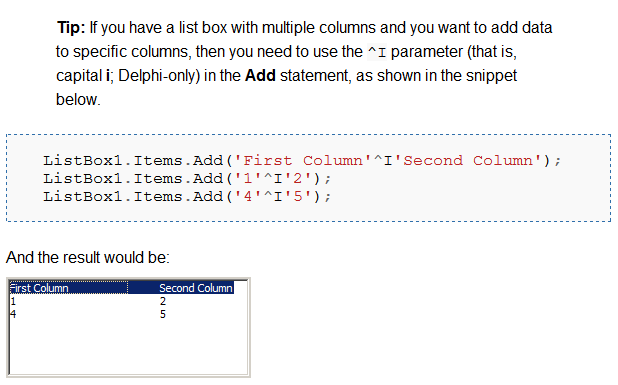
因此,我创建了以下VCL应用程序测试项目:
DPR:
program TListBoxMultiColumn;

uses
  Vcl.Forms,
  Unit1 in 'Unit1.pas' {Form1};

{$R *.res}

begin
  Application.Initialize;
  Application.MainFormOnTaskbar := True;
  Application.CreateForm(TForm1, Form1);
  Application.Run;
end.
PAS:
unit Unit1;

interface

uses
  Winapi.Windows, Winapi.Messages, System.SysUtils, System.Variants, System.Classes, Vcl.Graphics,
  Vcl.Controls, Vcl.Forms, Vcl.Dialogs, Vcl.StdCtrls;

type
  TForm1 = class(TForm)
    ListBox1: TListBox;
    Button1: TButton;
    procedure Button1Click(Sender: TObject);
  private
    { Private declarations }
  public
    { Public declarations }
  end;

var
  Form1: TForm1;

implementation

{$R *.dfm}

procedure TForm1.Button1Click(Sender: TObject);
begin
  ListBox1.Items.Add('First Column'^I'Second Column');
  ListBox1.Items.Add('1'^I'2');
  ListBox1.Items.Add('4'^I'5');
end;

end.
DFM:
object Form1: TForm1
  Left = 0
  Top = 0
  Caption = 'TListBox MultiColumn Test'
  ClientHeight = 191
  ClientWidth = 368
  Color = clBtnFace
  Font.Charset = DEFAULT_CHARSET
  Font.Color = clWindowText
  Font.Height = -15
  Font.Name = 'Segoe UI'
  Font.Style = []
  Position = poScreenCenter
  PixelsPerInch = 120
  TextHeight = 20
  object ListBox1: TListBox
    Left = 0
    Top = 0
    Width = 241
    Height = 191
    Margins.Left = 4
    Margins.Top = 4
    Margins.Right = 4
    Margins.Bottom = 4
    Align = alLeft
    Columns = 2
    ItemHeight = 20
    TabOrder = 0
    ExplicitHeight = 413
  end
  object Button1: TButton
    Left = 260
    Top = 20
    Width = 94
    Height = 31
    Margins.Left = 4
    Margins.Top = 4
    Margins.Right = 4
    Margins.Bottom = 4
    Caption = 'Button1'
    TabOrder = 1
    OnClick = Button1Click
  end
end
然而,其结果并不是文件中承诺的:
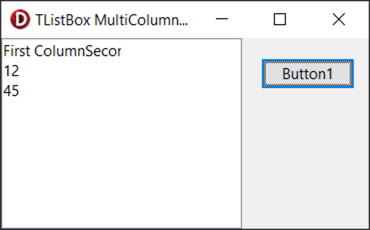
那么如何将多列项添加到TListBox中呢?
回答 1
Stack Overflow用户
回答已采纳
发布于 2022-07-23 12:14:31
必须将TabWidth属性设置为适当的、足够大的值:
ListBox1.TabWidth := 100;
ListBox1.Items.Add('First Column'^I'Second Column');
ListBox1.Items.Add('1'^I'2');
ListBox1.Items.Add('4'^I'5');额外信息:您可能想知道为什么在这里使用^I。因为我是英文字母表中的第九个字母,所以^I等于#9,也就是制表字符。
我会写这个
ListBox1.TabWidth := 100;
ListBox1.Items.Add('First Column'#9'Second Column');
ListBox1.Items.Add('1'#9'2');
ListBox1.Items.Add('4'#9'5');实际上,文档的当前版本声明
提示:如果您有一个启用制表符的列表框(
TabStop属性),并且希望将数据添加到特定的列中,则可以设置TabWidth属性以获得一个列表框,其中可以在列中显示单个行,只要它们在文本中使用选项卡,如下面的代码段所示(注意#9是选项卡字符)。
这是一个更好的描述,因为它提到了TabWidth属性,使用了#9而不是^I,并且没有误用“参数”这个词。然而,它对TabStop的引用完全是胡说八道。TabStop属性与窗体的选项卡顺序有关。
页面原文内容由Stack Overflow提供。腾讯云小微IT领域专用引擎提供翻译支持
原文链接:
https://stackoverflow.com/questions/73090492
复制相关文章
相似问题
腾讯云开发者

Copyright © 2013 - 2026 Tencent Cloud. All Rights Reserved. 腾讯云 版权所有
深圳市腾讯计算机系统有限公司 ICP备案/许可证号:粤B2-20090059  粤公网安备44030502008569号
腾讯云计算(北京)有限责任公司 京ICP证150476号 | 京ICP备11018762号