
MsgBox &从ClipBoard粘贴
MsgBox &从ClipBoard粘贴
提问于 2022-07-20 17:55:37
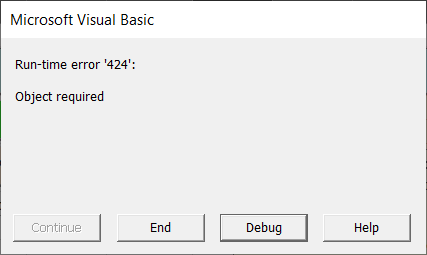
我有3段代码--试着让它们一起工作。双击,如果条件满足-粘贴发生.如果目标单元格不是空的,则会弹出带有“是/否”的消息框。如果用户想要覆盖单元格,代码应该这样做。但是,在Sub Paste()上获得错误:
Target.Value = S
Private Sub Worksheet_BeforeDoubleClick(ByVal Target As Range, Cancel As Boolean)
 If Not Application.Intersect(Target, Range("k4:s8")) Is Nothing And Target.Value = "" Then
 Cancel = True
 Call Paste
 'Else: MsgBox "If appropriate, clear the cell first. This is to prevent unintended data overwrite.", vbOKOnly + vbCritical, "Heads up" 'this works if MsgBox_YN_Paste won't
 Else: Call MsgBox_YN_Paste
 End If
End SubSub Paste()
'Tools -> References -> Microsoft Forms 2.0 Object Library
'or you will get a "Compile error: user-defined type not defined"
Dim DataObj As New MSForms.DataObject
Dim S As String
DataObj.GetFromClipboard
S = DataObj.GetText
'Debug.Print S 'print code in the Intermediate box in the Macro editor
Target.Value = S
End SubSub MsgBox_YN_Paste()
Dim AnswerYes As String
Dim AnswerNo As String
AnswerYes = MsgBox("Do you Wish to replace contents of this cell?", vbQuestion + vbYesNo, "Heads Up!")
If AnswerYes = vbYes Then
'Range("A1:A2").Copy Range("C1")
'ActiveCell.Clear
'or?
'Target.Value = ""
Call Paste
Else
'Range("A1:A2").Copy Range("E1")
End If
End Sub回答 3
Stack Overflow用户
发布于 2022-07-20 18:16:51
我会这样做:
Private Sub Worksheet_BeforeDoubleClick(ByVal Target As Range, Cancel As Boolean)

    If Application.Intersect(Target, Range("k4:s8")) Is Nothing Then Exit Sub

    If Len(Target.Value) > 0 Then
        If MsgBox("Do you Wish to replace contents of this cell?", _
                   vbQuestion + vbYesNo, "Heads Up!") <> vbYes Then Exit Sub
    End If

    Target.Value = ClipBoardText()
    Cancel = True
End Sub

'Tools -> References -> Microsoft Forms 2.0 Object Library
Function ClipBoardText() As String
    With New MSForms.DataObject
        .GetFromClipboard
        ClipBoardText = .GetText
    End With
End FunctionStack Overflow用户
发布于 2022-07-20 18:05:50
未定义目标。试一试
Private Sub Worksheet_BeforeDoubleClick(ByVal Target As Range, Cancel As Boolean)
 If Not Application.Intersect(Target, Range("k4:s8")) Is Nothing And Target.Value = "" Then
 Cancel = True
 Paste(Target)
 'Else: MsgBox "If appropriate, clear the cell first. This is to prevent unintended data overwrite.", vbOKOnly + vbCritical, "Heads up" 'this works if MsgBox_YN_Paste won't
 Else: Call MsgBox_YN_Paste
 End If
End Sub


Sub Paste(ByVal Target As Range)
'Tools -> References -> Microsoft Forms 2.0 Object Library
'or you will get a "Compile error: user-defined type not defined"
  Dim DataObj As New MSForms.DataObject
  Dim S As String
  DataObj.GetFromClipboard
  S = DataObj.GetText
  'Debug.Print S 'print code in the Intermediate box in the Macro editor
  Target.Value = S
End SubStack Overflow用户
发布于 2022-07-20 18:22:58
为了理解清楚,我在代码中做了一些清理。请注意,MsgBox的返回是一个整数数值类型,因此涉及的变量(AnswerYes,我改为AnswerYesOrNo ( integer ),消除了另一个未使用的AnswerNo )。“Debug.Print”实际上是打印在VBE即时窗口上的。
Option Explicit

Private Sub Worksheet_BeforeDoubleClick(ByVal Target As Range, Cancel As Boolean)
    If Not Application.Intersect(Target, Range("k4:s8")) Is Nothing And Target.Value = "" Then
        Cancel = True
        Call PasteIt(Target)
        'Else: MsgBox "If appropriate, clear the cell first. This is to prevent unintended data overwrite.", vbOKOnly + vbCritical, "Heads up" 'this works if MsgBox_YN_Paste won't
    Else: Call MsgBox_YN_Paste(Target)
    End If
End Sub

Sub PasteIt(ByRef Target As Excel.Range)
    'Tools -> References -> Microsoft Forms 2.0 Object Library
    'or you will get a "Compile error: user-defined type not defined"
    Dim DataObj As New MSForms.DataObject
    Dim S As String
    DataObj.GetFromClipboard
    S = DataObj.GetText
    'Debug.Print S 'print code in the VBE Immediate Window
    Target.Value = S
End Sub

Sub MsgBox_YN_Paste(ByRef Target As Excel.Range)

    Dim AnswerYesOrNo As Integer

    AnswerYesOrNo = MsgBox("Do you Wish to replace contents of this cell?", vbQuestion + vbYesNo, "Heads Up!")

    If AnswerYesOrNo = vbYes Then
        Call PasteIt(Target)
    End If

End Sub页面原文内容由Stack Overflow提供。腾讯云小微IT领域专用引擎提供翻译支持
原文链接:
https://stackoverflow.com/questions/73056187
复制相关文章
相似问题
腾讯云开发者

Copyright © 2013 - 2026 Tencent Cloud. All Rights Reserved. 腾讯云 版权所有
深圳市腾讯计算机系统有限公司 ICP备案/许可证号:粤B2-20090059  粤公网安备44030502008569号
腾讯云计算(北京)有限责任公司 京ICP证150476号 | 京ICP备11018762号