
当使用localStorage时用msal-react注销所有选项卡
我有一个使用NextJS 12.x的Reactive18.x应用程序,它使用msal-react 1.4.4 (依赖于msal-browser 2.28.0)和Azure B2C进行身份验证。我的配置如下:
export const msalConfig: Configuration = {
  auth: {
    clientId: clientId as string,
    authority: `https://${tenant}.b2clogin.com/${tenant}.onmicrosoft.com/${b2cPolicy}`,
    knownAuthorities: [`${tenant}.b2clogin.com`],
    redirectUri: '/openid-redirect',
    postLogoutRedirectUri: '/',
  },
  cache: {
    cacheLocation: 'localStorage',
  },
};页面由<MsalAuthenticationTemplate interactionType={InteractionType.Redirect} ...>组件保护,以通过重定向流强制登录。一切都很好。
在我的导航栏中有一个注销按钮:
const handleLogout = () => {
  msalInstance.logoutRedirect({
    account: msalInstance.getActiveAccount(),
  });
};<button onClick={() => handleLogout()}>
Logout
</button>标签本身就可以很好地注销。
所有其他选项卡都不允许访问access_token和其他信息,因此它们实际上是“注销”的,不能再用bearer身份验证调用API了。但是,该应用程序的UI不显示用户已注销。
我曾期望所有其他选项卡注意到注销和相应的更新,可能会将用户重定向到另一个页面。或者至少我希望我配置的loggerCallback显示有其他选项卡登录我们的事件或通知。
如果手动执行window.addEventListener('storage', evt => console.log(evt));,则会看到其他选项卡正在清除存储。
我找到了另一个相关问题,它是关于跨设备注销的,我希望它依赖于OpenID会话管理规范。我想这个解决方案可能对我有用,但另一个问题或答案也包含了一个可行的解决方案。
相关的MSDN文档没有提到“多个选项卡”或类似的东西。
如何配置我的应用程序和msal-对从其他选项卡发出通知的响应?
解决方案
目前,我们已经使用了以下解决方法:
export function useLogoutInOtherTabsListener() {
  const router = useRouter();

  useEffect(() => {
    const handler = (evt: StorageEvent) => {
      if (evt.key === 'logout-event' && evt.newValue === 'started') {
        msalInstance.logoutRedirect({
          onRedirectNavigate: () => false, // No need to do redirects via msal, we'll just route the user to '/' ourselves
        });
        router.push('/');
      }
    };

    window.addEventListener('storage', handler);
    return () => {
      window.removeEventListener('storage', handler);
    };
  }, [router]);
}export function logoutAllTabs(): void {
// We'd prefer to use an msal-mechanism, but so far couldn't find any.
// See also: https://stackoverflow.com/q/73051848/419956
window.localStorage.setItem('logout-event', 'started');
window.localStorage.removeItem('logout-event');
msalInstance.logoutRedirect();
}并在useLogoutInOtherTabsListener()中调用_app.tsx。
回答 1
Stack Overflow用户
发布于 2022-07-21 23:07:47
- 清除会话ids应该能够注销所有页面。要做到这一点,我们可以使用
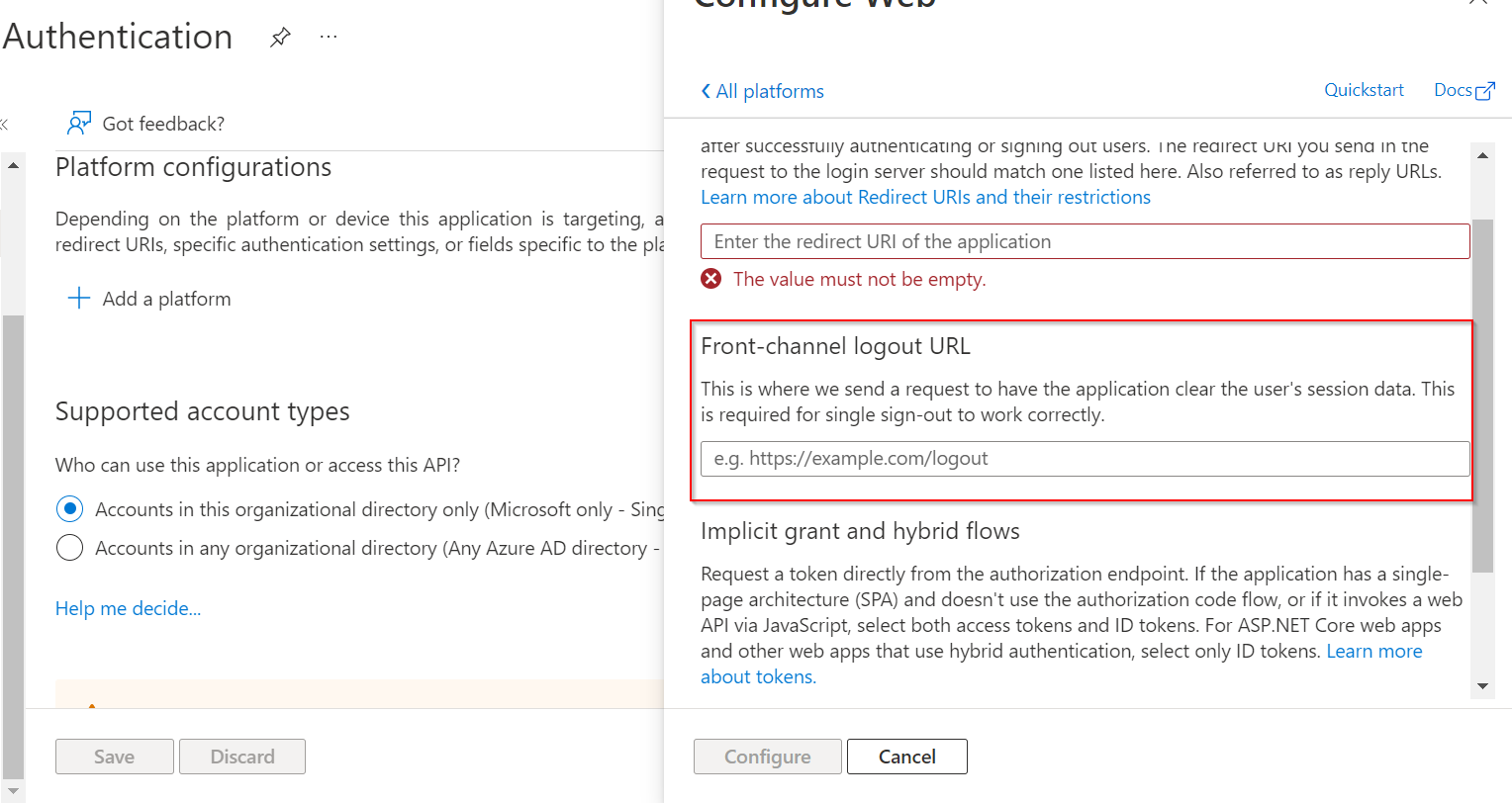
front channel logout的概念。 - 在
front channel logout中,我们基本上加载了一个不同的页面,它将完成所有的注销过程和清除缓存,并停止对站点的本地访问。在这里,页面将被加载到隐藏的iframe中,并且只执行签出操作。 - 但是,要使这一工作有效,我们必须将
system.allowRedirectInIframe设置为true。此外,我们还必须在门户注册注销url。
const msal = new PublicClientApplication({
    auth: {
        clientId: "my-client-id"
    },
    system: {
        allowRedirectInIframe: true
    }
})

// Automatically on page load
msal.logoutRedirect({
    onRedirectNavigate: () => {
        // Return false to stop navigation after local logout
        return false;
    }
});请参考下面的文档,上面的代码来自那里。
https://stackoverflow.com/questions/73051848
复制相似问题
腾讯云开发者

Copyright © 2013 - 2026 Tencent Cloud. All Rights Reserved. 腾讯云 版权所有
深圳市腾讯计算机系统有限公司 ICP备案/许可证号:粤B2-20090059  粤公网安备44030502008569号
腾讯云计算(北京)有限责任公司 京ICP证150476号 | 京ICP备11018762号