
自定义样式CountryCodePicker
自定义样式CountryCodePicker
提问于 2022-07-20 09:30:15
我想要这种类型的country_code_picker样式,但不能调整width和height of 采摘机

这是我的密码
InputDecorator(
              decoration: InputDecoration(
                labelText: 'Nationality',
                labelStyle:
                    const TextStyle(color: AppColors.fIconsAndTextColor),
                enabledBorder: OutlineInputBorder(
                  borderSide:
                      const BorderSide(color: AppColors.fIconsAndTextColor),
                  borderRadius: BorderRadius.circular(20.0),
                ),
                border: OutlineInputBorder(
                  borderRadius: BorderRadius.circular(20.0),
                ),
              ),
              child: CountryCodePicker(
                initialSelection: 'AE',
                showCountryOnly: true,
                textOverflow: TextOverflow.visible,
                showOnlyCountryWhenClosed: true,
                showDropDownButton: true,
              ),
            ),
我的输出
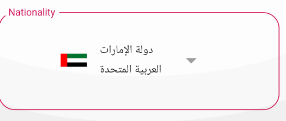
我怎样才能使这个看起来像上面的风格呢?
回答 1
Stack Overflow用户
回答已采纳
发布于 2022-07-20 10:15:15
我们可以使用Stack和CountryCodePicker的建设者。
body: LayoutBuilder(
  builder: (context, constraints) => Center(
    child: Container(
      width: constraints.maxWidth,
      height: 64,
      decoration: BoxDecoration(
          border: Border.all(color: Colors.red, width: 1),
          borderRadius: const BorderRadius.all(Radius.circular(24))),
      child: Stack(
        clipBehavior: Clip.none,
        children: [
          Positioned(
            top: -10,
            left: 24,
            child: Container(
              padding: const EdgeInsets.only(left: 8.0, right: 8),
              color: Colors.white,
              // container can be replace with text filed color
              child: Text(
                "Language",
                style: TextStyle(
                  color: Colors.red,
                ),
              ),
            ),
          ),
          SizedBox(
            width: constraints.maxWidth,
            height: 64,
            child: CountryCodePicker(
              builder: (p0) {
                return Padding(
                  padding: const EdgeInsets.symmetric(
                    horizontal: 25,
                  ),
                  child: Row(
                    mainAxisAlignment: MainAxisAlignment.spaceBetween,
                    children: [
                      if (p0?.code != null) Text(p0!.code!),
                      // decorate others
                      Icon(Icons.arrow_drop_down),
                    ],
                  ),
                );
              },
              showCountryOnly: true,
              showOnlyCountryWhenClosed: true,
              showDropDownButton: true,
            ),
          )
        ],
      ),
    ),
  ),
),
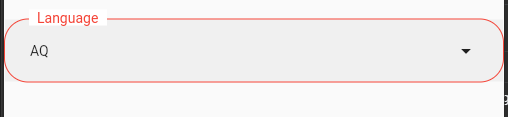
修改一些装饰,它将是完美的。
您可以使用prefix而不是prefixIcon。这个问题不会总是被人看到的。为此,您可以在autofocus: true,上使用TextFiled,您可以检查这条线的前缀可见性。
 TextFormField(
            autofocus: true,
            decoration:  InputDecoration(
      isDense: true,
      prefix: CountryCodePicker(
        showCountryOnly: true,
        showOnlyCountryWhenClosed: true,
        showDropDownButton: true,
      ),
      label: Text('Language'),
      floatingLabelAlignment: FloatingLabelAlignment.start,
      floatingLabelBehavior:
),您还可以使用Sizedbox包装CountryCodePicker以进行调整大小。
页面原文内容由Stack Overflow提供。腾讯云小微IT领域专用引擎提供翻译支持
原文链接:
https://stackoverflow.com/questions/73049124
复制相关文章
相似问题
腾讯云开发者

Copyright © 2013 - 2026 Tencent Cloud. All Rights Reserved. 腾讯云 版权所有
深圳市腾讯计算机系统有限公司 ICP备案/许可证号:粤B2-20090059  粤公网安备44030502008569号
腾讯云计算(北京)有限责任公司 京ICP证150476号 | 京ICP备11018762号