
QRawFont/QPainterPath再现图标
我正在尝试复制FontAwesome上的一个图标。
首先,我加载字体并得到点:
int fa = QFontDatabase::addApplicationFont(":/fonts/fa-solid-900.ttf");
auto fas = QFontDatabase::applicationFontFamilies(fa).at(0);

QRawFont rfont = QRawFont::fromFont(fas);

qDebug() << rfont.pathForGlyph(0);
其结果是:
QPainterPath: Element count=45
 -> MoveTo(x=10.5, y=-14)
 -> LineTo(x=1.5, y=-14)
 -> CurveTo(x=1.08333, y=-13.9792)
 -> CurveToData(x=0.729167, y=-13.8333)
 -> CurveToData(x=0.4375, y=-13.5625)
 -> CurveTo(x=0.166667, y=-13.2708)
 -> CurveToData(x=0.0208333, y=-12.9167)
 -> CurveToData(x=0, y=-12.5)
 -> LineTo(x=0, y=0.5)
 -> CurveTo(x=0.0208333, y=0.916667)
 -> CurveToData(x=0.166667, y=1.27083)
 -> CurveToData(x=0.4375, y=1.5625)
 -> CurveTo(x=0.729167, y=1.83333)
 -> CurveToData(x=1.08333, y=1.97917)
 -> CurveToData(x=1.5, y=2)
 -> LineTo(x=10.5, y=2)
 -> CurveTo(x=10.9167, y=1.97917)
 -> CurveToData(x=11.2708, y=1.83333)
 -> CurveToData(x=11.5625, y=1.5625)
 -> CurveTo(x=11.8333, y=1.27083)
 -> CurveToData(x=11.9792, y=0.916667)
 -> CurveToData(x=12, y=0.5)
 -> LineTo(x=12, y=-12.5)
 -> CurveTo(x=11.9792, y=-12.9167)
 -> CurveToData(x=11.8333, y=-13.2708)
 -> CurveToData(x=11.5625, y=-13.5625)
 -> CurveTo(x=11.2708, y=-13.8333)
 -> CurveToData(x=10.9167, y=-13.9792)
 -> CurveToData(x=10.5, y=-14)
 -> MoveTo(x=8.8125, y=-12)
 -> LineTo(x=6, y=-7.8125)
 -> LineTo(x=3.21875, y=-12)
 -> LineTo(x=8.8125, y=-12)
 -> MoveTo(x=2, y=-10.1875)
 -> LineTo(x=4.8125, y=-6)
 -> LineTo(x=2, y=-1.8125)
 -> LineTo(x=2, y=-10.1875)
 -> MoveTo(x=3.21875, y=0)
 -> LineTo(x=6, y=-4.1875)
 -> LineTo(x=8.8125, y=0)
 -> LineTo(x=3.21875, y=0)
 -> MoveTo(x=10, y=-1.8125)
 -> LineTo(x=7.21875, y=-6)
 -> LineTo(x=10, y=-10.1875)
 -> LineTo(x=10, y=-1.8125)
然后我试着复制它:
QPainterPath* polygonPath = new QPainterPath();

polygonPath->moveTo(10.5, -14);
polygonPath->lineTo(1.5, -14);
polygonPath->CurveTo(1.08333, -13.9792);
polygonPath->CurveToData(0.729167, -13.8333);
polygonPath->CurveToData(0.4375, -13.5625);
polygonPath->CurveTo(0.166667, -13.2708);
polygonPath->CurveToData(0.0208333, -12.9167);
polygonPath->CurveToData(0, -12.5);
polygonPath->lineTo(0, 0.5);
polygonPath->CurveTo(0.0208333, 0.916667);
polygonPath->CurveToData(0.166667, 1.27083);
polygonPath->CurveToData(0.4375, 1.5625);
polygonPath->CurveTo(0.729167, 1.83333);
polygonPath->CurveToData(1.08333, 1.97917);
polygonPath->CurveToData(1.5, 2);
polygonPath->lineTo(10.5, 2);
polygonPath->CurveTo(10.9167, 1.97917);
polygonPath->CurveToData(11.2708, 1.83333);
polygonPath->CurveToData(11.5625, 1.5625);
polygonPath->CurveTo(11.8333, 1.27083);
polygonPath->CurveToData(11.9792, 0.916667);
polygonPath->CurveToData(12, 0.5);
polygonPath->lineTo(12, -12.5);
polygonPath->CurveTo(11.9792, -12.9167);
polygonPath->CurveToData(11.8333, -13.2708);
polygonPath->CurveToData(11.5625, -13.5625);
polygonPath->CurveTo(11.2708, -13.8333);
polygonPath->CurveToData(10.9167, -13.9792);
polygonPath->CurveToData(10.5, -14);
polygonPath->moveTo(8.8125, -12);
polygonPath->lineTo(6, -7.8125);
polygonPath->lineTo(3.21875, -12);
polygonPath->lineTo(8.8125, -12);
polygonPath->moveTo(2, -10.1875);
polygonPath->lineTo(4.8125, -6);
polygonPath->lineTo(2, -1.8125);
polygonPath->lineTo(2, -10.1875);
polygonPath->moveTo(3.21875, 0);
polygonPath->lineTo(6, -4.1875);
polygonPath->lineTo(8.8125, 0);
polygonPath->lineTo(3.21875, 0);
polygonPath->moveTo(10, -1.8125);
polygonPath->lineTo(7.21875, -6);
polygonPath->lineTo(10, -10.1875);
polygonPath->lineTo(10, -1.8125);
polygonPath->closeSubpath();
不幸的是,我不知道用什么代替CurveTo和CurveToData。我一直在看医生,但我就是不明白。
我想要实现的是获得图标点,以便我可以画它作为一个多边形。与此类似:
QPolygon symbol;

symbol << QPoint(0.65, -9.75)
    << QPoint(5.85, -9.75)
    << QPoint(5.85, 0)
    << QPoint(0.65, 0);

painter.drawPolygon(symbol);
如果有人能这么好地提供一个解决方案,那就太棒了。
回答 1
Stack Overflow用户
发布于 2022-07-19 10:34:47
对于关于QPainterPath的另一个答案,我得到的反馈是,OP的实际问题似乎是为预期的字形检索油漆工路径。
因此,我修改了MCVE以绘制选定字符的画家路径。
首先,我使用MS字符表选择了一个很好的字符:
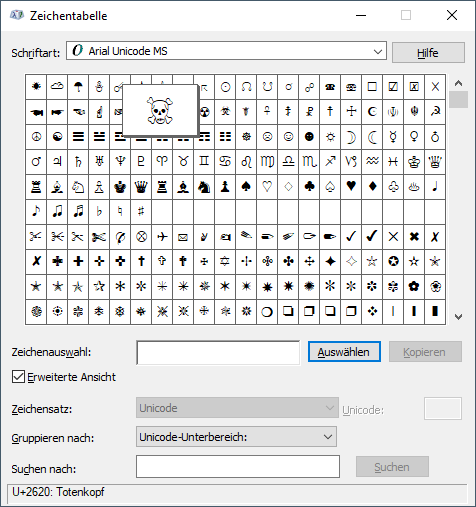
相关信息是在底部状态行:U+2620中显示的Unicode代码点。
然后,我修改了makeSample()以使用该字符检索相应的画家路径:
QPainterPath makeSample()
{
  // get a font which should be able to provide most of the Unicode code points
  QFont qFont("Arial Unicode MS");
  // transform font into a raw font
  QRawFont qRawFont = QRawFont::fromFont(qFont);
  // build a Qt string with the intended character
  QString qText(1, QChar(0x2620)); // 0x2620 is the Unicode code point for Skull
  // retrieve the glyph index for the character
  QVector<quint32> qGlyphIndices = qRawFont.glyphIndexesForString(qText);
  // build the Qt painter path
  QPainterPath qPainterPath;
  for (quint32 qGlyphIndex : qGlyphIndices) {
    qPainterPath += qRawFont.pathForGlyph(qGlyphIndex);
  }
  // done
  return qPainterPath;
}第一个结果是中文字形,直到我意识到字形索引与Unicode代码点无关。(我使用了0x2620 ( Unicode代码点)作为字形索引。)因此,我介绍了QRawFont::glyphIndexesForString()的转换。
与OP所描述的类似,接下来我得到的是左上角的一些线条。浏览一下转储列表,我就意识到转储中存在y坐标,其负数即呈现在我的Canvas小部件的顶部边框之外。
因此,我稍微调整了渲染,直到我发现它可以接受为止。
整个MCVE:
#include <QtWidgets>

class Canvas: public QWidget {

  private:
    QPainterPath *_pQPainterPath;

  public:
    explicit Canvas(QPainterPath* pQPainterPath, QWidget* pQParent = nullptr):
      QWidget(pQParent),
      _pQPainterPath(pQPainterPath)
    { }

  protected:
    virtual void paintEvent(QPaintEvent* pQEvent) override;
};

void Canvas::paintEvent(QPaintEvent* pQEvent)
{
  if (!_pQPainterPath) return;
  const QRectF qRect = _pQPainterPath->boundingRect();
  const qreal scale
    = std::min(width() / qRect.width(), height() / qRect.height());
  const QPointF center(0.5 * width(), 0.5 * height());
  QPainter qPainter(this);
  QPen qPen(Qt::blue);
  qPen.setCosmetic(true);
  qPainter.setPen(qPen);
  qPainter.translate(center);
  qPainter.scale(scale, scale);
  qPainter.translate(-qRect.center());
  qPainter.drawPath(*_pQPainterPath);
}

const char* toText(QPainterPath::ElementType type)
{
  static const char* const texts[] = {
    "MoveTo", "LineTo", "CurveTo", "CurveToData"
  };
  const size_t n = std::size(texts);
  return type < n ? texts[type] : "???";
}

QString list(const QPainterPath& qPainterPath)
{
  QString qText;
  QTextStream qOut(&qText);
  for (int i = 0, n = qPainterPath.elementCount(); i < n; ++i) {
    const QPainterPath::Element& qPPElem = qPainterPath.elementAt(i);
    qOut << toText(qPPElem.type) << "(x=" << qPPElem.x << ", y=" << qPPElem.y << ")\n";
  }
  return qText;
}

QString listSrc(const QPainterPath& qPainterPath)
{
  QString qText;
  QTextStream qOut(&qText);
  qOut << "QPainterPath qPainterPath;\n";
  for (int i = 0, n = qPainterPath.elementCount(); i < n; ++i) {
    const QPainterPath::Element& qPPElem = qPainterPath.elementAt(i);
    switch (qPPElem.type) {
      case QPainterPath::MoveToElement:
        qOut << "qPainterPath.moveTo(" << qPPElem.x << ", " << qPPElem.y << ");\n";
        break;
      case QPainterPath::LineToElement:
        qOut << "qPainterPath.lineTo(" << qPPElem.x << ", " << qPPElem.y << ");\n";
        break;
      case QPainterPath::CurveToElement: {
        if (i + 2 >= n
          || qPainterPath.elementAt(i + 1).type != QPainterPath::CurveToDataElement
          || qPainterPath.elementAt(i + 2).type != QPainterPath::CurveToDataElement) {
          qOut << "// BROKEN qPainterPath.cubicTo();\n";
          break; // ERROR!
        }
        const QPainterPath::Element& qPPElem1 = qPainterPath.elementAt(++i);
        const QPainterPath::Element& qPPElem2 = qPainterPath.elementAt(++i);
        qOut << "qPainterPath.cubicTo(" << qPPElem.x << ", " << qPPElem.y << ", "
           << qPPElem1.x << ", " << qPPElem1.y << ", "
           << qPPElem2.x << ", " << qPPElem2.y << ");\n";
      } break;
    }
  }
  return qText;
}

QPainterPath makeSample()
{
  QFont qFont("Arial Unicode MS");
  QRawFont qRawFont = QRawFont::fromFont(qFont);
  QString qText(1, QChar(0x2620)); // 0x2620 is the Unicode code point for Skull
  QVector<quint32> qGlyphIndices = qRawFont.glyphIndexesForString(qText);
  QPainterPath qPainterPath;
  for (quint32 qGlyphIndex : qGlyphIndices) {
    qPainterPath += qRawFont.pathForGlyph(qGlyphIndex);
  }
  return qPainterPath;
}

int main(int argc, char** argv)
{
  qDebug() << "Qt Version:" << QT_VERSION_STR;
  QApplication app(argc, argv);
  // setup data
  QPainterPath qPainterPath = makeSample();
  qDebug() << qPainterPath;
  // setup GUI
  QMainWindow qWinMain;
  qWinMain.setWindowTitle("Test QRawFont - QPainterPath");
  qWinMain.resize(480, 280);
  QSplitter qVSplit(Qt::Vertical);
  Canvas canvas(&qPainterPath);
  qVSplit.addWidget(&canvas);
  QSplitter qHSplit(Qt::Horizontal);
  QPlainTextEdit qEditCode;
  qEditCode.setPlainText(listSrc(qPainterPath));
  qHSplit.addWidget(&qEditCode);
  QPlainTextEdit qEditPath;
  qEditPath.setPlainText(list(qPainterPath));
  qHSplit.addWidget(&qEditPath);
  qVSplit.addWidget(&qHSplit);
  qVSplit.setSizes({ 100, 180 });
  qWinMain.setCentralWidget(&qVSplit);
  qWinMain.show();
  // runtime loop
  return app.exec();
}
输出:
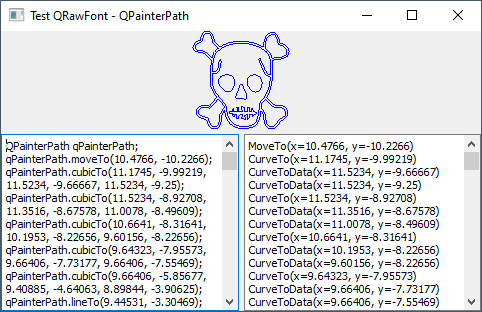
虽然渲染可能并不完美,但确实有相似之处。
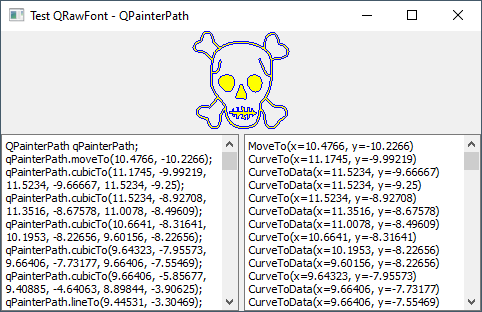
这是它的样子,如果一个黄色的刷子是与蓝色的笔。(在添加qPen.setCosmetic(true);之前,我删除了画笔,而结果却不符合我的预期。)
https://stackoverflow.com/questions/73031944
复制相似问题
腾讯云开发者

Copyright © 2013 - 2026 Tencent Cloud. All Rights Reserved. 腾讯云 版权所有
深圳市腾讯计算机系统有限公司 ICP备案/许可证号:粤B2-20090059  粤公网安备44030502008569号
腾讯云计算(北京)有限责任公司 京ICP证150476号 | 京ICP备11018762号