
用Svelte + Vite应用程序加载babel.config错误
用Svelte + Vite应用程序加载babel.config错误
提问于 2022-07-18 16:14:28
我正在用Svelte和Vite构建一个新的应用程序,我想用它来做一个有趣的测试。我像往常一样配置了它,但是我有关于一个错误的信息:
tests/App.spec.js
  ● Test suite failed to run

    /Users/ewakadziolka/Desktop/svelte/aloes/babel.config.js: Error while loading config - You appear to be using a native ECMAScript module configuration file, which is only supported when running Babel asynchronously.

      at loadCjsOrMjsDefault (node_modules/@babel/core/lib/config/files/module-types.js:82:13)
          at loadCjsOrMjsDefault.next (<anonymous>)
      at readConfigJS (node_modules/@babel/core/lib/config/files/configuration.js:215:47)
          at readConfigJS.next (<anonymous>)
      at Function.<anonymous> (node_modules/@babel/core/lib/gensync-utils/async.js:27:3)
      at evaluateSync (node_modules/gensync/index.js:251:28)
      at Function.sync (node_modules/gensync/index.js:89:14)
      at sync (node_modules/@babel/core/lib/gensync-utils/async.js:78:25)
      at sync (node_modules/gensync/index.js:182:19)

Test Suites: 1 failed, 1 total
Tests:       0 total
Snapshots:   0 total
Time:        2.681 s
Ran all test suites related to changed files.

Watch Usage: Press w to show more.
一个应用程序。短暂的苗条是非常容易的:
<main>
  <h1>Hello word!</h1>
</main>
我的babel.congig.js是这样的
module.exports = { presets: [["@babel/preset-env", { targets: { node: "current" } }]],
};
我的package.json是这样的:
{
  "name": "aloes",
  "private": true,
  "version": "0.0.0",
  "type": "module",
  "scripts": {
    "dev": "vite",
    "build": "vite build",
    "preview": "vite preview",
    "test": "jest --watch"
  },
  "devDependencies": {
    "@babel/preset-env": "^7.18.9",
    "@sveltejs/vite-plugin-svelte": "^1.0.1",
    "@testing-library/dom": "^8.16.0",
    "@testing-library/svelte": "^3.1.3",
    "@testing-library/user-event": "^14.2.6",
    "babel-jest": "^28.1.3",
    "jest": "^28.1.3",
    "jest-environment-jsdom": "^28.1.3",
    "svelte": "^3.49.0",
    "svelte-jester": "^2.3.2",
    "vite": "^3.0.0"
  },
  "jest": {
    "transform": {
      "^.+\\.svelte$": "svelte-jester",
      "^.+\\.js$": "babel-jest"
    },
    "testEnvironment": "jsdom"
  }
}
当我使用rollup来构建一个应用程序时,这个配置非常好。
回答 1
Stack Overflow用户
回答已采纳
发布于 2022-07-18 17:47:35
我找到了解决办法。我把babel.config.js改成了babel.config.cjs
module.exports = {
  presets: [
     [
        '@babel/preset-env',
        {
           targets: {
              node: 'current'
           }
        }
     ]
  ]
};
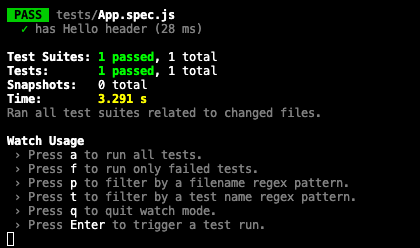
现在它起作用了:
页面原文内容由Stack Overflow提供。腾讯云小微IT领域专用引擎提供翻译支持
原文链接:
https://stackoverflow.com/questions/73025474
复制相关文章
相似问题
腾讯云开发者

Copyright © 2013 - 2026 Tencent Cloud. All Rights Reserved. 腾讯云 版权所有
深圳市腾讯计算机系统有限公司 ICP备案/许可证号:粤B2-20090059  粤公网安备44030502008569号
腾讯云计算(北京)有限责任公司 京ICP证150476号 | 京ICP备11018762号