
vscode没有在映像构建上安装请求的扩展。
vscode没有在映像构建上安装请求的扩展。
提问于 2022-07-18 13:17:55
我们已经按照这指南设置了一个最小的示例,这表明在我们的安装程序中,在构建开发容器时,扩展并不是自动安装的。
.devcontainer.json指定应该在容器构建上安装golang.go和ms-python.python。
{
    "name": "Container 1",
    "dockerComposeFile": ["../docker-compose.yml"],
    "service": "container-1",
    "shutdownAction": "none",
    "extensions": [
        "golang.go",
        "ms-python.python"
    ],
    // Open the sub-folder with the source code
    "workspaceFolder": "/workspace/container1-src",
  }
虽然这些扩展似乎被缓存了,但它们最终没有被安装(可用)。下面是日志的摘录
[23638 ms] 861598b8-962e-4242-883b-0c2e172dc4e0
[23638 ms]
[23639 ms] Start: Starting VS Code Server
[23640 ms] Start: Preparing Extensions
[23641 ms] Start: Run in container: test ! -f '/root/.vscode-server-insiders/data/Machine/.installExtensionsMarker' && set -o noclobber && mkdir -p '/root/.vscode-server-insiders/data/Machine' && { > '/root/.vscode-server-insiders/data/Machine/.installExtensionsMarker' ; } 2> /dev/null
[23652 ms]
[23653 ms]
[23660 ms] Extensions cache, install extensions: ms-python.python, golang.go, vscode.python, ms-python.vscode-pylance, ms-toolsai.jupyter, ms-python.pylint
[23661 ms] Start: Run in container: test -d /root/.vscode-server-insiders/extensionsCache && ls /root/.vscode-server-insiders/extensionsCache || true
[23666 ms]
[23666 ms]
[23670 ms] Extensions cache, copy to remote: ms-python.python-2022.4.1, ms-python.vscode-pylance-2022.4.0, ms-toolsai.jupyter-2022.3.1000901801, ms-toolsai.jupyter-keymap-1.0.0, ms-toolsai.jupyter-renderers-1.0.6
[23798 ms] Start: Run in container: # Copy extensions to remote
[24013 ms] /root
[24013 ms]
[24013 ms] Start: Run in container: cat <<'EOF-/tmp/vscode-remote-containers-525ff14d87410cce22568eada8e775519d4c39e6.js' >/tmp/vscode-remote-containers-525ff14d87410cce22568eada8e775519d4c39e6.js
[24128 ms]
[24129 ms]
[24130 ms] Start: Run in container: cat <<'EOF-/tmp/vscode-remote-containers-server-525ff14d87410cce22568eada8e775519d4c39e6.js' >/tmp/vscode-remote-containers-server-525ff14d87410cce22568eada8e775519d4c39e6.js_1658149613876
[24152 ms]
[24153 ms]
[24435 ms] userEnvProbe PATHs:
Probe:     '/usr/local/sbin:/usr/local/bin:/usr/sbin:/usr/bin:/sbin:/bin'
Container: '/usr/local/sbin:/usr/local/bin:/usr/sbin:/usr/bin:/sbin:/bin'
[24474 ms]
[24475 ms]
[24476 ms] Start: Run in Host: docker exec -i -u root -e SHELL=/bin/bash -e VSCODE_AGENT_FOLDER=/root/.vscode-server-insiders -w /root/.vscode-server-insiders/bin/1cd90cceddf3c413673963ab6f154d2ff294b17c-insider 0e72ac2aff313c24e70caa3b5b9d74428f7be41d6d00acc414dc4339e84ff807 /root/.vscode-server-insiders/bin/1cd90cceddf3c413673963ab6f154d2ff294b17c-insider/bin/code-server-insiders --log debug --force-disable-user-env --server-data-dir /root/.vscode-server-insiders --use-host-proxy --telemetry-level all --accept-server-license-terms --host 127.0.0.1 --port 0 --connection-token-file /root/.vscode-server-insiders/data/Machine/.connection-token-1cd90cceddf3c413673963ab6f154d2ff294b17c-insider --extensions-download-dir /root/.vscode-server-insiders/extensionsCache --install-extension ms-python.python --install-extension golang.go --install-extension vscode.python --install-extension ms-python.vscode-pylance --install-extension ms-toolsai.jupyter --install-extension ms-python.pylint --start-server --disable-websocket-compression
...
...
25393 ms] Installing extensions...
[25400 ms] [13:06:55] Extension host agent started.
[25517 ms] Port forwarding 63455 > 34827 > 34827 stderr: Connection established
[25601 ms] Port forwarding connection from 63459 > 34827 > 34827 in the container.
[25602 ms] Start: Run in Host: docker exec -i -u root -e VSCODE_REMOTE_CONTAINERS_SESSION=966c34aa-e1b8-4837-bd34-7dcc777a8ac81658149588164 0e72ac2aff313c24e70caa3b5b9d74428f7be41d6d00acc414dc4339e84ff807 /root/.vscode-server-insiders/bin/1cd90cceddf3c413673963ab6f154d2ff294b17c-insider/node -e
[25705 ms] [13:06:55] ComputeTargetPlatform: linux-x64
[25960 ms] [13:06:55] [127.0.0.1][831a8c84][ManagementConnection] New connection established.
[26132 ms] Port forwarding 63459 > 34827 > 34827 stderr: Connection established
[26388 ms] [13:06:56] [127.0.0.1][5655a2f8][ExtensionHostConnection] New connection established.
[26425 ms] [13:06:56] [127.0.0.1][5655a2f8][ExtensionHostConnection] <250> Launched Extension Host Process.
[32331 ms] [13:07:02] Getting Manifest... ms-vscode.vscode-js-profile-table
[33009 ms] [13:07:02] Installing extension: ms-vscode.vscode-js-profile-table
[13:07:02] Installing the extension without checking dependencies and pack ms-vscode.vscode-js-profile-table
[33131 ms] [13:07:02] Extracted extension to /root/.vscode-server-insiders/extensions/.1eafe36a-5761-4868-8244-3416d12fa1b5: ms-vscode.vscode-js-profile-table
[33138 ms] [13:07:02] Renamed to /root/.vscode-server-insiders/extensions/ms-vscode.vscode-js-profile-table-1.0.3
[33142 ms] [13:07:02] Extracting completed. ms-vscode.vscode-js-profile-table
[33143 ms] [13:07:02] Extension installed successfully: ms-vscode.vscode-js-profile-table
[34480 ms] Extensions cache, remote removals: None
[94501 ms] Extensions cache, remote removals: None
[154508 ms] Extensions cache, remote removals: None
[214520 ms] Extensions cache, remote removals: None
[274526 ms] Extensions cache, remote removals: None
[334542 ms] Extensions cache, remote removals: None
映像生成上只安装了一个包。
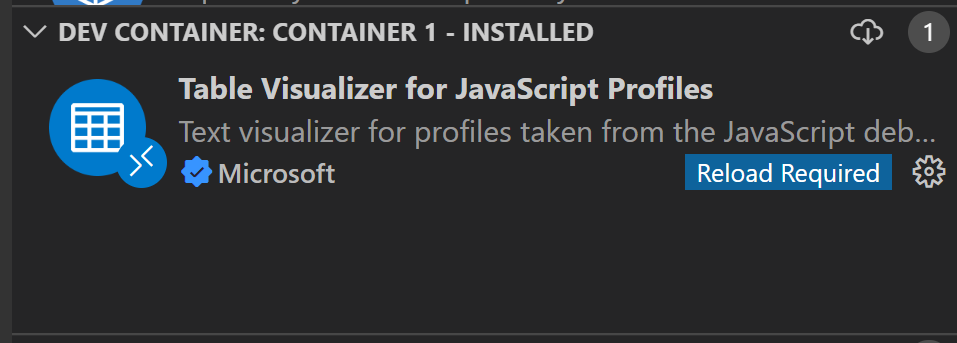
我们的设置:公司笔记本电脑后面的防火墙(zscalar)与对接窗口。通过GUI安装包在本地和容器内部都是没有问题的。我们已经在稳定的内部人士身上尝试过了。我们也尝试过从普通的窗口和wsl。
有什么想法吗?
回答 1
Stack Overflow用户
发布于 2022-07-19 17:26:17
这个github问题概述了解决方案。当我在控制台中没有得到self signed certificate in certificate chain错误时,在NODE_EXTRA_CA_CERTS中添加zscalar.crt解决了这个问题。现在正在按预期安装扩展程序。
对于另一个代理设置,我仍然面临一个类似的问题,无法让它工作。总的来说,扩展安装似乎对证书非常敏感,我仍然不清楚是否有更好的日志记录。
页面原文内容由Stack Overflow提供。腾讯云小微IT领域专用引擎提供翻译支持
原文链接:
https://stackoverflow.com/questions/73022954
复制相关文章
相似问题
腾讯云开发者

Copyright © 2013 - 2026 Tencent Cloud. All Rights Reserved. 腾讯云 版权所有
深圳市腾讯计算机系统有限公司 ICP备案/许可证号:粤B2-20090059  粤公网安备44030502008569号
腾讯云计算(北京)有限责任公司 京ICP证150476号 | 京ICP备11018762号