
使用pythin的传感器数据不会写入文件
使用pythin的传感器数据不会写入文件
提问于 2022-07-16 18:21:47
我目前正在为我的感应器在我的覆盆子Pi的脚本工作。下面的代码应该获取我的传感器的值,并将其写入data.json文件。我的问题是,如果我用Thonny编辑器运行file,一切正常,但是如果我将脚本添加到 crontab菜单中,数据就不会被写入data.json文件.。
代码:
import time
import board
import adafruit_dht
import psutil
import io
import json
import os
from gpiozero import LED
from datetime import date
from datetime import datetime

# We first check if a libgpiod process is running. If yes, we kill it!
for proc in psutil.process_iter():
    if proc.name() == "libgpiod_pulsein" or proc.name() == "libgpiod_pulsei":
        proc.kill()
sensor = adafruit_dht.DHT11(board.D23)

# init
temp_values = [10]
hum_values = [10]
counter = 0
dataLED = LED(13)
dataList = []

def errSignal():
    for i in range(0,3):
        dataLED.on()
        time.sleep(0.1)
        dataLED.off()
        time.sleep(0.1)

#on startup
def runSignal():
    for i in range(0,5):
        dataLED.on()
        time.sleep(0.2)
        dataLED.off()
        time.sleep(0.2)

def getExistingData():
    with open('data.json') as fp:
        dataList = json.load(fp)
    print(dataList)


def startupCheck():
    if os.path.isfile("data.json") and os.access("data.json", os.R_OK):
        # checks if file exists
        print("File exists and is readable.")
        # get json data  an push into arr on startup
        getExistingData()
    else:
        print("Either file is missing or is not readable, creating file...")
        # create json file
        with open("data.json", "w") as f:
            print("The json file is created.")#


def calc_avgValue(values):
    sum = 0
    for iterator in values:
        sum += iterator
    return sum / len(values)


def onOFF():
    dataLED.on()
    time.sleep(0.7)
    dataLED.off()


# data led blinking on startup
runSignal()

# checks if file exists
startupCheck()


while True:
    try:
        temp_values.insert(counter, sensor.temperature)
        hum_values.insert(counter, sensor.humidity)
        counter += 1
        time.sleep(6)
        if counter >= 10:
            print(
                "Temperature: {}*C   Humidity: {}% ".format(
                    round(calc_avgValue(temp_values), 2),
                    round(calc_avgValue(hum_values), 2)
                )
            )
            # get time
            today = date.today()
            now = datetime.now()


            # create json obj
            data = {
                "temperature": round(calc_avgValue(temp_values), 2),
                "humidity": round(calc_avgValue(hum_values), 2),
                "fullDate": str(today),
                "fullDate2": str(today.strftime("%d/%m/%Y")),
                "fullDate3": str(today.strftime("%B %d, %Y")),
                "fullDate4": str(today.strftime("%b-%d-%Y")),
                "date_time": str(now.strftime("%d/%m/%Y %H:%M:%S"))
            }


            # push data into list
            dataList.append(data)


            # writing to data.json
            with open("data.json", "w") as f:
                json.dump(dataList, f, indent=4, separators=(',',': '))

            # if data is written signal appears
            onOFF()

            print("Data has been written to data.json...")

            counter = 0

    except RuntimeError as error:
        continue
    except Exception as error:
        sensor.exit()
        while True:
            errSignal()
        raise error
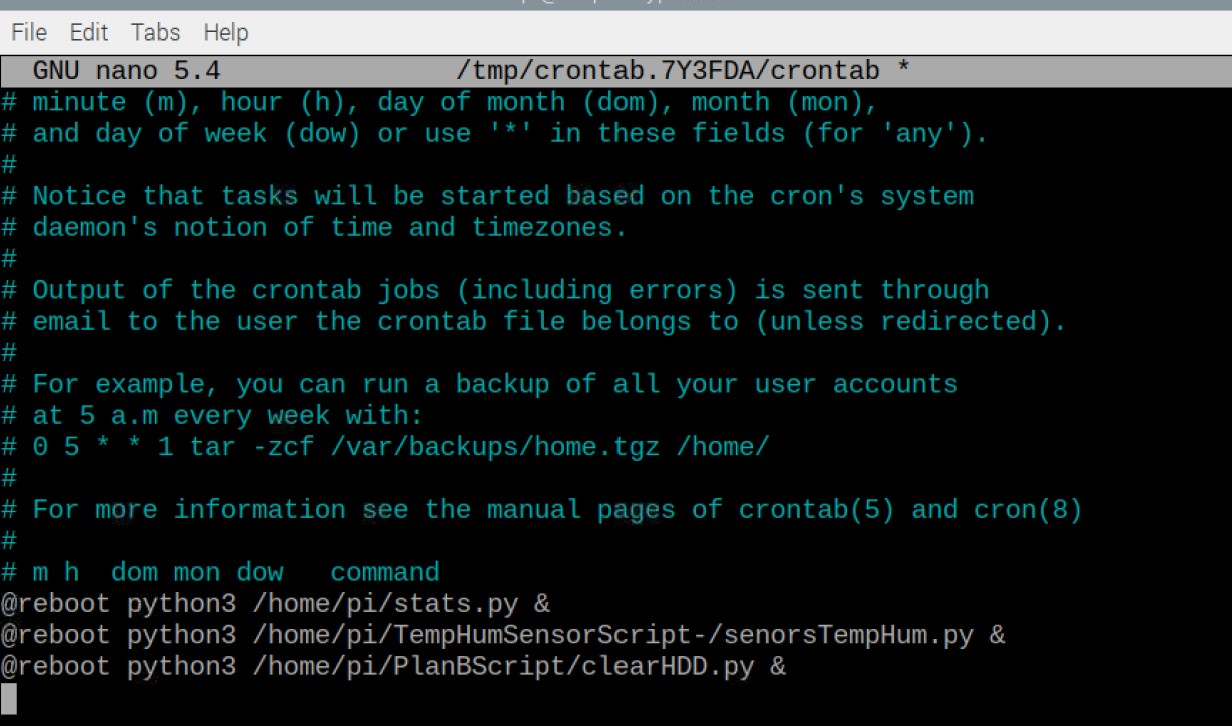
time.sleep(0.2)Crontab菜单:中间的行是脚本。
回答 1
Stack Overflow用户
回答已采纳
发布于 2022-07-20 03:28:01
调查领域:
- 不把
&放在crontab中,它没有任何用途。 - 您应该捕获脚本的输出以查看正在发生的事情。要做到这一点,可以添加
>/tmp/stats.out 2>/tmp/stats.err(其他2行类似)。您将看到脚本encounter. cron没有在相同的环境中运行脚本的输出和错误,以及从运行它们的同一个目录中运行的脚本。在script.cron中加载所需内容可能没有权限将其写入正在运行的目录中的data.yml中。指定完整路径,并确保cron可以在https://unix.stackexchange.com/questions/109804/crontabs-reboot-only-works-for-root上写入@reboot以供使用@reboot。应该通过systemd或init.d配置在启动时应该发生的事情(我不知道Rasperry使用的是什么vs发行版)。Cron是调度作业,而不是在启动时运行。- 它可以简单到没有在cron.
中配置的路径中配置python3。
页面原文内容由Stack Overflow提供。腾讯云小微IT领域专用引擎提供翻译支持
原文链接:
https://stackoverflow.com/questions/73006687
复制相关文章
相似问题
腾讯云开发者

Copyright © 2013 - 2026 Tencent Cloud. All Rights Reserved. 腾讯云 版权所有
深圳市腾讯计算机系统有限公司 ICP备案/许可证号:粤B2-20090059  粤公网安备44030502008569号
腾讯云计算(北京)有限责任公司 京ICP证150476号 | 京ICP备11018762号