
读取CryptographicException文件时的.pfx
读取CryptographicException文件时的.pfx
提问于 2022-07-16 01:37:53
我使用CLI从Azure Key Vault下载了一个PFX文件:
az keyvault secret download -f jul15.pfx -n dlis-api-call-xxxx --vault-name dlisIpsTrial --subscription XXXXXXX
我试图在此代码中使用证书:
            var handler = new WebRequestHandler();
            var certificate = new X509Certificate2("jul15.pfx");
            handler.ClientCertificates.Add(certificate);
handler.SslProtocols = SslProtocols.Tls12;但是我在new X509Certificate2("jul15.pfx");行中得到一个错误:System.Security.Cryptography.CryptographicException: Cannot find the requested object.
以下是完整的跟踪信息:
System.Security.Cryptography.CryptographicException: Cannot find the requested object.

   at System.Security.Cryptography.CryptographicException.ThrowCryptographicException(Int32 hr)
   at System.Security.Cryptography.X509Certificates.X509Utils._QueryCertFileType(String fileName)
   at System.Security.Cryptography.X509Certificates.X509Certificate.LoadCertificateFromFile(String fileName, Object password, X509KeyStorageFlags keyStorageFlags)
   at System.Security.Cryptography.X509Certificates.X509Certificate2..ctor(String fileName)
   at MultiMedia.Dlis.QueryDlisTool.Program.MakeRequest(Options options, String address, Byte[] imageBytes, NormalizedRectangle_1 crop, HashSet`1 requestedOutputs) in E:\DlisIps\src\MultiMedia.Dlis.QueryDlisTool\Program.cs:line 210
at MultiMedia.Dlis.QueryDlisTool.Program.Run(Options options, Byte[] imageBlob, NormalizedRectangle_1 crop, Dictionary`2 outputFeatures) in E:\DlisIps\src\MultiMedia.Dlis.QueryDlisTool\Program.cs:line 120知道如何解决这个错误吗?我是否应该下载.cert文件并将其与密钥关联以使其成为.pfx文件?我是否应该下载一个.pem,并尝试使它成为一个.pfx文件?
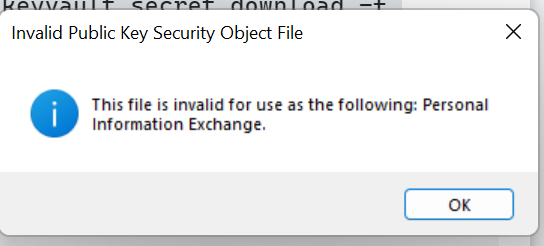
此外,当我试图安装我的jul15.pfx时,我会得到以下错误:
回答 1
Stack Overflow用户
发布于 2022-07-17 22:55:36
密钥库证书可以作为机密下载。证书是base64编码的。根据文档,您可以指定--encoding参数。这应该适用于你:
az keyvault secret download `
  --file jul15.pfx `
  --encoding base64 `
  --name dlis-api-call-xxxx `
  --vault-name dlisIpsTrial `
--subscription XXXXXXX页面原文内容由Stack Overflow提供。腾讯云小微IT领域专用引擎提供翻译支持
原文链接:
https://stackoverflow.com/questions/73000976
复制相关文章
相似问题
腾讯云开发者

Copyright © 2013 - 2026 Tencent Cloud. All Rights Reserved. 腾讯云 版权所有
深圳市腾讯计算机系统有限公司 ICP备案/许可证号:粤B2-20090059  粤公网安备44030502008569号
腾讯云计算(北京)有限责任公司 京ICP证150476号 | 京ICP备11018762号