
如何在Visual代码中调试python单元测试?
我有以下目录结构(一位朋友在他检查时把它放在github上)
- code
  - elements
    __init__.py
    type_of_car.py
  __init__.py
  car.py
- tests
  __init__.py
  test_car.py
这些是我的launch.json设置:
{
    "version": "0.2.0",
    "configurations": [
        {
            "name": "Python: Debug Tests",
            "type": "python",
            "request": "launch",
            "program": "${file}",
            "purpose": ["debug-test"],
            "console": "integratedTerminal",
            "justMyCode": false
        },
        {
            "name": "Python: Module",
            "type": "python",
            "request": "launch",
            "module": "main",
            "justMyCode": false,
            "cwd": "${workspaceFolder}"
        }
    ]
}
VS Python测试设置如下:
{
    "python.testing.unittestArgs": [
        "-v",
        "-s",
        "./tests",
        "-p",
        "test_*.py"
    ],
    "python.testing.pytestEnabled": false,
    "python.testing.unittestEnabled": true,
    "python.testing.cwd": "${workspaceFolder}"
}
test_car.py导入模块(当然是code.car )。但也包括code.car.type_of_car
当我从项目根运行测试时,可以调用并通过测试。py -m unittest tests.test_car.py
但是,我不能通过按F5 (参见launch.json)配置来运行我的主代码。这会失败,因为报告了No module named 'code.car'; 'code' is not a package。
此外,我还必须使用代码调试我的测试:
- 我导航到test_engine.py并打开它
- 将“运行和调试”切换到
Python: Debug Tests配置 - 按F5以运行调试。
这会失败,因为报告了No module named 'code.car'; 'code' is not a package。
我如何解决模块-地狱,以便我可以运行测试也从VSCode/调试器?(这件事确实花了我几个小时。任何暗示都会受到赞赏。)
有人知道VS代码启动程序在调用模块时认为它是根吗?
回答 1
Stack Overflow用户
发布于 2022-07-18 09:02:17
您可以按以下方式修改car.py和test_car.py文件:
我只粘贴了修改过的代码。
car.py**:**
# your code
from code.elements.type_of_car import TypeOfCar# my code
from elements.type_of_car import TypeOfCartest_car.py**:**
# your code
import unittest
from code.car import Car
from random import randint

from code.elements.type_of_car import TypeOfCar# my code
import unittest
import sys
sys.path.append("./code")
from car import Car
from random import randint
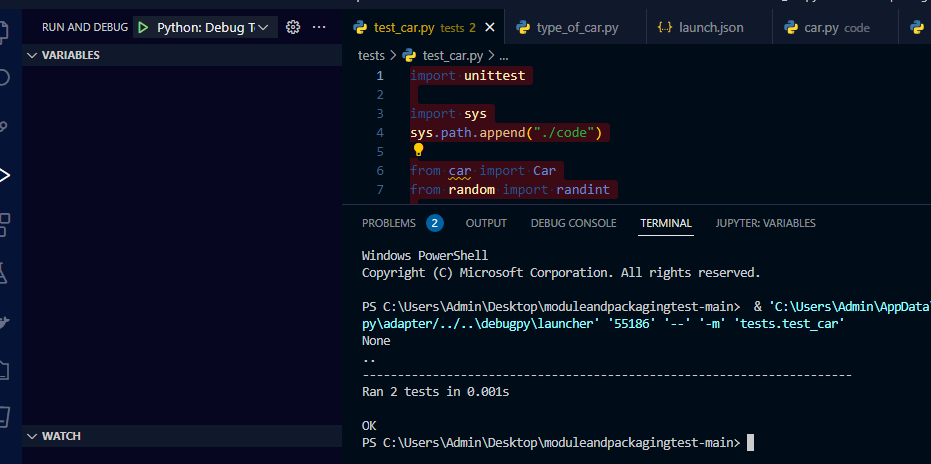
from elements.type_of_car import TypeOfCar调试Python: Debug Tests**:**的结果
https://stackoverflow.com/questions/72992588
复制相似问题
腾讯云开发者

Copyright © 2013 - 2026 Tencent Cloud. All Rights Reserved. 腾讯云 版权所有
深圳市腾讯计算机系统有限公司 ICP备案/许可证号:粤B2-20090059  粤公网安备44030502008569号
腾讯云计算(北京)有限责任公司 京ICP证150476号 | 京ICP备11018762号