
Yii2无法使用postman从API获得响应
我正在研究yii2,并在本地机器上创建了一些REST API's. One is for authenticating the user and the second one is for getting the data by using the auth from the 1st API. I am usingxampp``。身份验证API运行得非常好。但是当我试图执行第二个API时,它给了我一个错误。下面是我的代码
main.php
<?php

$params = array_merge(
require(__DIR__ . '/../../common/config/params.php'),
require(__DIR__ . '/../../common/config/params-local.php'),
require(__DIR__ . '/params.php'),
require(__DIR__ . '/params-local.php')
);

 return [
'id' => 'app-api',
'basePath' => dirname(__DIR__),
'bootstrap' => ['log'],
'modules' => [
    'v1' => [
        'basePath' => '@app/modules/v1',
        'class' => 'api\modules\v1\Module'
    ]
],
'components' => [
    'request' => [
        'csrfParam' => '_csrf-backend',

        'enableCookieValidation' => false,
        'enableCsrfValidation' => false,
    ],
    'user' => [
        'identityClass' => 'common\models\User',
        'enableAutoLogin' => false,
    ],
    'log' => [
        'traceLevel' => YII_DEBUG ? 3 : 0,
        'targets' => [
            [
                'class' => 'yii\log\FileTarget',
                'levels' => ['error', 'warning'],
            ],
        ],
    ],
    'urlManager' => [
        'enablePrettyUrl' => true,
        'enableStrictParsing' => true,
        'showScriptName' => false,
        'rules' => [
            [
                'class' => 'yii\rest\UrlRule',
                'controller' => ['v1/survey'],
                'tokens'=>[
                    '{id}' => '<id:\\d[\\d,]*>'
                ],
                'extraPatterns' => [
                    'POST add' => 'add',
                    'POST photo/save'=>'savepic',
                    'POST modify/{id}' => 'modify',
                    'GET refdata' => 'refdata',
                    'GET refdata.json' => 'refdatajson',
                    'GET shahid' => 'shahid',
                    'GET list' => 'list',

                ],
                'pluralize' => false
            ],[
                'class' => 'yii\rest\UrlRule',
                'controller' => ['v1/issue'],
                'extraPatterns' => [
                    'POST add' => 'add'
                ],
                'pluralize' => false
            ],[
                'class' => 'yii\rest\UrlRule',
                'controller' => ['v1/auth'],
                'extraPatterns' => [
                    'POST authenticate' => 'authenticate'
                ],
                'pluralize' => false
            ]
            , [
                'class' => 'yii\rest\UrlRule',
                'controller' => ['v1/auth'],
                'extraPatterns' => [
                    'POST authenticate2' => 'authenticate2'
                ],
                'pluralize' => false
            ],[
                'class' => 'yii\rest\UrlRule',
                'controller' => ['v1/team'],
                'extraPatterns' => [
                    'POST list' => 'list'
                ],
                'pluralize' => false
            ],
            [
                'class' => 'yii\rest\UrlRule',
                'controller' => ['v1/installation'],
                'extraPatterns' => [
                    'GET list' => 'items',
                    'POST add' => 'addnew',
                    'POST photo/save' =>'savephoto',
                    'GET loadsurveyimages' =>'loadsurveyimages',
                    'GET listinstall'=>'listinstall',
                    'GET loadinstallationimages' => 'loadinstallationimages',
                    'GET loadfiles'=>'loadfiles',
                    'POST email' =>'email',
                    'GET details' =>'details',
                    'GET simtransfer'=>'simtransfer',
                    'POST metertosimmap'=>'metertosimmap',
                    'GET meterping'=>'meterping',
                    //'GET simtransfer'=>'simtransfer',
                ],
                'pluralize' => false
            ],
            [
                'class' => 'yii\rest\UrlRule',
                'controller' => ['v1/preinstallation'],
                'extraPatterns' => [
                    'GET list' => 'items',
                    'POST add' => 'addnew',
                    'POST photo/save' =>'savephoto',
                    'GET loadsurveyimages' =>'loadsurveyimages',
                    'GET listinstall'=>'listinstall',
                    'GET loadinstallationimages' => 'loadinstallationimages',
                    'GET loadfiles'=>'loadfiles',
                    'GET email' =>'email',
                    'GET details' =>'details',
                    'GET refs' => 'refs',
                ],
                'pluralize' => false
            ],
            [
                'class' => 'yii\rest\UrlRule',
                'controller' => ['v1/routes'],
                'extraPatterns' => [
                    'GET list' => 'list',
                    'GET meters'=>'meters',
                    'GET refs' => 'refs',
                    'GET ref' => 'ref',
                    'POST status'=>'status'
                ],
                'pluralize' => false
            ]
        ],
    ]
],
'params' => $params,
];
身份验证API正在工作。
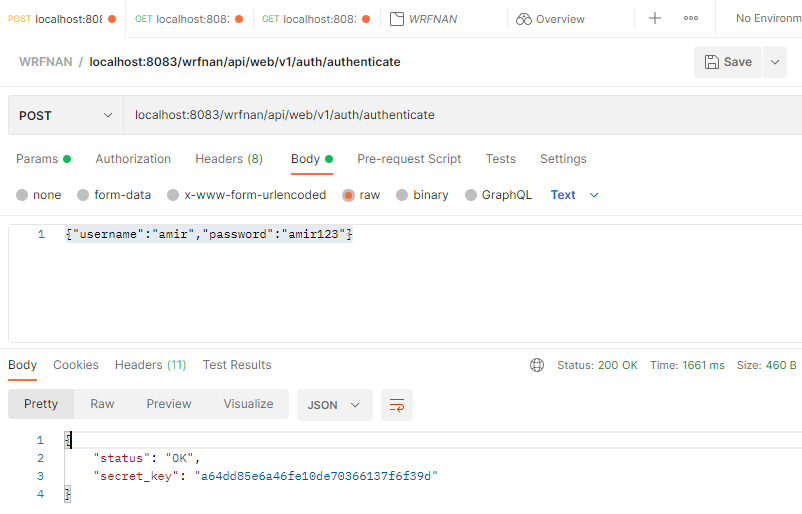
对于所有其他API,我们必须使用这个秘密密钥来访问数据并执行其他操作。
当我试图访问它时,我将得到以下错误
{
  "name": "Unauthorized",
  "message": "Your request was made with invalid credentials.",
  "code": 0,
  "status": 401,
  "type": "yii\\web\\UnauthorizedHttpException"
}
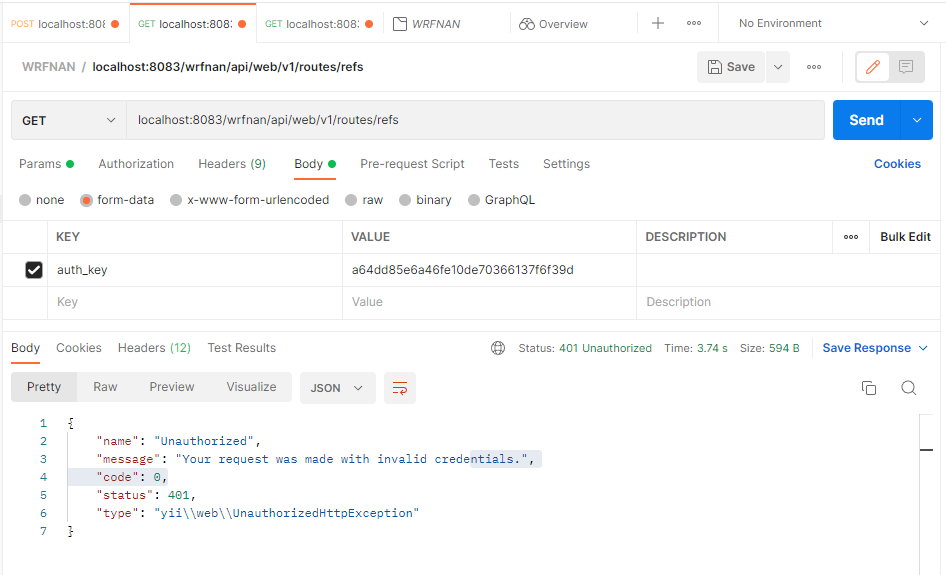
我已经使用了邮递员body下的所有选项。也使用了Params和Authorization,但是似乎什么都没有用。
.htaccess
#SetEnvIf Authorization "(.*)" HTTP_AUTHORIZATION=$1
SetEnvIf Authorization .+ HTTP_AUTHORIZATION=$0
RewriteEngine On

RewriteCond %{REQUEST_FILENAME} !-f
RewriteCond %{REQUEST_FILENAME} !-d

RewriteRule . index.php
基控制器
class BaseController extends ActiveController
{
/**
 * Activate Bear Authentication
 *
 * @return array
 */
public function behaviors()
{

    $behaviors = parent::behaviors();

    $behaviors['authenticator'] = [
        'class' => HttpBearerAuth::className(),
    ];

    return $behaviors;
}
}
HttpBearerAuth
class HttpBearerAuth extends HttpHeaderAuth
{
/**
 * {@inheritdoc}
 */
public $header = 'Authorization';
/**
 * {@inheritdoc}
            */
public $pattern = '/^Bearer\s+(.*?)$/';
/**
 * @var string the HTTP authentication realm
 */
public $realm = 'api';


/**
 * {@inheritdoc}
 */
public function challenge($response)
{

    $response->getHeaders()->set('WWW-Authenticate', "Bearer realm=\"{$this->realm}\"");

}
} 我已经和SetEnvIf Authorization "(.*)" HTTP_AUTHORIZATION=$0试过了。但问题仍然存在。
如何解决这个问题?任何帮助都将不胜感激。
回答 1
Stack Overflow用户
发布于 2022-07-14 05:54:28
对于HttpBearerAuth设置的令牌,如Authorization: Bearer {token}
对于邮递员,请使用Authorization选项卡并在此处选择令牌类型:
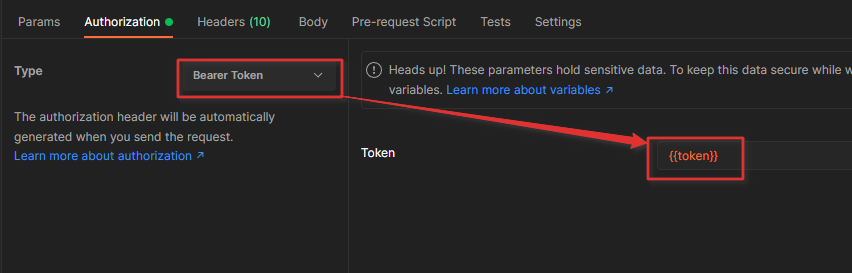
标记将自动替换到标头中(您可以看到是否显示自动生成的标头)。

https://stackoverflow.com/questions/72964870
复制相似问题
腾讯云开发者

Copyright © 2013 - 2026 Tencent Cloud. All Rights Reserved. 腾讯云 版权所有
深圳市腾讯计算机系统有限公司 ICP备案/许可证号:粤B2-20090059  粤公网安备44030502008569号
腾讯云计算(北京)有限责任公司 京ICP证150476号 | 京ICP备11018762号