
adminjs -用于编辑的资源自定义组件不更新值。
adminjs -用于编辑的资源自定义组件不更新值。
提问于 2022-07-12 16:59:27
我在我的资源字段中使用自定义组件时遇到了一些问题。对于我的服务类别,我有一个名为parent_service_id的字段,它属于与另一个模型服务的关系。当我为字段parent_service_id使用自定义组件并尝试将字段更新为不同的值时,它不会读取新值。我使用react select更新新字段。当使用console.log()时,我可以检查组件状态是否更改。我在提交时检查了有效负载,但是parent_service_id保持不变。使用默认组件的其他字段没有问题。下面是我的服务类别模型
const ServiceSubCategory = db.sequelize.define("service_sub_categories", {
  name_en: {
    type: db.Sequelize.STRING,
    allowNull: false,
  },
  name_cn: {
    type: db.Sequelize.STRING,
    allowNull: false,
  },
  name_zh: {
    type: db.Sequelize.STRING,
    allowNull: false,
  },
  parent_service_id: {
    type: db.Sequelize.INTEGER,
    allowNull: false,
  },
  parent_service_new_id: {
    type: db.Sequelize.VIRTUAL,
    allowNull: true,
  },

});
const options = {
  properties: {

    parent_service_id: {
      components: {
        list: AdminJS.bundle('./../../components/admin/service_sub_categories/list_service_category_id_field.jsx'),
        show: AdminJS.bundle('./../../components/admin/service_sub_categories/show_service_category_id_field.jsx'),
        edit: AdminJS.bundle('./../../components/admin/service_sub_categories/edit_service_category_id_field.jsx')
      },
    },
  },
};
module.exports = {
  options,
  resource: ServiceSubCategory,
};
我的自定义编辑组件
import React, {Component} from 'react'
import Select from 'react-select'
import {FormGroup, FormMessage} from "@adminjs/design-system";
import { Label } from '@adminjs/design-system'
class SelectParentServiceID extends Component {


    state = {
        selectedOption: {
            value: this.props.record.populated.parent_service_id.params.id,
            label: this.props.record.populated.parent_service_id.params.name_en,
        },
        value: this.props.record.populated.parent_service_id.params.id,
        parent_service_id: this.props.record.populated.parent_service_id.params.id,
    };

    handleChange = (selectedOption) => {
        this.setState({
            selectedOption: selectedOption,
            value: selectedOption.value,
            parent_service_id: selectedOption.value
        }, () => {
                console.log(`Option selected:`, this.state.selectedOption)
                console.log(`Option selected:`, this.state.parent_service_id)
        });
    };


    componentDidMount() {
        this.fetchData()
    }

    fetchData = async () => {
        let data;
        try {
            const response = await fetch('/api/servicecategories/get/');
            // Use the `.json` method on the fetch response object
            data = await response.json();
            const options = data.map(d => ({
                "value" : d.id,
                "label" : d.name_en
            }))
            this.setState({selectOptions: options})
        } catch (error) {
            console.log('error', error);
        }
    }

    render() {
        return (
            <FormGroup error={''}>
                <Label htmlFor={'parent_service_id'} required={true}>Parent Service Category</Label>
                <Select options={this.state.selectOptions}
                        onChange={this.handleChange}
                        defaultValue={this.state.selectedOption}
                        required={true}
                        name={'parent_service_id'}
                        value={this.state.selectedOption}
                />
                <FormMessage>{''}</FormMessage>
            </FormGroup>
        )
    }
}

export default SelectParentServiceID
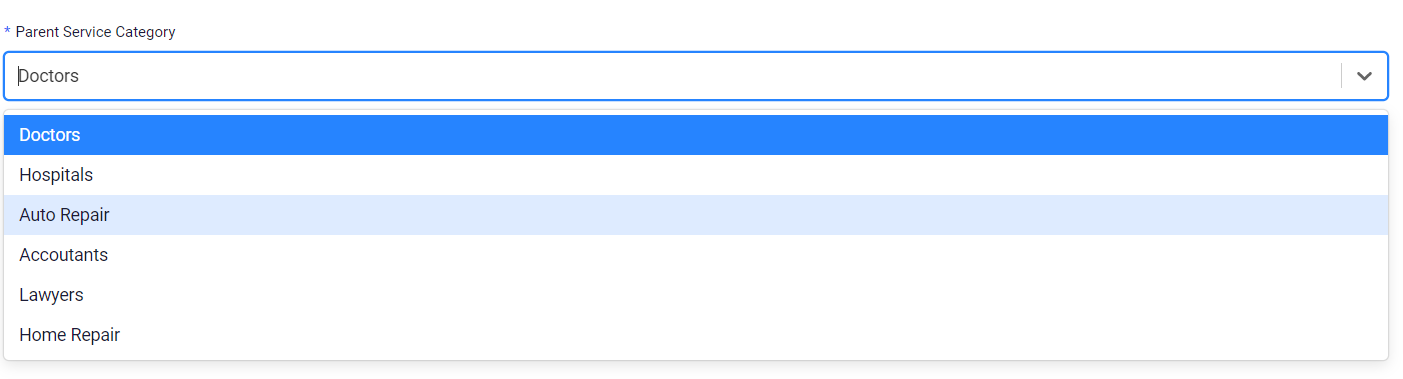

显示正确的选择名称和选择值。
console.log显示组件状态已更改。
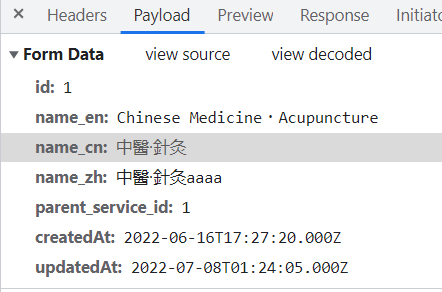
回答 1
Stack Overflow用户
发布于 2022-07-13 06:14:36
记录没有被更新,因为您只设置了组件的本地状态,但是您没有对record对象本身做任何事情,这就是AdminJS用来包含表单数据的内容。你必须这样做:
this.props.onChange(this.props.property.path, selectedOption.value)在您的handleChange方法中。但是,我们在AdminJS中的任何地方都使用函数组件,我不确定它是否适用于类组件。
页面原文内容由Stack Overflow提供。腾讯云小微IT领域专用引擎提供翻译支持
原文链接:
https://stackoverflow.com/questions/72955918
复制相关文章
相似问题
腾讯云开发者

Copyright © 2013 - 2026 Tencent Cloud. All Rights Reserved. 腾讯云 版权所有
深圳市腾讯计算机系统有限公司 ICP备案/许可证号:粤B2-20090059  粤公网安备44030502008569号
腾讯云计算(北京)有限责任公司 京ICP证150476号 | 京ICP备11018762号