
PyQt5 UI冻结,ADB & SCRCPY也在冻结时使用
PyQt5 UI冻结,ADB & SCRCPY也在冻结时使用
提问于 2022-07-06 14:54:10
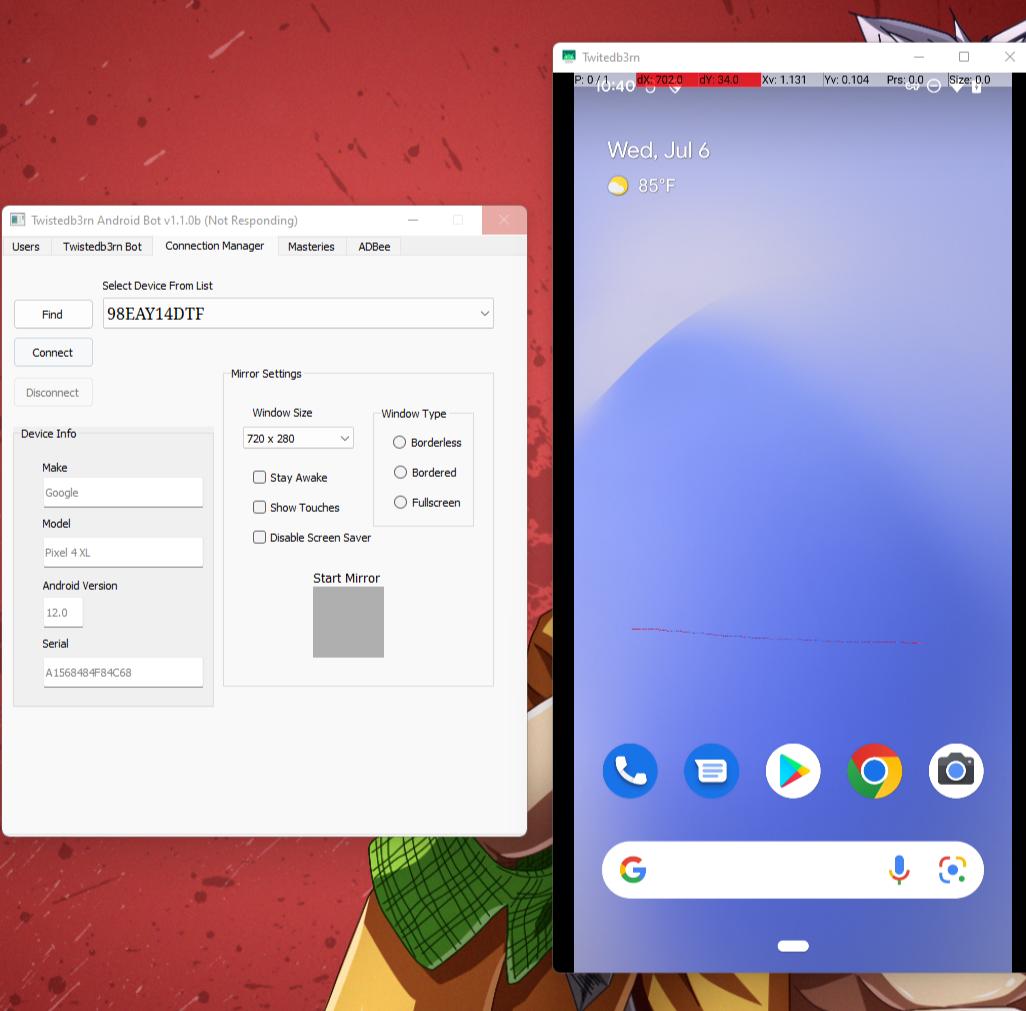
我正在尝试使用PyQt5、亚行、scrcpy和python创建一个程序。当我单击connect (启动scrcpy服务器并在屏幕上镜像android设备)时,我的UI会冻结,直到我关闭scrcpy会话/服务器。我将分享这两种.py文件代码,这两种代码用来使这一工作和外观。
from PyQt5.QtCore import *
from PyQt5.QtGui import *
from PyQt5.QtWidgets import *
from PyQt5 import uic
import os
import sys
from ADBee import *
from twt_start import *

devs = devices()
log_window = []
# GET LIST OF CONNECTED SERIAL NUMBERS
os.chdir('resources/ui/')
class TB_Main_Window(QMainWindow):

    def __init__(self):
        super(TB_Main_Window, self).__init__()
        uic.loadUi('main.ui', self)
        self.find_button.clicked.connect(lambda: self.find_devices(devs))
        self.connect_button.clicked.connect(self.connect_to_device)
        self.disconnect_button.clicked.connect(self.disconnect_from_device)

        self.connect_button.setEnabled(False)
        self.disconnect_button.setEnabled(False)
        #make = self.device_make.placeholderText.connect(self.get_selected_items)


        self.show()


    def find_devices(self, devs):

        count = 0
        try:

            if len(devs) == 0:
                print(" --- No Devices Found --- \n")
            elif len(devs) > 0:
                for d in devs:
                    self.device_listbox.addItem(devs[count])
                    count += 1
            self.connect_button.setEnabled(True)
        except:
            print("\nCould Not Find Devices\n")


    def get_selected_items(self):
        serial =  self.device_listbox.currentText()
        print(serial)
        return serial

    # CONNECT TO SELECTED DEVICE (SERIAL)
    def connect_to_device(self):
        _serial = self.device_listbox.currentText()
        self.find_button.setEnabled(False)
        self.connect_button.setEnabled(False)
        num_devices = self.device_listbox.count()


        if num_devices == 1:
            try:
                twt()
            except:
                print("\nCould Not Connect To Device\n")
        if num_devices > 1:
            try:
                self.find_button.setEnabled(False)
                self.connect_button.setEnabled(False)
                twt_ws(serial=_serial)
            except:
                print(f'Failed to connect to:{_serial}')
        elif num_devices == 0:
            print(f'\nNo Devices Found\n')

    def disconnect_from_device(self):
        self.device_listbox.setEnabled(True)
        self.find_button.setEnabled(True)
        self.connect_button.setEnabled(False)
        try:
            kill_server()
            print(f"Device Disconnect Successfully")
        except:
            print(f"Can't Disconnect From Device")

app = QApplication([])
window = TB_Main_Window()
window.show()
sys.exit(app.exec_())
############################################################################################
from subprocess import Popen as send
import subprocess
import os


def twt(window_title='Twitedb3rn', width='480', height='900'):

    try:
        orientation()
        console_send = send(
            f"scrcpy --always-on-top --window-title={window_title} --window-width={width} --window-height={height} ",
            stdin=subprocess.PIPE,
            stdout=subprocess.PIPE,
            stderr=subprocess.PIPE,
            text=True)
        _twt, errors = console_send.communicate()
        print(f'\n\tTWT Started\n\n!---START---!\n\n{_twt}\n!---END---!')
        console_send.wait()
    except:
        print(f'\nScrcpy Failed {errors}\n\n')


def twt_ws(window_title='Twitedb3rn', width='480', height='900', serial='99031FFBA0083T'):

        try:
            orientation_ws(serial)
            new_directoy = os.chdir('resources/scrcpy')
            console_send = send(
                f'scrcpy --always-on-top --window-title={window_title} --window-width={width} --window-height={height} -s{serial}',
                stdin=subprocess.PIPE,
                stdout=subprocess.PIPE,
                stderr=subprocess.PIPE,
                text=True)
            _twt_ws, errors = console_send.communicate()
            console_send.wait()
            print(f'\n\tTWT Started\n\n!---START---!\n\n{_twt_ws}\n!---END---!')
        except:
            print(f'\nTWT Failed\n\n')
            print(errors)


#adb shell dumpsys window | grep 'mLandscapeRotation'
def orientation_ws(serial):
    try:
        console_send = send(
            f"adb -s {serial} shell content insert --uri content://settings/system --bind name:s:accelerometer_rotation --bind value:i:0",
            stdin=subprocess.PIPE,
            stdout=subprocess.PIPE,
        stderr=subprocess.PIPE,
        text=True)
        _orientation, errors = console_send.communicate()
        console_send.wait()
        print(f'\nScreen Rotation Disabled')
        try:
            home = send(f'adb -s {serial} shell input keyevent KEYCODE_HOME')
            home.communicate()
            home.wait()
            console_send = send(
            f"adb -s {serial} shell content insert --uri content://settings/system --bind name:s:user_rotation --bind value:i:1",
            stdin=subprocess.PIPE,
            stdout=subprocess.PIPE,
            stderr=subprocess.PIPE,
            text=True)
            _orientation, errors = console_send.communicate()
            console_send.wait()
            print(f'\nScreen Set Landscape')
        except:
            print(f'\nScreen Landscape Failed')
            print(errors)
    except:
        print(f'\nScreen Rotation Not Disabled')
        print(errors)
    return errors

def orientation():
    try:
        console_send = send(
            f"adb shell content insert --uri content://settings/system --bind name:s:accelerometer_rotation --bind value:i:0",
            stdin=subprocess.PIPE,
            stdout=subprocess.PIPE,
        stderr=subprocess.PIPE,
        text=True)
        _orientation, errors = console_send.communicate()
        console_send.wait()
        print(f'\nScreen Rotation Disabled')
        try:
            home = send(f'adb shell input keyevent KEYCODE_HOME')
            home.communicate()
            home.wait()
            console_send = send(
            f"adb shell content insert --uri content://settings/system --bind name:s:user_rotation --bind value:i:0",
            stdin=subprocess.PIPE,
            stdout=subprocess.PIPE,
            stderr=subprocess.PIPE,
            text=True)
            _orientation, errors = console_send.communicate()
            console_send.wait()
            print(f'\nScreen Set Porttrait')
        except:
            print(f'\nScreen Portrait Failed')
            print(errors)
    except:
        print(f'\nScreen Portrait Not Disabled')
        print(errors)
    return errors
回答 2
Stack Overflow用户
发布于 2022-07-06 15:20:01
总之,看起来您的亚行通信代码的格式更好,如下所示。
注意,我已经省略了所有的尝试/例外;最好是处理异常和错误“更高”,而不是仅仅打印一个错误,让程序继续,就好像没有什么坏的事情发生一样。
import subprocess


def set_adb_value(name, value):
    # TODO: this is not safe against shell injection vulnerabilities if `name` and `value`
    #       are user-controlled.
    subprocess.check_call(
        f"adb shell content insert --uri content://settings/system "
        f"--bind name:s:{name} "
        f"--bind value:{value}"
    )


def set_orientation(landscape=False):
    # Disable screen rotation
    set_adb_value("accelerometer_rotation", "i:0")
    # Press home key
    subprocess.check_call("adb shell input keyevent KEYCODE_HOME")
    # Set rotation
    set_adb_value("user_rotation", ("i:1" if landscape else "i:0"))


def start_scrcpy(window_title="Twitedb3rn", width="480", height="900", landscape=False):
    set_orientation(landscape=landscape)
    # TODO: this is not safe against shell injection vulnerabilities.
    return subprocess.Popen(
        f"scrcpy --always-on-top "
        f"--window-title={window_title} "
        f"--window-width={width} "
        f"--window-height={height}",
)Stack Overflow用户
发布于 2022-07-06 15:08:03
不,您需要首先了解您对子进程所做的操作,然后相应地使用communicate等。
顺便说一句,你现在拥有的许多Popen (或send)使用会更好地由subprocess.check_call()提供。
这就是答案。
我删除了:
_twt, errors = console_send.communicate()
console_send.wait()
还包括:
_twt_ws, errors = console_send.communicate()
console_send.wait()页面原文内容由Stack Overflow提供。腾讯云小微IT领域专用引擎提供翻译支持
原文链接:
https://stackoverflow.com/questions/72885728
复制相关文章
相似问题
腾讯云开发者

Copyright © 2013 - 2026 Tencent Cloud. All Rights Reserved. 腾讯云 版权所有
深圳市腾讯计算机系统有限公司 ICP备案/许可证号:粤B2-20090059  粤公网安备44030502008569号
腾讯云计算(北京)有限责任公司 京ICP证150476号 | 京ICP备11018762号