
如何改变现有芯片的标签颤振?
如何改变现有芯片的标签颤振?
提问于 2022-07-06 09:44:54
我使用芯片在我的代码,当我点击芯片一个计数器显示,我想更新芯片标签时,计数被添加。
Widget returnWidget() {
    return InkWell(
      child: Chip(
        label: Text(temp!),
      ),
      onTap: () {
        print(temp);
        _showMyDialog();
      },
    );
  }
这是我用来添加多个芯片的小部件。
Future<void> _showMyDialog() async {
    return showDialog<void>(
      context: context,
      barrierDismissible: false, // user must tap button!
      builder: (BuildContext context) {
        return AlertDialog(
          scrollable: false,
          title: const Text('Add Count'),
          content: Container(
            height: 50,
            width: 50,
            alignment: Alignment.center,
            padding: const EdgeInsets.all(3),
            decoration: BoxDecoration(
              borderRadius: BorderRadius.circular(5),
            ),
            child: Row(
              mainAxisAlignment: MainAxisAlignment.center,
              children: const [
                AddCount(),
              ],
            ),
          ),
          actions: <Widget>[
            TextButton(
              child: const Text('Cancel'),
              onPressed: () {
                {
                  setState(() {
                    _itemCount = 0;
                  });
                }
                Navigator.of(context).pop();
              },
            ),
            TextButton(
              child: const Text('Add'),
              onPressed: () {
                if(count==0) {
                  setState((){
                    temp = temp! + _itemCount.toString();
                    Text(temp!);
                    count++;
                  });
                }
                print(text);
              },
            ),
          ],
        );
      },
    );
  }
这是显示计数器对话框的代码块。我想更新芯片标签上的添加。
回答 1
Stack Overflow用户
回答已采纳
发布于 2022-07-06 12:39:35
你好,这里有一个解决方案,我没有看到关于您的代码的更多细节,但是在这里我做了一个可行的解决方案,您想要更新的变量应该位于使用的类中,但是您也可以使用状态管理或InheritedWidget来全局更新变量:
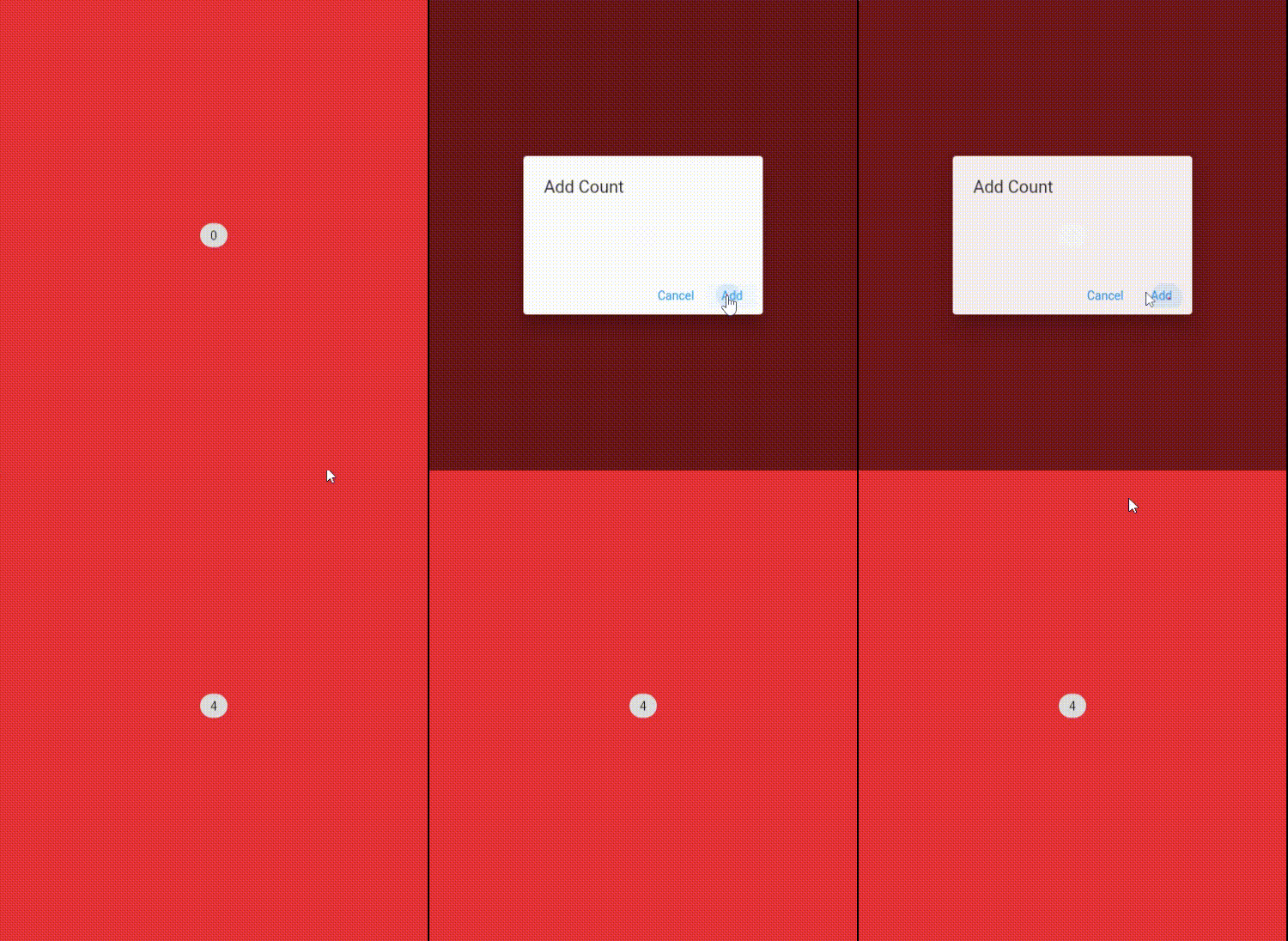
class App extends StatelessWidget {
  const App({Key? key}) : super(key: key);

  @override
  Widget build(BuildContext context) {
    return MaterialApp(
      debugShowCheckedModeBanner: false,
      home: Example(),
    );
  }
}

class Example extends StatefulWidget {
  const Example({Key? key}) : super(key: key);

  @override
  State<Example> createState() => _ExampleState();
}

class _ExampleState extends State<Example> {
  int temp = 0;  //  declare the variable inside the class you want to update it

  Future<void> _showMyDialog() async {
    return showDialog<void>(
      context: context,
      barrierDismissible: false,
      builder: (BuildContext context) {
        return AlertDialog(
          scrollable: false,
          title: const Text('Add Count'),
          content: Container(
            height: 50,
            width: 50,
            alignment: Alignment.center,
            padding: const EdgeInsets.all(3),
            decoration: BoxDecoration(
              borderRadius: BorderRadius.circular(5),
            ),
            child: Row(
              mainAxisAlignment: MainAxisAlignment.center,
              children: const [
                // AddCount(),
              ],
            ),
          ),
          actions: <Widget>[
            TextButton(
              child: const Text('Cancel'),
              onPressed: () {
                  Navigator.of(context).pop();
              },
            ),
            TextButton(
              child: const Text('Add'),
              onPressed: () {
                setState((){
                  temp = temp += 1;   // update the chip UI
                });
                Navigator.of(context).pop();
              },
            ),
          ],
        );
      },
    );
  }

  Widget returnWidget() {
    return InkWell(
      child: Chip(
        label: Text("count $temp"), // <-- new change
      ),
      onTap: () {
        print(temp);
        _showMyDialog();
      },
    );
  }

  @override
  Widget build(BuildContext context) {
    return Scaffold(
      backgroundColor: Colors.red,
      body: Center(
        child: Container(
          margin: const EdgeInsets.all(32),
          child: returnWidget(),
        ),
      ),
    );
  }
}页面原文内容由Stack Overflow提供。腾讯云小微IT领域专用引擎提供翻译支持
原文链接:
https://stackoverflow.com/questions/72881280
复制相关文章
相似问题
腾讯云开发者

Copyright © 2013 - 2026 Tencent Cloud. All Rights Reserved. 腾讯云 版权所有
深圳市腾讯计算机系统有限公司 ICP备案/许可证号:粤B2-20090059  粤公网安备44030502008569号
腾讯云计算(北京)有限责任公司 京ICP证150476号 | 京ICP备11018762号