
检索HiddenField服务器端
我发现了几个类似的帖子,但并不完全是我想要做的。我的aspx中有一个保存按钮。我在事件处理程序中有一些逻辑来检查某些条件,如果它们被满足了,那么我需要一个请求确认的弹出来继续。由于这是在一些处理之后发生的,而不是在单击按钮之后立即发生,所以我在后端调用它。
政务司司长
Page.ClientScript.RegisterStartupScript(this.GetType(), "CallMyFunction", "MyFunction()", true);
JavaScript
<script type="text/javascript">
function MyFunction() {
    if (confirm("Do you want to continue?") == true) {
        document.getElementById('<%=HiddenField1.ClientID %>').value = "True";
    } else {
        document.getElementById('<%=HiddenField1.ClientID %>').value = "False";
    }
}
</script>
aspx
<asp:HiddenField ID="HiddenField1" runat="server"/>
这一切基本上都很好。接下来我需要做的是在后端进行基于HiddenField的附加处理:
if (HiddenField1.Value == "True")
{
    FinishProcessing();
}
else
{
    // Do nothing
}
问题是,我必须按两次按钮才能得到结果,就像我需要做回发才能得到HiddenValue一样。我不喜欢使用Server.Transfer这样的回发,因为我需要在表单上保留几个元素,尽管我认为UpdatePanel可以解决这个问题。
我尝试过的替代代码:
JavaScript (在警报中显示正确的值,但存在与上面相同的行为)
<script type="text/javascript">
function MyFunction() {
    if (confirm("Do you want to continue?") == true) {
        document.getElementById('<%=HiddenField1.ClientID %>').value = "True";
        alert(document.getElementById('<%=HiddenField1.ClientID%>').value);
        document.getElementById('form1').submit();
    } else {
        document.getElementById('<%=HiddenField1.ClientID %>').value = "False";
        alert(document.getElementById('<%=HiddenField1.ClientID%>').value);
        document.getElementById('form1').submit();
    }
}
</script>
aspx
<asp:UpdatePanel ID="UpdatePanelHidden" runat="server">
    <ContentTemplate>
        <asp:HiddenField ID="HiddenField1" runat="server"/>
    </ContentTemplate>
</asp:UpdatePanel>
这两组代码产生相同的问题。我做错了什么?
回答 2
Stack Overflow用户
发布于 2022-07-08 03:15:17
我想出了办法。综上所述,我正在寻找一种方法来单击一个按钮,该按钮将运行一些服务器端处理,然后切换到客户端脚本,然后切换回服务器端以完成处理,所有这些都只需单击一个按钮。我就是这样做的:
javascript
    <script type="text/javascript">
        function MyFunction() {
            if (confirm("Do you want to continue?") == true) {
                document.getElementById('<%=HiddenTextBox1.ClientID %>').value = "True";
                __doPostBack("<%=UpdatePanel1.UniqueID %>", "");
            } else {
                document.getElementById('<%=HiddenTextBox1.ClientID %>').value = "False";
                __doPostBack("<%=UpdatePanel1.UniqueID %>", "");
            }
        }
    </script>
在下面的aspx中,我使用了一个隐藏的TextBox,而不是一个HiddenField,因为当JavaScript通过RegisterStartupScript被调用时,它并没有保留AutoPostBack之后的值。
aspx
    <asp:ScriptManager ID="ScriptManager1" runat="server">
        </asp:ScriptManager>
        <asp:UpdatePanel ID="UpdatePanel1" runat="server">
            <ContentTemplate>
                <asp:TextBox ID="HiddenTextBox1" runat="server" style="display:none;"></asp:TextBox>
            </ContentTemplate>
        </asp:UpdatePanel>
    <asp:Button ID="Button1" runat="server" Text="Button" OnClick="Button1_Click" />
在cs中,我在Button1_Click事件处理程序之后进行了一些处理。在我准备调用JavaScript的时候,我使用RegisterStartupScript。
政务司司长
Page.ClientScript.RegisterStartupScript(this.GetType(), "CallMyFunction", "MyFunction()", true);然后,我可以使用来自JavaScript的输入,并使用Page_Load中的以下内容在服务器端完成处理。
    protected void Page_Load(object sender, EventArgs e)
    {
        if (IsPostBack)
        {
            if (HiddenTextBox1.Text == "True")
            {
                Process();
            }
            else
            {
                // Do nothing
            }
        }
}Stack Overflow用户
发布于 2022-07-06 17:48:32
处理这个问题的最好方法是在页面上放置一个平面jane asp.net按钮。
然后,当js例程返回true时,可以让单击按钮(服务器端代码)有条件地运行。
所以,比如说一些标记,还有一个如下按钮:
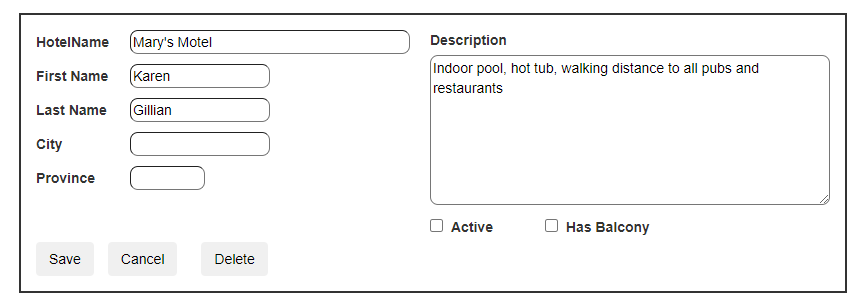
这3个按钮是:
      <asp:Button ID="cmdSave" runat="server" Text="Save" CssClass="btn" />
      <asp:Button ID="cmdCancel" runat="server" Text="Cancel" CssClass="btn" style="margin-left:10px" />
      <asp:Button ID="cmdDelete" runat="server" Text="Delete" CssClass="btn" style="margin-left:20px" ClientIDMode="Static"
           OnClick="cmdDelete_Click"  />

      <asp:Button ID="cmdDelete2" runat="server" Text="Delete" CssClass="btn" style="margin-left:20px" ClientIDMode="Static"
          OnClientClick="return confirm('Delete this reocrd');" OnClick="cmdDelete2_Click"
          />
注意客户端单击事件。如果js代码返回false,那么存根后面的代码就不会运行。
这表明,如果您可以检查客户端,然后让js代码返回true或false,那么这将控制后台服务器端代码是否运行。
现在,如果您必须运行服务器端按钮代码,然后进行确认?这是比较困难的,但建议你需要两个按钮。首先单击按钮,运行服务器端代码,检查条件,然后在js中弹出一个确认对话框--如果他们接受是,那么第二个按钮代码可以/将触发。
(因此,第二个按钮可以隐藏,style=display:none)。
因此,在上面,我们将添加第二个删除按钮
因此,单击第一个按钮,此代码可能会运行:
所以,我们现在有:
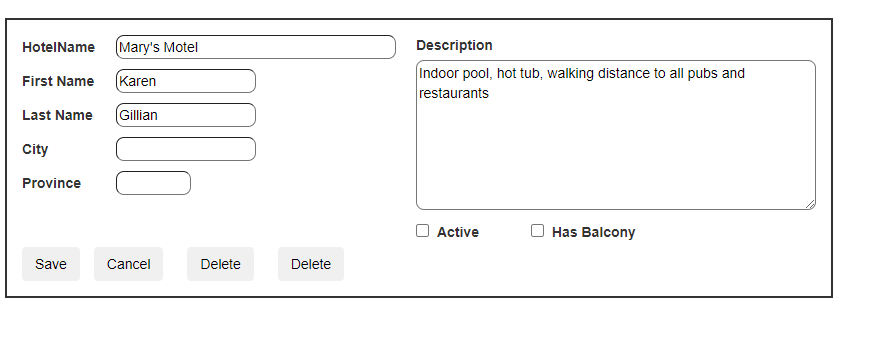
因此,这两个按钮的代码如下:
    protected void cmdDelete_Click(object sender, EventArgs e)
    {
        // do whatever checking you like, then
        // prompt user

        string strJs = "$('#cmdDelete2').click();";
        Page.ClientScript.RegisterStartupScript(this.GetType(), "myprompt", strJs, true);


    }

    protected void cmdDelete2_Click(object sender, EventArgs e)
    {
        Debug.Print("delete code will run");

    }
因此,如果拥有,我会尝试做测试客户端-这样我们只需要一个按钮。
但是,如上面所示,用户单击“第一个删除”按钮。我们现在可以运行代码走狗-做什么,然后条件弹出一个对话框。该对话框将单击第二个按钮,如果用户点击confrirm的ok,那么代码将在第二个例程中运行。
如前所述,如果您可以在第一个按钮单击测试,然后让它的客户端单击返回true或false,这将有条件地运行服务器端代码。
但是,如果您不能进行客户端测试,那么我们需要像上面提到的那样使用两个按钮,并且如前所述,我们一次可以用style=display:none隐藏第二个按钮。
https://stackoverflow.com/questions/72880128
复制相似问题
腾讯云开发者

Copyright © 2013 - 2026 Tencent Cloud. All Rights Reserved. 腾讯云 版权所有
深圳市腾讯计算机系统有限公司 ICP备案/许可证号:粤B2-20090059  粤公网安备44030502008569号
腾讯云计算(北京)有限责任公司 京ICP证150476号 | 京ICP备11018762号